
The house lights dim. A hush falls over the audience. On stage, a performer holds a final, dramatic pose before the scene cuts to black. The moment is perfect, the culmination of weeks of rehearsal. Then, with an audible click, a bank of fluorescent lights overhead flickers to life, shattering the carefully crafted darkness and yanking everyone out of the story.
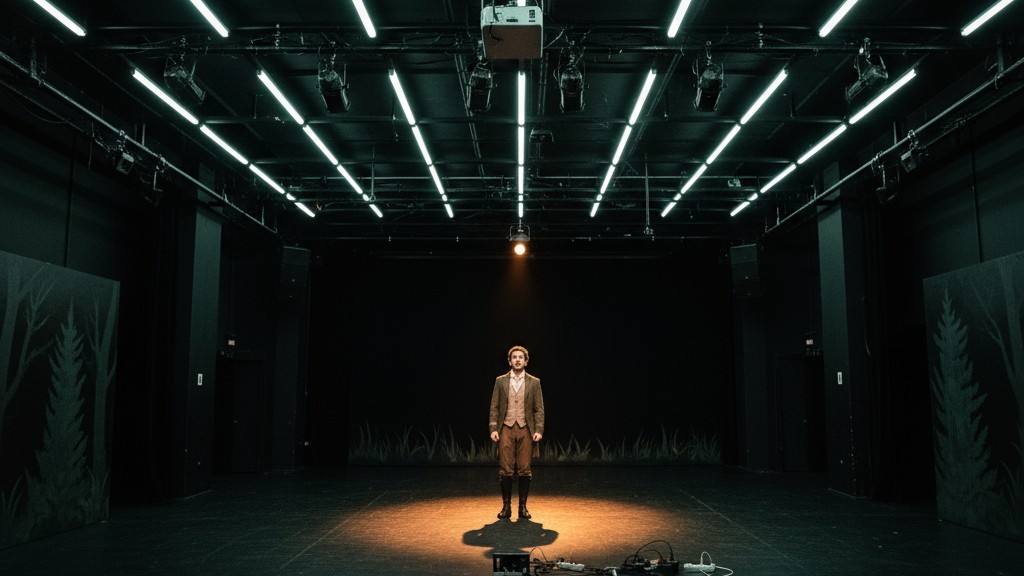
The culprit isn’t a missed cue from the lighting booth. It’s a motion sensor—a device installed to save energy, now acting as an unwitting saboteur. This disaster is painfully familiar in black box theaters, school auditoriums, and rehearsal rooms where standard building technology clashes with the demands of performance. The solution isn’t to abandon automated lighting, but to implement it with intelligence. It requires a shift from aggressive automation to a system that assists rather than dictates. By favoring manual control, employing patient timeouts, and placing sensors strategically, you can achieve energy efficiency without ever compromising a blackout.
The Enemy of Discipline: Why Standard Occupancy Sensors Fail in Performance
The failure of most off-the-shelf motion sensors in a theatrical setting stems from one flawed assumption: that a lack of motion means a lack of people. In an office, this is a safe bet. In a theater, it’s a catastrophic miscalculation.
The Auto-On Ambush
Standard occupancy sensors are built for convenience. They detect a person entering a room and immediately turn on the lights. This “auto-on” function is the primary source of conflict. During a performance, light is a narrative tool. An unexpected blast of light, triggered by an actor moving in the wings or an audience member shifting in their seat, is a jarring, unscripted event that shatters the fourth wall. Lighting for a performance must be 100% intentional, dictated by the script and the designer, not an algorithm.
The Stillness Problem
The second point of failure is the “auto-off” function. Most common sensors, particularly Passive Infrared (PIR) types, don’t detect presence; they detect the change caused by a moving heat source. A person walking creates a dynamic thermal signature the sensor easily registers. An actor holding a dramatic pause, however, or an entire audience rapt in a quiet scene, presents a static one. After its timeout period, the sensor interprets this stillness as an empty room and cuts the power. The result is a premature blackout that can derail a rehearsal or ruin a performance.
The First Principle: Embrace Manual-On Control
The most effective way to prevent these failures is to invert the sensor’s logic. A theatrical space doesn’t need a system that assumes the lights should be on; it needs one that waits for a direct command. This is the job of a vacancy sensor.
Rayzeek人感センサーのポートフォリオを見る.
お探しの製品が見つかりませんか?ご安心ください。課題を解決する手段は常に複数存在します。当社の製品ポートフォリオのいずれかがお役に立つかもしれません。
While they look identical, occupancy and vacancy sensors operate on different principles. An occupancy sensor is fully autonomous, automating both “on” and “off.” A vacancy sensor only automates the “off.” The lights must be turned on manually with a wall switch. The sensor’s only job is to turn the lights off after confirming the room has been empty for a set period.
This simple distinction is transformative. By requiring a manual “on” command, a vacancy sensor returns authority to the stage manager or director. The work lights are turned on when a session begins and stay on, regardless of motion, until they are switched off or the room is empty for an extended time. During a performance, the work lights are off by default, so the sensor does nothing. It cannot trigger an “auto-on ambush” because the feature doesn’t exist. The system becomes a passive failsafe, not an active participant.
The Art of Patience: Set Timeouts for Theatrical Stillness
For a vacancy sensor to work, its timeout must respect the rhythm of a theatrical environment. The short, 5-to-15-minute delays common in offices are useless here; they will inevitably trigger the “stillness problem” during rehearsals.
A rehearsal room sees long periods of low motion during note sessions, table reads, or extended pauses. The sensor’s timeout must be long enough to bridge these moments. A 30-minute timeout is a good starting point, but 45 to 60 minutes is often more practical. The goal is a delay longer than any anticipated period of inactivity.
こちらの商品もおすすめです

- 電圧: 単4形乾電池 2本
- 昼/夜モード
- タイマー設定時間: 15分、30分、1時間(デフォルト)、2時間

- 無電圧接点リレー出力付き天井取り付け型PIR人感センサー
- 12/24VDCまたは12/24VAC低電圧電源
- EMS、HVAC、および建物制御入力用COM、NO、NC絶縁リレー接点

- 低電圧DC天井埋め込み型マイクロ波人感センサースイッチ
- 10~30 VDC範囲の12 VDC / 24 VDC入力
- 調整可能なタイムラグ、照度(Lux)閾値、感度を備えた最大動作電流10A仕様
- 高負荷対応型 埋込型天井取付けマイクロ波人感センサースイッチ
- 100-265 VAC 商用電源入力、10Aモデル
- 調整可能なタイムラグ、照度(Lux)閾値、感度を備えた5.8 GHzマイクロ波検知
- 埋込型天井取付けマイクロ波人感センサースイッチ
- 100-265 VAC商用電圧入力、5Aモデル
- 調整可能なタイムラグ、照度(Lux)閾値、感度を備えた5.8 GHzマイクロ波検知
- 220V電源対応 天井取付けRZ037 PIR(赤外線)人感センサー調光器
- 定格負荷660W、最大動作電流3A
- LUXボタンによる照度センサーのON/OFFおよびユーザー設定の調光明るさ制御
- 110V電源対応 天井取付けRZ037 PIR(赤外線)人感センサー調光器
- 定格負荷330W、最大動作電流3A
- LUXボタンによる照度センサーのON/OFFおよびユーザー設定の調光明るさ制御

- 低電圧DC対応 天井取付けマイクロ波人感センサースイッチ
- 10~30 VDC範囲の12 VDC / 24 VDC入力
- 調整可能なタイムラグ、照度(Lux)閾値、感度を備えた最大動作電流10A仕様
- 高負荷対応 天井取付型マイクロ波人感センサースイッチ
- 100-265 VAC 商用電源入力、10Aモデル
- 調整可能なタイムラグ、照度(Lux)閾値、感度を備えた5.8 GHzマイクロ波検知
- 天井取り付け型マイクロ波人感センサースイッチ
- 100-265 VAC商用電圧入力、5Aモデル
- 調整可能なタイムラグ、照度(Lux)閾値、感度を備えた5.8 GHzマイクロ波検知

- 低電圧DC埋込型天井PIR人感センサースイッチ
- 10~30 VDC範囲の12 VDC / 24 VDC入力
- 最大動作電流10A(調整可能なタイムラグ、照度閾値、感度設定付き)

- 高負荷対応 埋込型天井PIR人感センサースイッチ
- 100-265 VAC 商用電源入力、10Aモデル
- 360度検知(調整可能なタイムラグ、照度閾値、感度設定付き)
- 埋込型天井PIR人感センサースイッチ
- 100-265 VAC商用電圧入力、5Aモデル
- 360度検知(調整可能なタイムラグ、照度閾値、感度設定付き)

- 屋内用照明ON/OFF制御ワイヤレススイッチ&受信機キット
- 100-230VAC、50/60Hz、定格電流5A受信機
- 2.4GHz通信対応 CR2032電池駆動ワイヤレススイッチ
- Occupancy(自動点灯/自動消灯)
- 12–24V DC (10–30VDC)、最大10A
- 360°検知エリア、直径8–12m
- タイムラグ 15秒–30分
- 照度センサー オフ/15/25/35 Lux
- 高/低感度
- 自動点灯/自動消灯人感モード
- 100–265V AC, 10A(中性線必須)
- 360°検知範囲、検知直径8–12 m
- タイムデレイ15秒–30分、Lux OFF/15/25/35、感度 高/低
- 自動点灯/自動消灯人感モード
- 100–265V AC, 5A(中性線必須)
- 360°検知範囲、検知直径8–12 m
- タイムデレイ15秒–30分、Lux OFF/15/25/35、感度 高/低
This long timeout also serves as a crucial buffer. If the work lights are on the same circuit as the theatrical grid, a long delay ensures they don’t shut off during a performance blackout. The sensor won’t detect motion in the dark, but the extended timeout will carry the system through until the stage lights come back up. It’s a small compromise on energy efficiency that pays massive dividends in reliability.
Strategic Sightlines: Watch the Doors, Not the Drama
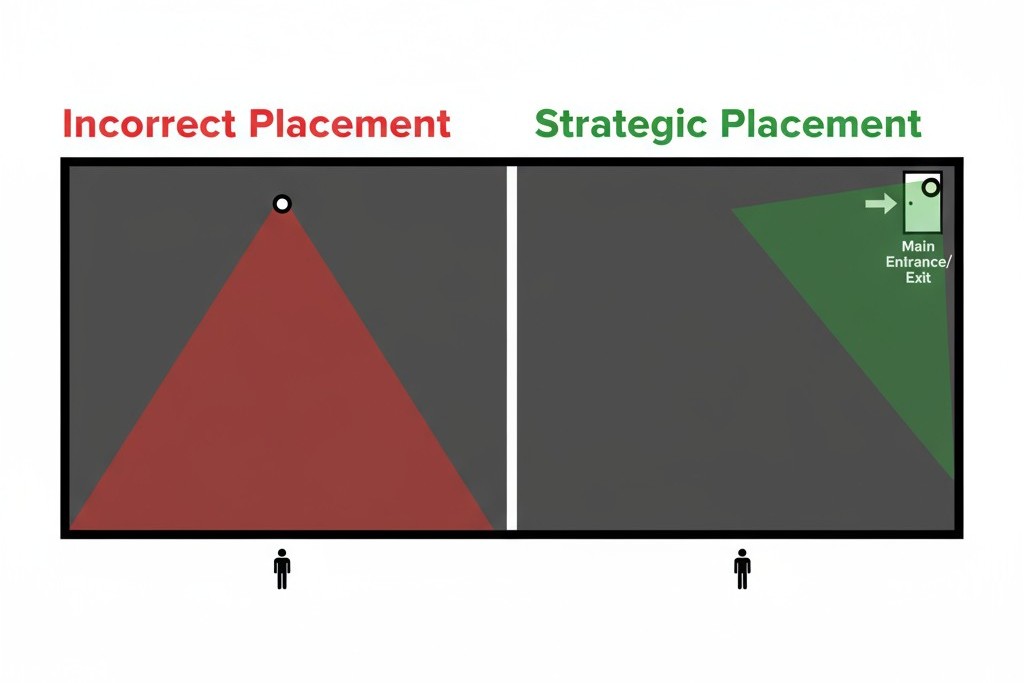
A sensor’s placement is as important as its programming. Its goal is not to track every person on stage, but simply to determine if the room is occupied. This requires targeted observation, not comprehensive coverage.
The most reliable placement is aimed at the main entry and exit points. A sensor with a clear view of the doorway can accurately register when people come and go. This provides the only information that matters—is the room in use?—without monitoring the performance area itself. This strategy narrows the sensor’s field of view to only what is necessary, minimizing the chance it will be affected by on-stage action.
Placing a sensor with a view of the stage or audience is a common mistake. A sensor pointed at the stage can be fooled by the rapid heating and cooling of theatrical lighting instruments, causing false triggers. More importantly, it creates a system that is trying to watch the very activity it should be ignoring. The sensor’s job is to be a simple gatekeeper, not a critic in the front row.
人感センサーを活用した省エネソリューションをお探しですか?
PIR人感センサー、人感センサー搭載省エネ製品、人感センサースイッチ、商業施設向けOccupancy/Vacancy(在室/不在)ソリューションについては、お気軽にお問い合わせください。
Adapting the Space: Solutions for Multi-Use Rooms
Many performance spaces double as rehearsal halls, classrooms, and event venues. In these environments, a single sensor configuration may not be ideal. The solution is an adaptable system.
Mode-Based Controls
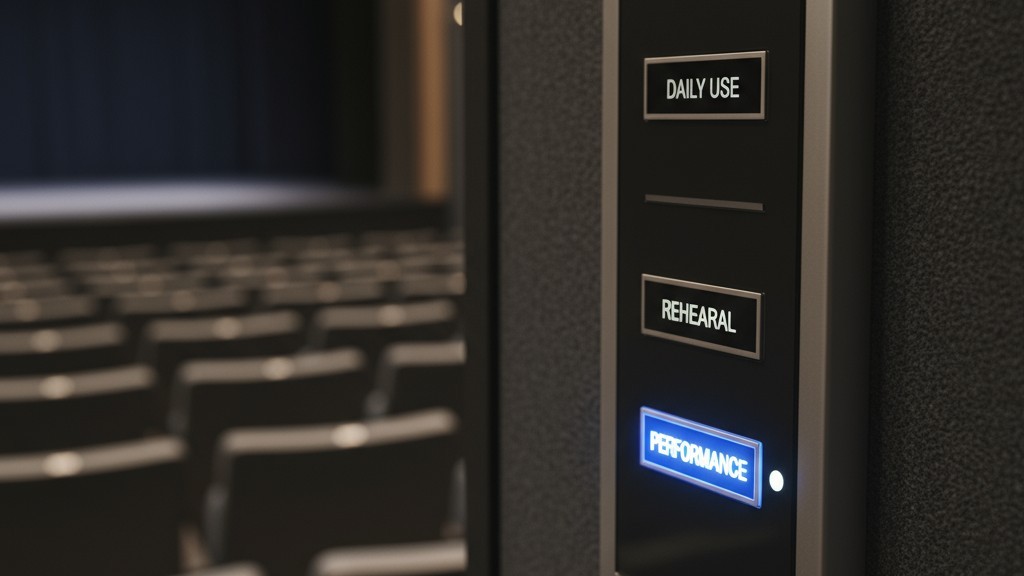
For a multi-use space, the ideal setup is a lighting control system with selectable modes. A wall-mounted keypad or a simple key switch can allow a user to choose the correct sensor profile for the day’s activity. A “Rehearsal” mode could engage the vacancy sensor with a 30-minute timeout. A “Performance” mode would disable the sensor’s auto-off capability entirely, putting the room’s lighting under the exclusive control of the lighting console. This offers the best of both worlds: automated efficiency for daily use and absolute manual control when it matters most.
Practical Workarounds
When a full system replacement isn’t an option, you can still mitigate the problems. If an existing occupancy sensor has an aggressive “auto-on” function, a simple workaround is to carefully apply opaque electrical tape to its lens, blocking its view of the stage and shrinking its effective zone to just the entryway. If a sensor’s timeout is too short and can’t be adjusted, the only reliable solution during a performance is to disable that circuit entirely. It’s a crude fix, but one that guarantees your show won’t be sabotaged by a flicker of unwanted light.







