

Η χρήση ενός φωτιστικού που ενεργοποιείται με την ανίχνευση κίνησης σε κατοικίες, γραφεία ή δημόσιους εσωτερικούς χώρους μπορεί να μειώσει σημαντικά τη σπατάλη ηλεκτρικής ενέργειας, προσφέροντας παράλληλα μια αυτόματη εμπειρία φωτισμού χωρίς τη χρήση των χεριών. Τις περισσότερες φορές, ένας διακόπτης φωτισμού με ανιχνευτή κίνησης αποτελεί την ιδανική λύση για εσωτερική χρήση, καθώς είναι εύκολη η αναβάθμιση και η αντικατάσταση του υπάρχοντος επιτοίχιου διακόπτη σας, ενώ ο επιτοίχιος διακόπτης με αισθητήρα είναι πιο προσβάσιμος για τους χρήστες όταν απαιτείται χειροκίνητος έλεγχος.
Περιεχόμενα
- Βήμα 1. Προετοιμασία εργαλείων για την εγκατάσταση
- Βήμα 2. Τοποθέτηση του ανιχνευτή κίνησης
- Βήμα 3. Καλωδίωση του ανιχνευτή κίνησης στο φωτιστικό
- Βήμα 4. Ρύθμιση του ανιχνευτή κίνησης
Ορισμένες φορές είναι απαραίτητη η ανίχνευση κίνησης σε ευρύτερη περιοχή κάλυψης, όπου ένας επιτοίχιος διακόπτης με αισθητήρα κίνησης ανεπαρκεί λόγω του περιορισμένου πεδίου ανίχνευσης στον τοίχο. Σε αυτή την περίπτωση, ένας αισθητήρας κίνησης οροφής ή ένας ανεξάρτητος ανιχνευτής κίνησης τοποθετημένος στον τοίχο, ο οποίος μπορεί να ανιχνεύσει παρουσία ατόμων σε εύρος έως και 360 μοιρών με μεγαλύτερη ζώνη ευαισθησίας, δίνει την τελική λύση στο πρόβλημα.
Ένα επιπλέον πλεονέκτημα της προσθήκης ενός αισθητήρα κίνησης, δηλαδή ενός αισθητήρα παρουσίας, στο υπάρχον φωτιστικό σας είναι η δυνατότητα αυτόματης ενεργοποίησης/απενεργοποίησης (ON/OFF) του φωτισμού, η οποία είναι εντελώς ανέπαφη και κατάλληλη για κοινόχρηστους χώρους και γραφεία. Επιπλέον, ένας αισθητήρας παρουσίας οροφής απαιτεί μόνο διαθέσιμη καλωδίωση για την εγκατάσταση και προσφέρει μεγαλύτερη ευελιξία ως προς το σημείο τοποθέτησης, σε αντίθεση με τους επιτοίχιους διακόπτες αισθητήρων που πρέπει να εγκατασταθούν σε υπάρχον εντοιχισμένο κουτί διακλάδωσης.
Βήμα 1. Προετοιμασία εργαλείων για την εγκατάσταση
Πριν προσθέσουμε έναν αισθητήρα κίνησης στο φωτιστικό, προετοιμάστε αυτά τα εργαλεία για να επιταχύνετε τη διαδικασία.
- Ένας αισθητήρας κίνησης
- Κατσαβίδι
- Προαιρετικά
- Κόφτης καλωδίων: για την κοπή καλωδίων εάν είναι απαραίτητο
- Wire connectors: most motion sensor light switches would include wire connecters by default in the accessory pack
- Voltage tester: to identify the hotwire and ensure the voltage is off
- Electrical tapes: to mark the hotwire
- Junction box: for fixing and installing the motion sensor
Βήμα 2. Τοποθέτηση του ανιχνευτή κίνησης
Turn off the power to the light which you want to add a motion sensor to. Find a place where you want to install the motion sensor between the power source from your house to the light.
Install a junction box and cut the hot wire and neutral wire for installing and fixing the motion sensor, if needed.
Now we mark the hot wire and load wire.
Ίσως σας ενδιαφέρει επίσης

- Τάση: 2 Μπαταρίες AAA
- Λειτουργία Ημέρας/Νύχτας
- Καθυστέρηση χρόνου: 15min, 30min, 1h(προεπιλογή), 2h

- Ανιχνευτής πληρότητας PIR οροφής με έξοδο ξηρής επαφής ρελέ
- Τροφοδοσία χαμηλής τάσης 12/24VDC ή 12/24VAC
- Απομονωμένες επαφές ρελέ COM, NO και NC για εισόδους συστημάτων EMS, HVAC και ελέγχου κτιρίων

- Χωνευτός διακόπτης ανιχνευτή κίνησης μικροκυμάτων οροφής χαμηλής τάσης DC
- Είσοδος 12 VDC / 24 VDC με εύρος 10-30 VDC
- Μέγιστο ρεύμα λειτουργίας 10A με ρυθμιζόμενη καθυστέρηση χρόνου, ουδός Lux και ευαισθησία
- Χωνευτός διακόπτης ανιχνευτή κίνησης μικροκυμάτων οροφής για υψηλότερα φορτία
- Είσοδος τάσης δικτύου 100-265 VAC, μοντέλο 10A
- Ανίχνευση μικροκυμάτων 5.8 GHz με ρυθμιζόμενη καθυστέρηση χρόνου, κατώφλι Lux και ευαισθησία
- Χωνευτός διακόπτης αισθητήρα κίνησης μικροκυμάτων τοποθέτησης σε οροφή
- Είσοδος τάσης γραμμής 100-265 VAC, μοντέλο 5A
- Ανίχνευση μικροκυμάτων 5.8 GHz με ρυθμιζόμενη καθυστέρηση χρόνου, κατώφλι Lux και ευαισθησία
- Ροοστάτης αισθητήρα πληρότητας PIR οροφής RZ037 για τροφοδοσία 220V
- Μέγιστο ρεύμα λειτουργίας 3A με ονομαστικό φορτίο 660W
- Το κουμπί LUX ελέγχει την ενεργοποίηση/απενεργοποίηση (ON/OFF) του αισθητήρα φωτός και τη φωτεινότητα ρύθμισης έντασης που ορίζει ο χρήστης
- Ροοστάτης αισθητήρα πληρότητας PIR οροφής RZ037 για τροφοδοσία 110V
- Μέγιστο ρεύμα λειτουργίας 3A με ονομαστικό φορτίο 330W
- Το κουμπί LUX ελέγχει την ενεργοποίηση/απενεργοποίηση (ON/OFF) του αισθητήρα φωτός και τη φωτεινότητα ρύθμισης έντασης που ορίζει ο χρήστης

- Διακόπτης αισθητήρα κίνησης μικροκυμάτων τοποθέτησης οροφής χαμηλής τάσης DC
- Είσοδος 12 VDC / 24 VDC με εύρος 10-30 VDC
- Μέγιστο ρεύμα λειτουργίας 10A με ρυθμιζόμενη καθυστέρηση χρόνου, ουδός Lux και ευαισθησία
- Διακόπτης αισθητήρα κίνησης μικροκυμάτων οροφής για υψηλότερα φορτία
- Είσοδος τάσης δικτύου 100-265 VAC, μοντέλο 10A
- Ανίχνευση μικροκυμάτων 5.8 GHz με ρυθμιζόμενη καθυστέρηση χρόνου, κατώφλι Lux και ευαισθησία
- Διακόπτης αισθητήρα κίνησης μικροκυμάτων τοποθέτησης σε οροφή
- Είσοδος τάσης γραμμής 100-265 VAC, μοντέλο 5A
- Ανίχνευση μικροκυμάτων 5.8 GHz με ρυθμιζόμενη καθυστέρηση χρόνου, κατώφλι Lux και ευαισθησία

- Διακόπτης αισθητήρα κίνησης PIR χωνευτής τοποθέτησης οροφής χαμηλής τάσης DC
- Είσοδος 12 VDC / 24 VDC με εύρος 10-30 VDC
- Μέγιστο ρεύμα λειτουργίας 10A με ρυθμιζόμενη καθυστέρηση χρόνου, κατώφλι Lux και ευαισθησία

- Διακόπτης αισθητήρα κίνησης PIR χωνευτής τοποθέτησης οροφής για υψηλότερο φορτίο
- Είσοδος τάσης δικτύου 100-265 VAC, μοντέλο 10A
- Ανίχνευση 360 μοιρών με ρυθμιζόμενη καθυστέρηση χρόνου, κατώφλι Lux και ευαισθησία
- Διακόπτης αισθητήρα κίνησης PIR χωνευτής τοποθέτησης οροφής
- Είσοδος τάσης γραμμής 100-265 VAC, μοντέλο 5A
- Ανίχνευση 360 μοιρών με ρυθμιζόμενη καθυστέρηση χρόνου, κατώφλι Lux και ευαισθησία

- Κιτ ασύρματου διακόπτη και δέκτη για έλεγχο φωτισμού ON/OFF εσωτερικού χώρου
- Δέκτης 100-230VAC, 50/60Hz με ονομαστικό ρεύμα 5A
- Ασύρματος διακόπτης τροφοδοτούμενος από μπαταρία CR2032 με επικοινωνία 2.4GHz
- Πληρότητα (Auto-ON/Auto-OFF)
- 12–24V DC (10–30VDC), έως 10A
- Κάλυψη 360°, διάμετρος 8–12 m
- Καθυστέρηση χρόνου 15 s–30 min
- Αισθητήρας φωτός Off/15/25/35 Lux
- Υψηλή/Χαμηλή ευαισθησία
- Function Auto-ON/Auto-OFF (Αυτόματη Ενεργοποίηση/Απενεργοποίηση) λειτουργία παρουσίας
- 100–265V AC, 10A (απαιτείται ουδέτερος)
- Κάλυψη 360°, διάμετρος ανίχνευσης 8–12 m
- Χρονοκαθυστέρηση 15 s–30 min, Lux OFF/15/25/35, Ευαισθησία Υψηλή/Χαμηλή
- Function Auto-ON/Auto-OFF (Αυτόματη Ενεργοποίηση/Απενεργοποίηση) λειτουργία παρουσίας
- 100–265V AC, 5A (απαιτείται ουδέτερος)
- Κάλυψη 360°, διάμετρος ανίχνευσης 8–12 m
- Χρονοκαθυστέρηση 15 s–30 min, Lux OFF/15/25/35, Ευαισθησία Υψηλή/Χαμηλή
- Turn on the power and use the non-contact voltage tester to test each black wire in the junction box. The hot wire has power but the load wire to your light does not have power.
- Turn off the power and use the non-contact voltage tester to confirm.
- Mark the hot wire with electrical tapes if needed.
Βήμα 3. Καλωδίωση του ανιχνευτή κίνησης στο φωτιστικό
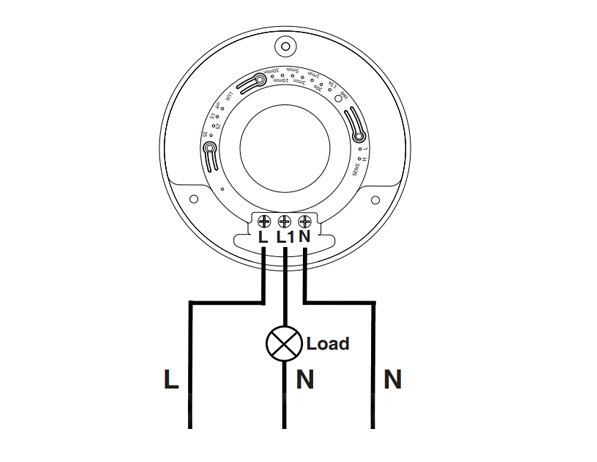
This is a standard motion sensor wiring diagram and you can apply nearly all wirings like above. The wiring is pretty straightforward, similar to installing a motion sensor light switch.
Αναζητάτε λύσεις εξοικονόμησης ενέργειας με ενεργοποίηση μέσω κίνησης;
Επικοινωνήστε μαζί μας για ολοκληρωμένους αισθητήρες κίνησης PIR, προϊόντα εξοικονόμησης ενέργειας με ενεργοποίηση μέσω κίνησης, διακόπτες αισθητήρων κίνησης και επαγγελματικές λύσεις Occupancy/Vacancy.
There are only 3 wires needed. The L is for line wire or hot wire, which is the power source from your house. The L1 is for load wire which powers the lights. The N is the neutral wire, and you only need to simply wire them together.
- Connect the hot wire from your house to the hot wire on the motion sensor.
- Connect the load wire to your light to the load wire on the motion sensor.
- Connect the neutral wire from your house to the neutral wire on the motion sensor.
Βήμα 4. Ρύθμιση του ανιχνευτή κίνησης
Now we partially screw the motion sensor into the junction box and turn on the power for testing the best setting.
Test a couple of times and adjust the motion sensor’s setting to the best value, such as time delay, motion detection sensitivity, light sensor LUX.
Alter the motion sensor to ensure it can detect the ideal motion detection area. Install and screw tight the motion sensor.








I’ve never heard of a “load wire”. Only HOT (black) Neutral (white) and ground (green). What is a load wire?
Hi Patrick,
A “load wire” is the wire that connects the sensor with the load. In this case, the load is the light connected and driven by the motion sensor.
Say you want to control your light with a motion sensor.
The motion sensor draws power from the hot wire and it needs to send the power to the light via the load wire. Now the sensor can control when to keep the light ON or OFF because the light is directly powered by the motion sensor.
A load wire may have different colors, usually red or black. Some motion sensors may have hot wire and load wire the same color and they are interchangeable. You need to refer to your sensor’s manual for this part.
Most motion sensors have a load wire and control the lighting in this way. If your motion sensor does not have a load wire, it is mostly a wireless sensor that needs to be integrated into a smart home system so that the light is controlled by other means.
Nice article very well written. It answered the questions i had. Thank you.
How much would an electrician charge for something like this?
Hi, I don’t understand how connecting one wire (load) to the light makes it work what about the neutral wire from the lights
Cuando ce cobra por estos trabajos