

Motion sensors are great at saving energy and bringing convenience. They can automatically turn on the light for us when detecting motion from a person and turn off the light for us when no motion is detected. Whether it’s outdoor or indoor usage, a вимикача світла з датчиком руху is better than a mechanical light switch in most cases.
Зміст
- Step 1. Prepare tools for the installation
- Step 2. Remove the Old Switch
- Step 3. Wire the Motion Sensor Light Switch
- Step 4. Fix the Switch Into the Wallbox
Motion sensor light switches are great at saving energy and bringing convenience to our home. The motion sensor detector can automatically turn on the light for us when we enter the room and turn off the light after we leave. A motion sensor light switch is more preferred than a motion sensor light for home use because we need to manually take control of the light most of the time. And it’s easier to simply upgrade the traditional wall switch with a motion sensor light switch than to replace the light fixture.
It’s never too late to replace your manual mechanical light switch with a smart, motion-activated one, and wiring and installing a motion sensor light switch can be fast and easy.
You don’t need to call an electrician for the job. All you need is some common tools like a screwdriver that every home has (you don’t own a screwdriver?) and within 30 minutes, you can get the job done even for beginners with no electrical knowledge.
Check the video version of installing a motion sensor light switch.
If you want a step by step instruction to follow, keep reading.
Step 1. Prepare tools for the installation
Before we install a motion sensor light switch, prepare these tools first so we can speed up the process.
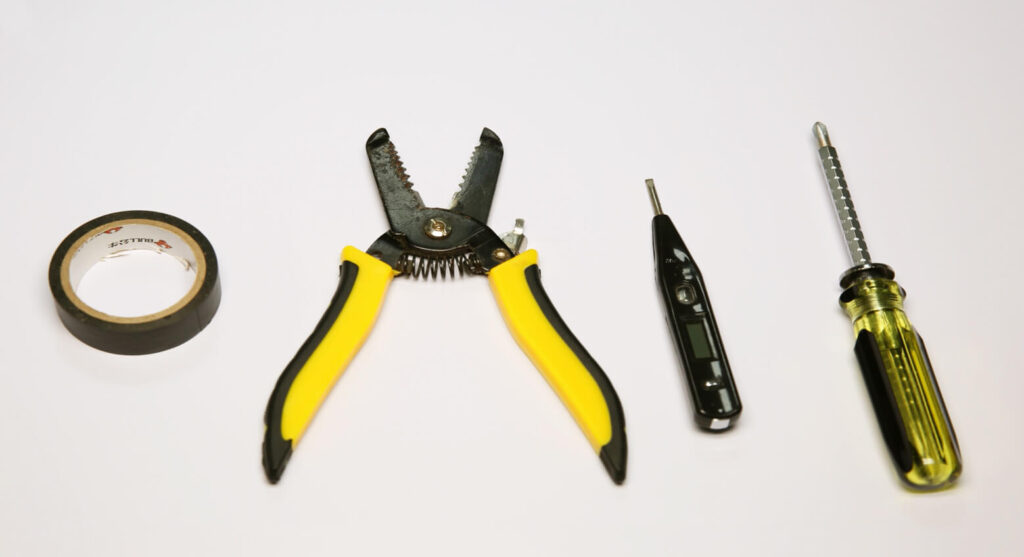
- A motion sensor light switch
- Викрутка
- Опціонально
- Cтрипер для зняття ізоляції та стрижки дротів: щоб обрізати дроти за потреби
- Зєднувачі для дротів: більшість вимикачів світла з датчиком руху за замовчуванням містять зєднувачі в комплекті аксесуарів
- Voltage tester: to identity the hotwire and ensure the voltage is off
- Electrical tapes: to mark the hotwire
Step 2. Remove the Old Switch
Turn off the breaker to the light you want to replace the switch of and turn on/off the existing switch several times to ensure there is no power.
Now we can safely remove the old switch. Suppose you have absolutely no electrical knowledge and worry about the wiring. In that case, you can take a picture of the existing wiring to apply similar wirings to the motion sensor light switch or even restore the old wiring and the switch.
Шукаєте енергозбережні рішення з датчиками руху?
Зв'яжіться з нами, щоб отримати повний асортимент інфрачервоних (PIR) датчиків руху, енергозбережних продуктів, що активуються рухом, вимикачів із датчиками руху, а також комерційних рішень для контролю присутності та відсутності (Occupancy/Vacancy).
Mark the hot wire(the black wire) with electrical tapes if necessary.
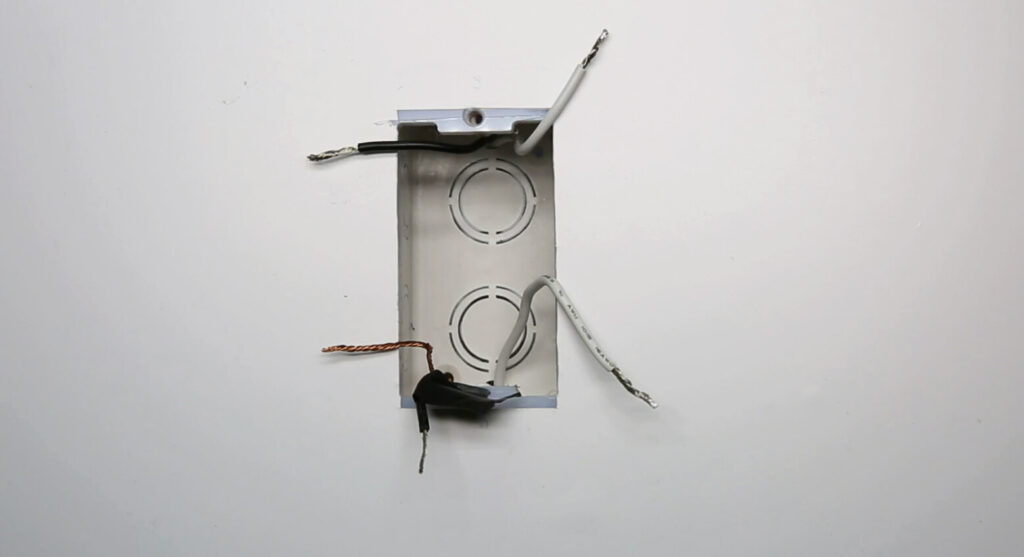
If you do not know which is load wire or hot wire, use the voltage tester to confirm with the following process:
- Turn on the breaker
- Move the voltage tester near each black wire
- The hotwire has power and the load wire does not have power
- Turn off the breaker
- Use the voltage near the hot wire to ensure the power is off
- Mark the hotwire with electrical tapes
Step 3. Wire the Motion Sensor Light Switch
First, make sure the breaker is turned off and there is no power with a voltage tester.
Надихайтеся портфоліо датчиків руху Rayzeek.
Не знайшли те, що шукаєте? Не хвилюйтеся. Завжди є альтернативні способи розв'язання ваших завдань. Можливо, одне з наших портфоліо стане вам у пригоді.
Now we start wiring the motion sensor light switch to the light by connecting the wires with the same color.
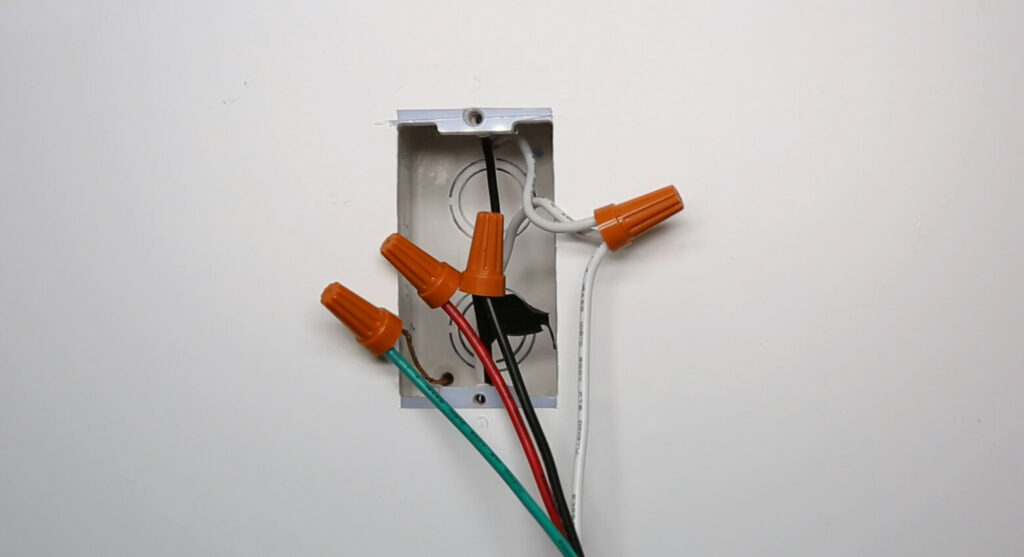
- Hotwire(black) to the light switch’s hotwire(black)
- Load wire(black or red) to the light switch’s load wire(red)
- Connect all neutral wires together (white)
- Connect all ground wires together(green or bare copper)
Now we partially screw the motion sensor switch into the wall box and test the wiring.
Turn on the breaker and the motion sensor light switch needs some time to warm up and will automatically turn on the light if the wiring is correct.
Можливо, вас зацікавить

- Напруга: 2 батарейки AAA
- Режим День/Ніч
- Затримка часу: 15 хв, 30 хв, 1 год (за замовчуванням), 2 год

- Стелярний PIR-датчик присутності з виходом реле типу «сухий контакт»
- Низьковольтне живлення 12/24 В постійного струму або 12/24 В змінного струму
- Ізольовані контакти реле COM, NO та NC для систем управління будівлями (EMS), опалення, вентиляції та кондиціонування (HVAC)

- Низьковольтний врізний стельовий мікрохвильовий вимикач із датчиком руху постійного струму
- Вхід 12 В / 24 В постійного струму з діапазоном 10–30 В постійного струму
- Максимальний робочий струм 10A з регульованою затримкою часу, порогом Lux і чутливістю
- Врізний стельовий мікрохвильовий вимикач із датчиком руху для підвищеного навантаження
- Вхідна мережева напруга 100-265 VAC, модель 10A
- Мікрохвильове виявлення 5.8 GHz з регульованою затримкою часу, порогом Lux і чутливістю
- Врізний стельовий мікрохвильовий вимикач із датчиком руху
- Вхідна мережева напруга 100-265 VAC, модель 5A
- Мікрохвильове виявлення 5.8 GHz з регульованою затримкою часу, порогом Lux і чутливістю
- Стельовий димер із PIR-датчиком присутності RZ037 для живлення 220V
- Максимальний робочий струм 3A із номінальним навантаженням 660W
- Кнопка LUX керує увімкненням/вимкненням датчика освітленості та налаштованою користувачем яскравістю димування
- Стельовий PIR-датчик присутній з димером RZ037 для живлення 110V
- Максимальний робочий струм 3A із номінальним навантаженням 330W
- Кнопка LUX керує увімкненням/вимкненням датчика освітленості та налаштованою користувачем яскравістю димування

- Низьковольтний стельовий мікрохвильовий датчик руху постійного струму
- Вхід 12 В / 24 В постійного струму з діапазоном 10–30 В постійного струму
- Максимальний робочий струм 10A з регульованою затримкою часу, порогом Lux і чутливістю
- Стельовий мікрохвильовий датчик руху для підвищеного навантаження
- Вхідна мережева напруга 100-265 VAC, модель 10A
- Мікрохвильове виявлення 5.8 GHz з регульованою затримкою часу, порогом Lux і чутливістю
- Стельовий мікрохвильовий датчик руху
- Вхідна мережева напруга 100-265 VAC, модель 5A
- Мікрохвильове виявлення 5.8 GHz з регульованою затримкою часу, порогом Lux і чутливістю

- Низьковольтний врізний стельовий PIR-датчик руху постійного струму
- Вхід 12 В / 24 В постійного струму з діапазоном 10–30 В постійного струму
- Максимальний робочий струм 10A з регульованою затримкою часу, порогом Lux та чутливістю

- Врізний стельовий PIR-датчик руху для підвищеного навантаження
- Вхідна мережева напруга 100-265 VAC, модель 10A
- Детекція на 360 градусів з регульованою затримкою часу, порогом Lux та чутливістю
- Врізний стельовий вимикач із PIR-датчиком руху
- Вхідна мережева напруга 100-265 VAC, модель 5A
- Детекція на 360 градусів з регульованою затримкою часу, порогом Lux та чутливістю

- Комплект бездротового вимикача та приймача для внутрішнього керування освітленням (УВІМК/ВИМК)
- Приймач 100-230VAC, 50/60Hz із номінальним струмом 5A
- Бездротовий вимикач із живленням від CR2032 та зв'язком 2.4GHz
- Режим присутності (Auto-ON/Auto-OFF)
- 12–24V DC (10–30VDC), до 10A
- Зона охоплення 360°, діаметр 8–12 m
- Затримка часу 15 s–30 min
- Датчик освітленості Off/15/25/35 Lux
- Висока/низька чутливість
- Режим присутності Auto-ON/Auto-OFF (автоматичне увімкнення/вимкнення)
- 100–265V AC, 10A (необхідна нейтраль)
- Зона охоплення 360°; діаметр виявлення 8–12 м
- Затримка часу 15 s–30 min; Lux OFF/15/25/35; чутливість High/Low
- Режим присутності Auto-ON/Auto-OFF (автоматичне увімкнення/вимкнення)
- 100–265V AC, 5A (необхідна нейтраль)
- Зона охоплення 360°; діаметр виявлення 8–12 м
- Затримка часу 15 s–30 min; Lux OFF/15/25/35; чутливість High/Low
Press the buttons on the light switch to see if you can successfully control the ON and OFF of the light.
Step 4. Fix the Switch Into the Wallbox
Strengthen the screws, install the cover plates, and adjust the switch to a straight position.
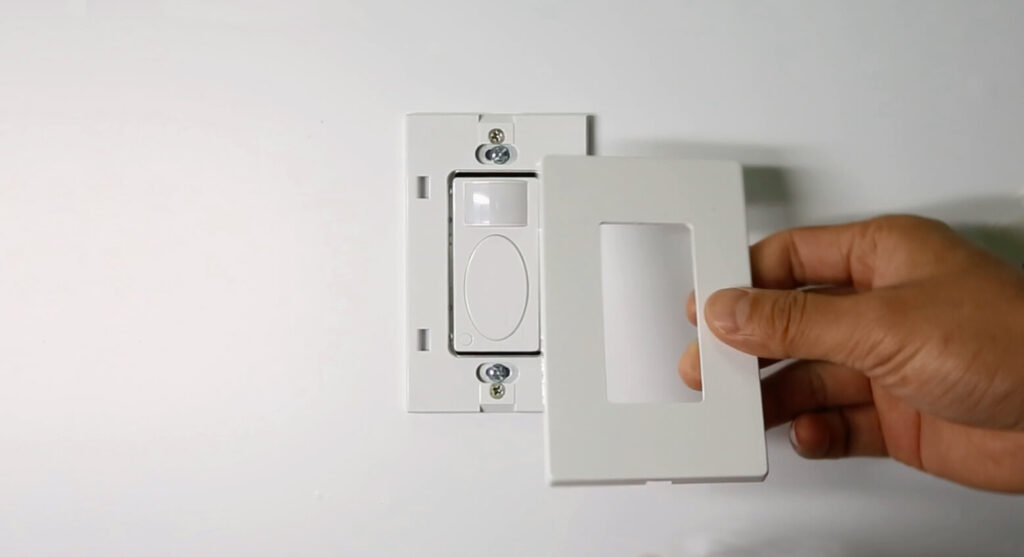
Now you can adjust the functions of the motion sensor light switch to a proper setting according to the user manual, such as occupancy sensor and vacancy sensor motion detection mode, time delay, and ambient light sensing.







