
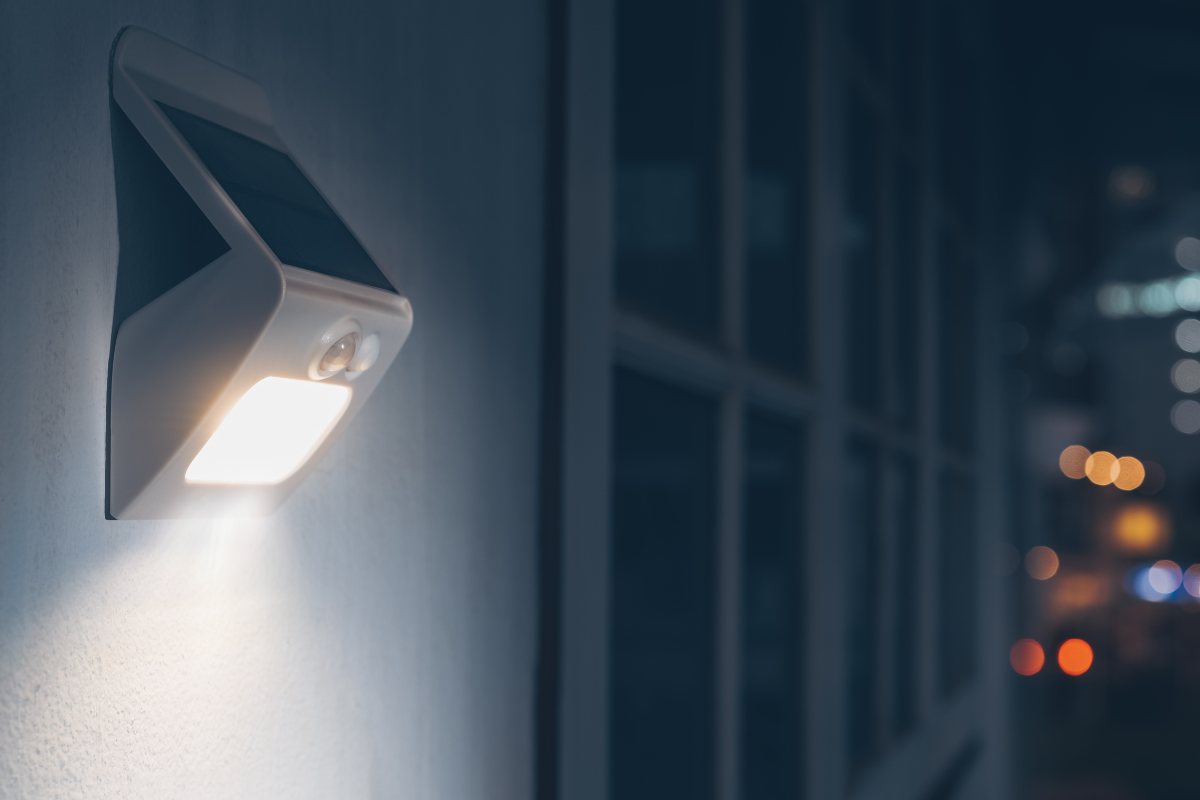
現代の住宅や公共スペースでよく見かける人感センサーライトは、技術と実用性が融合した便利なアイテムです。必要なときだけ点灯し、使用しないときは節電できるため、照明や防犯対策として利便性と省エネ性を兼ね備えています。では、人感センサーライトは何に反応して点灯するのでしょうか。どのような要因で動作するのか、また誤検知を防ぐにはどうすればよいのでしょうか。
目次
本記事では、人感センサーライトの複雑な仕組みについて解説し、動きを検知する方法、反応の原因、光や天候などの外部要因による影響を詳しく探ります。さらに最も重要なポイントとして、誤作動を防ぐ方法や、ライトが想定より長く点灯し続ける理由についても解説します。
センサーの仕組みと動きを検知する方法
人感センサーライトの中核である人感センサーは、さまざまな技術を用いて作動しています。技術ごとに動きを検知する独自の仕組みがあり、用途や設置環境に応じて設計されています。その動作メカニズムを理解することで、何が原因でセンサーが反応するのかを把握しやすくなります。
人感センサーは、動きを検知するために信号を送信するかどうかによって、大きくアクティブ(能動型)センサーとパッシブ(受動型)センサーの2つに分類されます。
アクティブ人感センサー
マイクロ波センサーに代表されるアクティブ人感センサーは、マイクロ波と呼ばれる電磁波を発信します。この波は物体に反射してセンサーに戻ります。人などの物体によってこの波が遮られたり変化したりすると、センサーがその乱れを検知して信号を送信します。この信号により、照明の点灯やアラームの発報など各種動作が実行されます。
超音波人感センサーも一般的に利用されているアクティブセンサーの一種です。マイクロ波センサーと同様に超音波を発信し、物体に反射して発信元へと戻ってくる波を利用します。移動する物体によって波が乱れると、センサーが反応してあらかじめ設定された動作を行います。
こちらの商品もおすすめです

- 電圧: 単4形乾電池 2本
- 昼/夜モード
- タイマー設定時間: 15分、30分、1時間(デフォルト)、2時間

- 無電圧接点リレー出力付き天井取り付け型PIR人感センサー
- 12/24VDCまたは12/24VAC低電圧電源
- EMS、HVAC、および建物制御入力用COM、NO、NC絶縁リレー接点

- 低電圧DC天井埋め込み型マイクロ波人感センサースイッチ
- 10~30 VDC範囲の12 VDC / 24 VDC入力
- 調整可能なタイムラグ、照度(Lux)閾値、感度を備えた最大動作電流10A仕様
- 高負荷対応型 埋込型天井取付けマイクロ波人感センサースイッチ
- 100-265 VAC 商用電源入力、10Aモデル
- 調整可能なタイムラグ、照度(Lux)閾値、感度を備えた5.8 GHzマイクロ波検知
- 埋込型天井取付けマイクロ波人感センサースイッチ
- 100-265 VAC商用電圧入力、5Aモデル
- 調整可能なタイムラグ、照度(Lux)閾値、感度を備えた5.8 GHzマイクロ波検知
- 220V電源対応 天井取付けRZ037 PIR(赤外線)人感センサー調光器
- 定格負荷660W、最大動作電流3A
- LUXボタンによる照度センサーのON/OFFおよびユーザー設定の調光明るさ制御
- 110V電源対応 天井取付けRZ037 PIR(赤外線)人感センサー調光器
- 定格負荷330W、最大動作電流3A
- LUXボタンによる照度センサーのON/OFFおよびユーザー設定の調光明るさ制御

- 低電圧DC対応 天井取付けマイクロ波人感センサースイッチ
- 10~30 VDC範囲の12 VDC / 24 VDC入力
- 調整可能なタイムラグ、照度(Lux)閾値、感度を備えた最大動作電流10A仕様
- 高負荷対応 天井取付型マイクロ波人感センサースイッチ
- 100-265 VAC 商用電源入力、10Aモデル
- 調整可能なタイムラグ、照度(Lux)閾値、感度を備えた5.8 GHzマイクロ波検知
- 天井取り付け型マイクロ波人感センサースイッチ
- 100-265 VAC商用電圧入力、5Aモデル
- 調整可能なタイムラグ、照度(Lux)閾値、感度を備えた5.8 GHzマイクロ波検知

- 低電圧DC埋込型天井PIR人感センサースイッチ
- 10~30 VDC範囲の12 VDC / 24 VDC入力
- 最大動作電流10A(調整可能なタイムラグ、照度閾値、感度設定付き)

- 高負荷対応 埋込型天井PIR人感センサースイッチ
- 100-265 VAC 商用電源入力、10Aモデル
- 360度検知(調整可能なタイムラグ、照度閾値、感度設定付き)
- 埋込型天井PIR人感センサースイッチ
- 100-265 VAC商用電圧入力、5Aモデル
- 360度検知(調整可能なタイムラグ、照度閾値、感度設定付き)

- 屋内用照明ON/OFF制御ワイヤレススイッチ&受信機キット
- 100-230VAC、50/60Hz、定格電流5A受信機
- 2.4GHz通信対応 CR2032電池駆動ワイヤレススイッチ
- Occupancy(自動点灯/自動消灯)
- 12–24V DC (10–30VDC)、最大10A
- 360°検知エリア、直径8–12m
- タイムラグ 15秒–30分
- 照度センサー オフ/15/25/35 Lux
- 高/低感度
- 自動点灯/自動消灯人感モード
- 100–265V AC, 10A(中性線必須)
- 360°検知範囲、検知直径8–12 m
- タイムデレイ15秒–30分、Lux OFF/15/25/35、感度 高/低
- 自動点灯/自動消灯人感モード
- 100–265V AC, 5A(中性線必須)
- 360°検知範囲、検知直径8–12 m
- タイムデレイ15秒–30分、Lux OFF/15/25/35、感度 高/低
これらのセンサーは、高温で過酷な環境において特に効果を発揮します。ただし、小動物が横切ったり強風が吹いたりするだけで誤報を引き起こす可能性もあります。また、常にマイクロ波などを発信し続けるため、持続的な電源供給や大容量バッテリーが必要です。
パッシブ人感センサー
パッシブ(受動型)人感センサー(PIRセンサーなど)は、異なる仕組みで動作します。人間や動物から放出される熱や赤外線を受けることでエネルギーを発生させます。PIRセンサーがこの熱を検知すると、検知信号を生成してライトを点灯させたりアラームを鳴らしたりします。
PIR人感センサーは、赤外線に反応する特殊な素材で作られた2つのセンサー素子で構成されています。一方の素子は監視エリアの周囲温度(通常状態の環境)を測定し、もう一方の素子はエリア内の急激な温度変化を捉えます。これら2つの素子が捉える情報に差が生じたとき、「移動」を示すパルスが生成されます。
PIRセンサーは、検知のために自らエネルギーを放出し尽くさないため「パッシブ(受動型)」と呼ばれます。その代わりに、他の物体から放射されるエネルギーを感知することのみで動作します。一部のPIRセンサーは一定サイズ以下の物体や動物を無視する機能を備えており、小型ペットによる誤作動を防ぎます。ただし、気温が95°F(約35℃)を超えるような猛暑環境では、正常に機能しない場合があります。
デュアルテクノロジー(複合型)検知器
Dual-technology detectors combine two different motion-detecting technologies. These sensors are more resistant to false alarms, as both technologies must be triggered to confirm a valid motion singal. For example, one of the common dual-tech motion sensors is PIR ultrasonic dual-tech motion sensors. Only when both the PIR sensor and ultrasonic sensor detect motion, the dual-tech sensor will consider it a valid motion signal. And only when the PIR and ultrasonic sensor both cannot detect the ongoing motion anymore does the dual-tech sensor make sure there is no motion happening around the sensor.
Dual-technology detectors/sensors significantly lower the false alarms of both False-On and False-Off, as discussed above. The downside is the high cost, as both sensor technologies are involved in a single sensor.
Motion Sensor Lights
Motion sensor lights are activated by these motion sensors mentioned above. Typically, the light remains on either for a set time or as long as it senses movement. The type of sensor used depends on the specific application and environment, with some sensors being more suitable for indoor use and others for outdoor use.
As PIR motion sensors have significant advantages such as being energy-efficient(does not emit signals), inexpensive(compared to active sensors), and durable(for outdoor conditions, almost all motion sensor lights are equipped or working in conjunction with PIR motion sensors nowadays.
Understanding how these sensors work is crucial to understanding what sets off motion sensor lights. And we will mainly explore PIR motion sensors in the following sections as motion sensor lights are mostly activated and controlled by PIR motion sensors.
人感センサーが反応する原因
Motion sensors, particularly those utilizing Passive Infrared (PIR) technology, are triggered by the movement of objects that generate infrared light. This is due to their ability to detect changes in heat. When an object that emits enough infrared energy and causes a temperature shift enters the sensor’s field of view, it triggers the motion detector.
Common Triggers
- Humans and Animals: Humans and animals are common triggers as they emit heat and can cause a significant temperature shift in the sensor’s field of view.
- Heaters and Sunlight: Heaters and sunlight can also set off a motion sensor. These sources can cause a sudden change in temperature, which the sensor picks up.
- Other Heat Sources: Other heat-emitting objects, such as automobiles, can also trigger a motion sensor.
False Triggers
False triggers can occur due to various factors:
Rayzeek人感センサーのポートフォリオを見る.
お探しの製品が見つかりませんか?ご安心ください。課題を解決する手段は常に複数存在します。当社の製品ポートフォリオのいずれかがお役に立つかもしれません。
- Heat Changes: Changes in heat, such as a radiator turning on or a street light switching on within view, can trigger a PIR sensor.
- Damaged Sensor: A damaged sensor can falsely trigger if a crack in the sensor exposes it to outside elements.
- Interfering Signals(Microwave): An interfering RF or electromagnetic signal, such as from a garage door opener, can trigger a motion sensor.
光によって人感センサーは反応するか
Yes, light can indeed trigger a motion sensor. However, it’s not just any light that can set off a motion sensor. For instance, the normal lights turning on and off in your living room are unlikely to trigger a motion sensor. A passive motion sensor, on the other hand, is more likely to be triggered by sunlight shining directly on it or an extremely hot bulb situated close to the sensor.
However, active motion sensors aren’t foolproof either. Small animals, insects, or even the wind can potentially trigger an active motion sensor. To prevent false alarms, most of today’s motion sensors are a combination of passive and active sensors. This means that both microwaves and heat must be detected simultaneously to trigger the sensor.
In the context of a security system that includes a motion sensor light with a camera, adjusting lighting to reduce false alarms is crucial. This can be achieved in several ways that don’t involve curtains or blinds. For example, you can remove objects that are reflecting light or causing patterns, such as relocating a troublesome mirror or moving a tree whose leaves are creating issues. Another strategy is to keep your home brighter during the day to reduce the contrast between inside and outside light sources.
天候は人感センサーに影響を与えるか
Contrary to what one might expect, weather conditions generally have minimal impact on the functioning of motion sensor lights. While PIR sensors may exhibit increased sensitivity in colder temperatures, it’s typically atmospheric disturbances like storms that pose a greater likelihood of interfering with your lights.
Strong winds or heavy rainfall can cause movement of plants and outdoor decorations, potentially triggering your lights. However, such occurrences are relatively rare. If you find your motion sensor lights being set off due to weather-induced movements, there’s a simple solution at hand. You can adjust the sensitivity of your motion sensor to ignore movements small enough to be caused by inclement weather.
This way, your motion sensor lights will continue to function optimally, providing illumination when needed, without being falsely triggered by the weather. Remember, the key is to strike a balance between sensitivity and functionality to ensure your motion sensor lights serve their purpose effectively.
誤検知を防ぐ方法
Preventing false detection or triggers in motion sensor lights involves a combination of careful placement, regular maintenance, and the use of advanced features available in modern sensors.
Proper Placement of Sensors
The placement of motion sensors is crucial for preventing false triggers. Kep sensors clear of any heat sources such as fireplaces, heaters, and direct sunlight. High-traffic areas that would be hard to avoid in a home, like an entryway, stairwell, or primary hallway, are ideal places for motion sensors.
Regular Maintenance
Regular maintenance is also critical for the proper functioning of motion sensors(well, for any electronics). This includes checking for any damage to the sensor, such as cracks or general wear and tear. If any damage is found, it’s more reliable to replace the sensor outright.
Adjusting Sensitivity and Coverage
Most sensors can be adjusted or replaced with newer models that can ignore pets under 2 1/2 feet and up to 85 lbs. Sometimes, just installing the sensors upside down can get the window of coverage up above what a pet could trigger. If there is something in the field of view which could be changing heat, then you may need to insulate it. Alternatively, you could try adjusting the sensitivity of your sensor.
Dealing with Interfering Signals
For active sensors, if you suspect an interfering signal could be the issue, you can test this by holding your cell phone up to the sensor and dialing someone. If the phone causes the sensor to trip, it is likely an interference. You can get sensors more resistant to interrupting signals.
Following these strategies can significantly reduce the chances of false detection or triggers in your motion sensor lights. The key is regular maintenance and staying updated with the latest advancements in sensor technology.
人感センサーライトが点灯したままになる理由
Motion sensor lights are designed to illuminate when they detect movement and turn off after a set period of inactivity. However, there are instances when these lights may stay on longer than expected. This could be due to several factors.
High Sensitivity Setting
If the sensitivity setting of your light is too high, it may be triggered by minor movements such as a leaf blowing in the wind or a speck of dust settling on the sensor. This could cause the light to stay on as it continually detects these minor movements.
人感センサーを活用した省エネソリューションをお探しですか?
PIR人感センサー、人感センサー搭載省エネ製品、人感センサースイッチ、商業施設向けOccupancy/Vacancy(在室/不在)ソリューションについては、お気軽にお問い合わせください。
Long Duration Settings
Typically, a motion detector light should only stay on for about 20 to 30 seconds after it’s triggered. However, some lights come with adjustable settings that allow them to stay on for longer durations. If your duration setting is too long, it may seem like your motion light never turns off.
Stuck in Auto-On Mode
Some lights have an auto-on setting that causes them to stay on all the time. It’s possible that this mode has been accidentally triggered, or a malfunction has caused the light to get stuck in this mode.
Age, Storm Damage, Power Surge, Improper Installation
These factors can also cause your motion detector to stay on. They may affect the functionality of the sensor or the light itself, causing it to behave abnormally.
If your motion light stays on all the time, it doesn’t always mean that professional intervention is required. There are a few things you can try yourself.
Test Sensitivity
Adjust your sensor’s sensitivity settings and test them. Run different scenarios by placing or throwing objects to see which ones trigger your light. If the test objects that trigger your light are far away or tiny, your sensitivity setting is likely too high. Keep adjusting until you get it just right.
Reset your Motion Detector
To reset your motion light, unplug it from its power source for a full 10 seconds. Plug it back in and allow it to come back on. This should reset your light and turn off the auto-on function.
In addition to these, it’s a good idea to consult your manual and double-check the settings and functions of your light. There’s a possibility that your light’s settings simply need to be tweaked a bit or that your unit needs to be reset.








Bonjour,
Ma lampe (plafonnier) avec détecteur de mouvement est perturbée par la présence, à 2 mètres environ d’un routeur wifi 6G. Elle s’allume et s’éteint de manière intempestive. En revanche si l’opérateur commute le signal en 2.4G la lampe fonctionne normalement. Quelqu’un a-t-il une idée de comment rétablir la 5G sans ces perturbations ?
Consulta un motor eléctrico para portón corredizo energizar puede activar el sensor de movimiento pir