

There is a specific smell associated with a bathroom that relies on human memory for ventilation. It is the faint, earthy scent of damp drywall that never quite dries out between showers, mixed with the lingering humidity of a towel left on the floor.

The problem is rarely the fan itself—most modern fans move enough air. The problem is the switch on the wall and the person operating it. You walk in, flip the toggle, shower, towel off, and flip the toggle off as you leave. The fan ran for twelve minutes. To actually purge the moisture and prevent mold from eating the vanity backing, it needed to run for thirty.
But you can’t expect a guest, or even a teenager, to stand in the dark for twenty minutes just to let the fan finish its job.
This is where the single-toggle switch fails. It bundles two completely opposing needs: the light, which should be on only when a human is present, and the fan, which needs to run based on the physics of air exchange, not human presence. If you install a standard motion sensor without understanding this conflict, you just automate the annoyance. The light turns off while you are brushing your teeth, or the fan roars to life at 3 AM when you only wanted a sip of water. Buying a sensor is the easy part. The real solution lies in configuring the logic to separate these two timelines.
The Two-Clock Problem
A bathroom is a machine that manages two different commodities: lumens and cubic feet of air. They do not operate on the same clock.
When you enter a room, you need light immediately. When you leave, you want that light gone almost instantly to save energy. The fan is different. According to ASHRAE 62.2 ventilation standards, clearing the moisture load from a hot shower requires a sustained air exchange rate that extends well past the moment the water stops running. If you tie the fan and light to the same motion sensor with the same timeout—say, five minutes—you fail the building. The moisture stays, condenses on the cold mirror, and eventually drips behind the baseboards.
If you swing the other way and set the sensor timeout to thirty minutes to satisfy the fan, you fail the human. Now, every time someone walks in to wash their hands, the light and the noisy fan blaze away for a half-hour after they leave. This is why people disable sensors. They get tired of the fan droning on while they are trying to read in the next room.
人感センサーを活用した省エネソリューションをお探しですか?
PIR人感センサー、人感センサー搭載省エネ製品、人感センサースイッチ、商業施設向けOccupancy/Vacancy(在室/不在)ソリューションについては、お気軽にお問い合わせください。
There is also the issue of detection dead zones, often called the “Shower Wave.” Passive Infrared (PIR) sensors detect heat differentials—a warm body moving against a cooler background. Glass shower doors are excellent insulators; they block infrared heat signatures. If your sensor is set to a short timeout and cannot “see” through the glass, you end up waving a soapy arm over the curtain rod just to trigger the lights back on. A properly configured Rayzeek sensor deals with this not by seeing through glass (it can’t), but by using a time delay buffer that outlasts the average shower, or by using sensitivity settings that catch the micro-movements of you stepping out to grab a towel.
Wiring Reality: The Neutral Wire Check
Before you even look at the Rayzeek model numbers, you have to look inside your wall. The most common reason a bathroom sensor install fails is not the sensor, but the wiring in the box.
Older homes, particularly those built before the NEC updates in the 2010s required a neutral wire in switch boxes, often use “switch loops.” You might open the box and see only two wires: a black and a white. Do not assume the white is a neutral. In a switch loop, that white wire is likely a “hot” wire carrying power down from the light fixture, while the black wire carries it back up.
This matters because standard smart switches and motion sensors need to consume a tiny amount of power to stay “alive” and watch for motion. They need a complete circuit. If you have a neutral wire (usually a bundle of white wires capped together in the back of the box), you can use the standard Rayzeek models that tie into that neutral. This is the gold standard. It is stable, reliable, and doesn’t care what kind of light bulb you use.
If you do not have a neutral, you are in the “No-Neutral” landscape. You must select a model specifically designed for this, often using a “ground leakage” method or a capacitor bypass. Be very careful here. Some no-neutral sensors will cause low-wattage LED vanity bulbs to flicker or glow faintly when they are supposed to be off, because the switch is leaking a small amount of current through the bulb just to stay powered. If you see the lights pulsing like a disco at 20% brightness, you have a minimum load issue. You may need to install a bypass capacitor at the fixture or upgrade to a sensor model that uses a battery-operated relay—though replacing batteries in a switch is a maintenance chore you generally want to avoid.
Under the Faceplate: Configuration Is Everything
Most people install the switch, screw on the faceplate, and walk away. Big mistake. The default settings on a Rayzeek unit (often set to “Occupancy Mode” with a 15-second test timer) are for verifying the install, not for living with it. You need to pry off the small cover plate—there is usually a small notch for a flathead screwdriver—to access the DIP switches or dials that control the logic.
The first decision is the “Mode.” You will likely see options for Occupancy (Auto-ON / Auto-OFF) そして Vacancy (Manual-ON / Auto-OFF).
For a residential bathroom, Vacancy モード is almost always superior. In Occupancy mode, the light triggers automatically the moment you cross the threshold. This sounds convenient until you walk past the open bathroom door at night and trigger a floodlight that wakes up your spouse. Or you stumble in at 3 AM for a bathroom break and are blinded by 5000K daylight LEDs. Vacancy mode requires you to tap the button to turn the light on—preserving your night vision if you don’t need it—but will still turn it off automatically when you leave. You control the start; the machine handles the finish.
こちらの商品もおすすめです

- 電圧: 単4形乾電池 2本
- 昼/夜モード
- タイマー設定時間: 15分、30分、1時間(デフォルト)、2時間

- 無電圧接点リレー出力付き天井取り付け型PIR人感センサー
- 12/24VDCまたは12/24VAC低電圧電源
- EMS、HVAC、および建物制御入力用COM、NO、NC絶縁リレー接点

- 低電圧DC天井埋め込み型マイクロ波人感センサースイッチ
- 10~30 VDC範囲の12 VDC / 24 VDC入力
- 調整可能なタイムラグ、照度(Lux)閾値、感度を備えた最大動作電流10A仕様
- 高負荷対応型 埋込型天井取付けマイクロ波人感センサースイッチ
- 100-265 VAC 商用電源入力、10Aモデル
- 調整可能なタイムラグ、照度(Lux)閾値、感度を備えた5.8 GHzマイクロ波検知
- 埋込型天井取付けマイクロ波人感センサースイッチ
- 100-265 VAC商用電圧入力、5Aモデル
- 調整可能なタイムラグ、照度(Lux)閾値、感度を備えた5.8 GHzマイクロ波検知
- 220V電源対応 天井取付けRZ037 PIR(赤外線)人感センサー調光器
- 定格負荷660W、最大動作電流3A
- LUXボタンによる照度センサーのON/OFFおよびユーザー設定の調光明るさ制御
- 110V電源対応 天井取付けRZ037 PIR(赤外線)人感センサー調光器
- 定格負荷330W、最大動作電流3A
- LUXボタンによる照度センサーのON/OFFおよびユーザー設定の調光明るさ制御

- 低電圧DC対応 天井取付けマイクロ波人感センサースイッチ
- 10~30 VDC範囲の12 VDC / 24 VDC入力
- 調整可能なタイムラグ、照度(Lux)閾値、感度を備えた最大動作電流10A仕様
- 高負荷対応 天井取付型マイクロ波人感センサースイッチ
- 100-265 VAC 商用電源入力、10Aモデル
- 調整可能なタイムラグ、照度(Lux)閾値、感度を備えた5.8 GHzマイクロ波検知
- 天井取り付け型マイクロ波人感センサースイッチ
- 100-265 VAC商用電圧入力、5Aモデル
- 調整可能なタイムラグ、照度(Lux)閾値、感度を備えた5.8 GHzマイクロ波検知

- 低電圧DC埋込型天井PIR人感センサースイッチ
- 10~30 VDC範囲の12 VDC / 24 VDC入力
- 最大動作電流10A(調整可能なタイムラグ、照度閾値、感度設定付き)

- 高負荷対応 埋込型天井PIR人感センサースイッチ
- 100-265 VAC 商用電源入力、10Aモデル
- 360度検知(調整可能なタイムラグ、照度閾値、感度設定付き)
- 埋込型天井PIR人感センサースイッチ
- 100-265 VAC商用電圧入力、5Aモデル
- 360度検知(調整可能なタイムラグ、照度閾値、感度設定付き)

- 屋内用照明ON/OFF制御ワイヤレススイッチ&受信機キット
- 100-230VAC、50/60Hz、定格電流5A受信機
- 2.4GHz通信対応 CR2032電池駆動ワイヤレススイッチ
- Occupancy(自動点灯/自動消灯)
- 12–24V DC (10–30VDC)、最大10A
- 360°検知エリア、直径8–12m
- タイムラグ 15秒–30分
- 照度センサー オフ/15/25/35 Lux
- 高/低感度
- 自動点灯/自動消灯人感モード
- 100–265V AC, 10A(中性線必須)
- 360°検知範囲、検知直径8–12 m
- タイムデレイ15秒–30分、Lux OFF/15/25/35、感度 高/低
- 自動点灯/自動消灯人感モード
- 100–265V AC, 5A(中性線必須)
- 360°検知範囲、検知直径8–12 m
- タイムデレイ15秒–30分、Lux OFF/15/25/35、感度 高/低
Then there are the dials: タイムラグ(遅延時間) そして 感度.
The Time Delay is your buffer against the shower problem. If this sensor controls the light そして the fan together (not ideal, but often necessary), you have to compromise. Fifteen minutes is the floor. Anything less, and you risk the “Shower Wave.” Anything more, and you are wasting heat or AC by venting conditioned air for too long.
The Sensitivity dial is often overlooked. If the bathroom is near a hallway, a high sensitivity setting will trigger the sensor every time a cat walks by the door. Dial it down so it only catches deliberate entry, not casual passing.
The Advanced Fix: Separating the Loads
If you want to truly solve the “Two-Clock” problem—light for 5 minutes, fan for 30—you need to separate the loads.
Rayzeek人感センサーのポートフォリオを見る.
お探しの製品が見つかりませんか?ご安心ください。課題を解決する手段は常に複数存在します。当社の製品ポートフォリオのいずれかがお役に立つかもしれません。
In many bathrooms, the fan and light are wired together on a single switch leg. When one turns on, the other must follow. This is the root of the “fan noise fatigue” complaint; people stop using the fan because they don’t want the noise just to wash their hands.
The professional fix is to separate these wires. This might involve fishing a new wire leg from the fan to the switch box, or if you are lucky, finding that they are already separate in the box but just wire-nutted together. Once separated, you can install two distinct controls in a double-gang box.
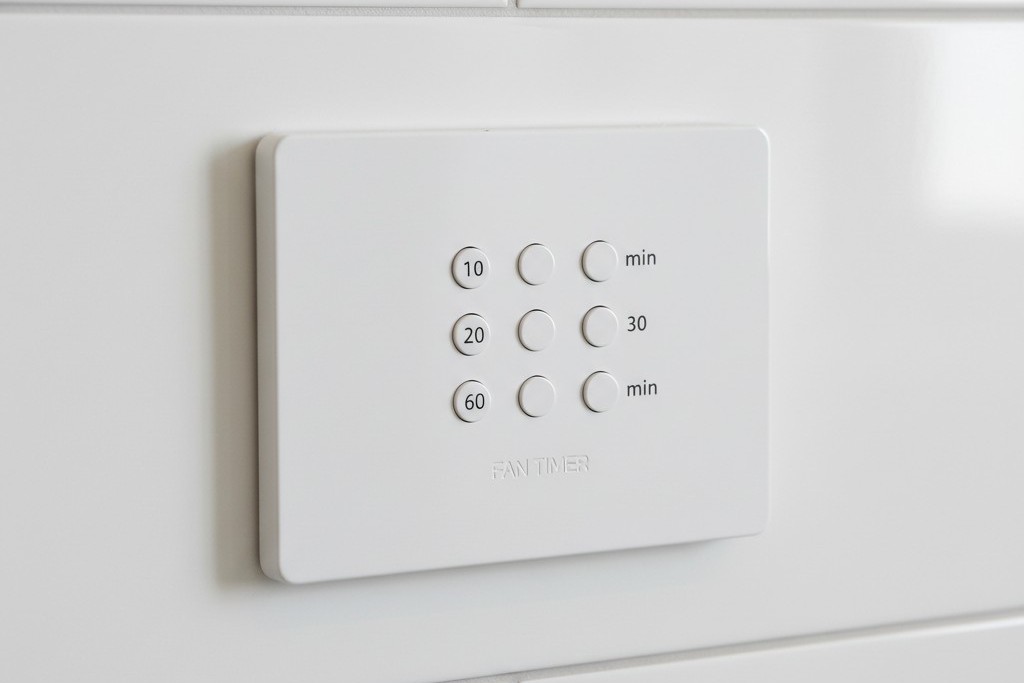
Ideally, you put the vanity light on a Rayzeek motion sensor set to Vacancy モード (Manual ON) with a short timeout (5 minutes). This ensures lights are never left on but gives you manual control. Then, you put the exhaust fan on a separate countdown timer switch—one of those with the buttons for 10, 20, 30, or 60 minutes.
This is the “Guest-Proof” standard. The guest hits the light (Manual ON). They shower. They hit the “30 Min” button on the fan timer as they leave. The light turns itself off after 5 minutes of no motion. The fan runs for the full 30 minutes to purge the moisture, then cuts out. No mold, no wasted electricity, no 3 AM noise.
Why Not Just Use a Humidity Sensor?
You might ask why we don’t just use a humidity-sensing switch for the fan. In theory, they are perfect: they detect steam and turn on.
In practice, they are often frustrating. In humid climates, a humidity sensor can trigger on a muggy July day just because the window is open, pulling out your expensive air conditioning. Conversely, in winter, they might not trigger fast enough before condensation has already formed on the walls. A motion sensor (triggering the event) plus a guaranteed timer (sustaining the event) is a deterministic logic. It doesn’t guess if it’s humid; it knows you were there, and it knows the code requires air exchange.
The Guest-Proof Standard
The goal of any bathroom automation is that it should work for your grandmother without explanation. If she has to wave her arms to keep the lights on, the design failed. If she has to read a manual to turn on the fan, the design failed.
By using a high-quality Rayzeek sensor for the lighting load—specifically configured for Manual-ON and a generous timeout—and separating the ventilation logic where possible, you move from a “smart home” gadget to actual building infrastructure. The bathroom stays dry, the energy bill stays down, and nobody gets blinded at midnight.







