

There is a specific, quiet desperation found only in the back rows of a university law library at 11:00 PM. A student, deep in the study of torts, sits on the floor between two towering rows of metal shelves. They haven’t moved their legs in ten minutes. They turn a page, and suddenly, the aisle plunges into absolute darkness. To the observer, what follows is a ritual of frustration: the student sighs, stands up, and waves their arms frantically at the ceiling like a castaway signaling a plane. The lights flicker back on. Five minutes later, the cycle repeats.
This isn’t a ghost story—it’s a failure of geometry. Facility managers often inherit these “haunted” stacks, receiving ticket after ticket about lights that die on readers or, conversely, strobe like a disco whenever someone walks down the main corridor. The instinct is to blame the sensor brand or the sensitivity dial, but the root cause is almost always the physical shape of the room. A library stack isn’t an office; physically, it is a canyon. If you treat it like an open-plan workspace, you guarantee failure.
The Canyon Effect
Standard “energy-saving” motion sensors fail here because the room fights the hardware. In a typical office, a ceiling-mounted 360-degree Passive Infrared (PIR) sensor—that ubiquitous white dome—looks out in a cone shape. It relies on a clear line of sight to detect the heat differential of a moving body. In an open room, this works perfectly.
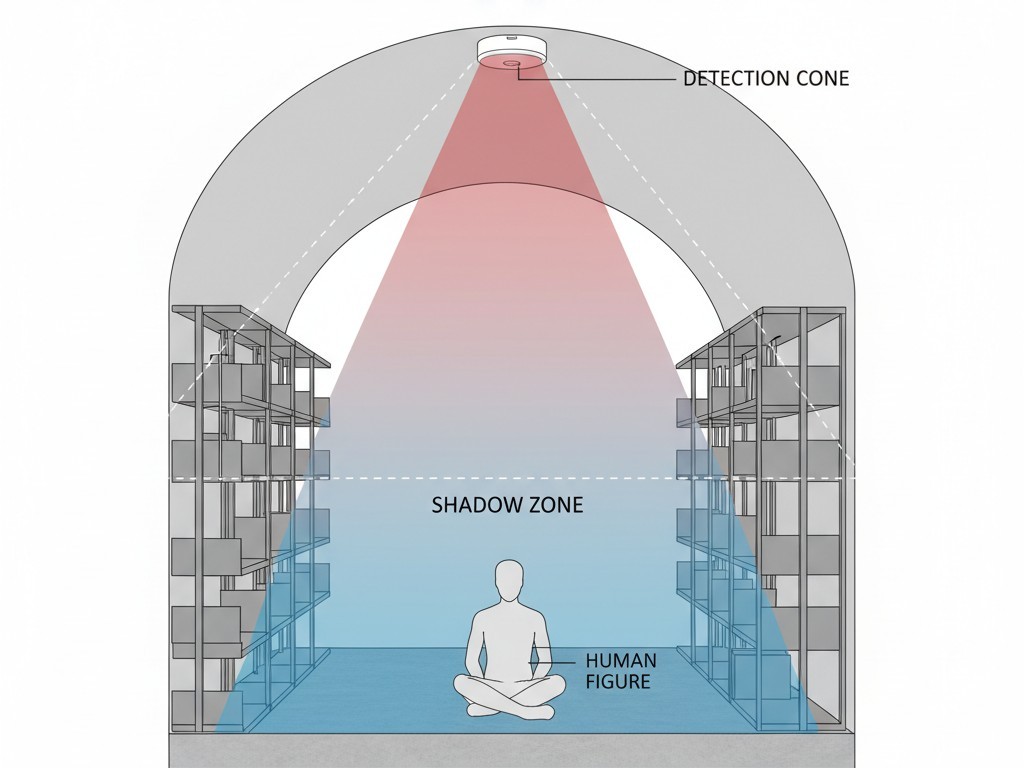
Drop that same sensor into a library stack, however, and the physics change. You are placing the sensor at the top of a narrow vertical channel, often only 36 inches wide and lined with steel shelves that rise nearly to the ceiling. The top shelf effectively blinds the sensor, creating a massive “shadow zone” near the floor. If a researcher is sitting on a stool or the floor—common behavior in archives—they become invisible the moment they stop walking. The sensor sees the tops of the books, not the heat of the human.
There is a modern temptation to solve this with fixture-integrated sensors—those little nubs built directly into every LED strip. On paper, it looks granular and efficient. In practice, especially in high-density storage or mobile shelving (compactus) units, these sensors look straight down. They lack the peripheral “throw” to see someone entering the aisle from the far end. You end up with a system where the user has to walk ten feet into the dark before the light wakes up. For an archivist carrying a box of uncatalogued manuscripts, walking into darkness is a safety hazard, not an energy strategy.
The Art of the Cut-Off

The fix isn’t more sensitivity. It’s better restriction. The most common error in stack lighting is the “Runway Effect,” which happens when sensors are placed at the ends of aisles without proper masking. A guard walks down the main perpendicular corridor for a security check, and as they pass each aisle, the sensor inside detects their motion. The result is a cascading wave of illumination—forty rows lighting up in sequence, timing out, then lighting up again on the return trip. It might look impressive, but it is aggressive, wasteful, and visually exhausting for anyone working in the adjacent rows.
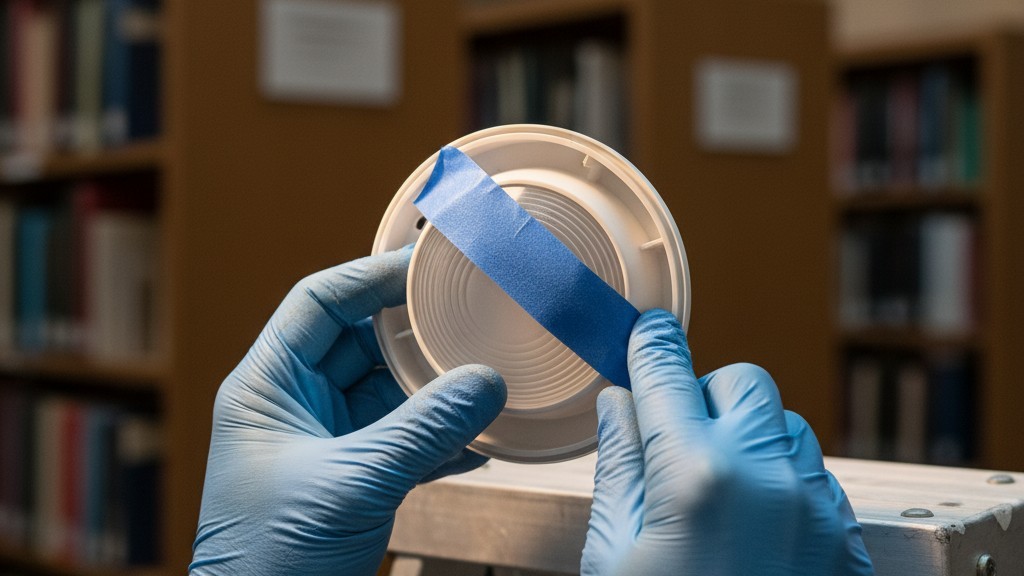
You must mask the lens. This is a hardware reality that software apps cannot fix. Whether you use a dedicated aisle sensor (like the Wattstopper CX-100 series with an aisle lens) or a standard unit, you have to physically restrict the field of view. This often involves snapping in plastic “blinders” or, in a pinch, applying layers of blue painter’s tape to the inside of the lens cover during testing. You are trying to create a hard “cut-off” line exactly at the edge of the shelving unit.
The goal is a detection pattern that acts like a curtain, not a cone. The sensor should see strictly down the center of the aisle and nowhere else. If you stand one inch outside the aisle in the main corridor, the lights should stay off. Take one step in, and they should fire. Achieving this requires a ladder, a roll of tape, and patience, but it is the only way to stop the phantom triggering.
人感センサーを活用した省エネソリューションをお探しですか?
PIR人感センサー、人感センサー搭載省エネ製品、人感センサースイッチ、商業施設向けOccupancy/Vacancy(在室/不在)ソリューションについては、お気軽にお問い合わせください。
Incidentally, this visual discipline solves a secondary, often ignored complaint: the auditory distraction. In older retrofits using mechanical relays, every trigger event comes with a loud “clack” from the ceiling. If the sensors are unmasked and triggering constantly from cross-traffic, the library sounds like a room full of typewriters. Masking the lens creates visual silence, which in turn creates auditory silence.
The Ultrasonic Liability
When PIR sensors fail to pick up a student turning a page, standard advice says to switch to “Dual Technology.” These sensors combine PIR (heat detection) with Ultrasonic (sound wave reflection). The logic is sound: Ultrasonic is incredibly sensitive to minor motion. It can detect a hand moving on a keyboard or a page turning even if the body is still.
But in an archive or basement stack, Ultrasonic is a liability. These spaces are often conditioned by massive, aging HVAC systems with ductwork running directly over the stacks. When the air handler kicks on, the ducts vibrate. Loose papers on a shelf might flutter. An Ultrasonic sensor left at factory settings interprets this vibration as human occupancy.
I have seen county record basements where the lights burned 24/7 for five years because the sensors were “listening” to the air conditioning. If you must use Dual Tech to catch the quiet readers, treat the Ultrasonic sensitivity like a loaded weapon. Dial it down to the absolute minimum—20% or less. It should only be used to maintain the lights once the PIR has initially triggered them, never to turn them on. If you are in a space with rattling pipes or heavy vibration, abandon Ultrasonic entirely and rely on PIR with a longer time-out delay.
こちらの商品もおすすめです

- 電圧: 単4形乾電池 2本
- 昼/夜モード
- タイマー設定時間: 15分、30分、1時間(デフォルト)、2時間

- 無電圧接点リレー出力付き天井取り付け型PIR人感センサー
- 12/24VDCまたは12/24VAC低電圧電源
- EMS、HVAC、および建物制御入力用COM、NO、NC絶縁リレー接点

- 低電圧DC天井埋め込み型マイクロ波人感センサースイッチ
- 10~30 VDC範囲の12 VDC / 24 VDC入力
- 調整可能なタイムラグ、照度(Lux)閾値、感度を備えた最大動作電流10A仕様
- 高負荷対応型 埋込型天井取付けマイクロ波人感センサースイッチ
- 100-265 VAC 商用電源入力、10Aモデル
- 調整可能なタイムラグ、照度(Lux)閾値、感度を備えた5.8 GHzマイクロ波検知
- 埋込型天井取付けマイクロ波人感センサースイッチ
- 100-265 VAC商用電圧入力、5Aモデル
- 調整可能なタイムラグ、照度(Lux)閾値、感度を備えた5.8 GHzマイクロ波検知
- 220V電源対応 天井取付けRZ037 PIR(赤外線)人感センサー調光器
- 定格負荷660W、最大動作電流3A
- LUXボタンによる照度センサーのON/OFFおよびユーザー設定の調光明るさ制御
- 110V電源対応 天井取付けRZ037 PIR(赤外線)人感センサー調光器
- 定格負荷330W、最大動作電流3A
- LUXボタンによる照度センサーのON/OFFおよびユーザー設定の調光明るさ制御

- 低電圧DC対応 天井取付けマイクロ波人感センサースイッチ
- 10~30 VDC範囲の12 VDC / 24 VDC入力
- 調整可能なタイムラグ、照度(Lux)閾値、感度を備えた最大動作電流10A仕様
- 高負荷対応 天井取付型マイクロ波人感センサースイッチ
- 100-265 VAC 商用電源入力、10Aモデル
- 調整可能なタイムラグ、照度(Lux)閾値、感度を備えた5.8 GHzマイクロ波検知
- 天井取り付け型マイクロ波人感センサースイッチ
- 100-265 VAC商用電圧入力、5Aモデル
- 調整可能なタイムラグ、照度(Lux)閾値、感度を備えた5.8 GHzマイクロ波検知

- 低電圧DC埋込型天井PIR人感センサースイッチ
- 10~30 VDC範囲の12 VDC / 24 VDC入力
- 最大動作電流10A(調整可能なタイムラグ、照度閾値、感度設定付き)

- 高負荷対応 埋込型天井PIR人感センサースイッチ
- 100-265 VAC 商用電源入力、10Aモデル
- 360度検知(調整可能なタイムラグ、照度閾値、感度設定付き)
- 埋込型天井PIR人感センサースイッチ
- 100-265 VAC商用電圧入力、5Aモデル
- 360度検知(調整可能なタイムラグ、照度閾値、感度設定付き)

- 屋内用照明ON/OFF制御ワイヤレススイッチ&受信機キット
- 100-230VAC、50/60Hz、定格電流5A受信機
- 2.4GHz通信対応 CR2032電池駆動ワイヤレススイッチ
- Occupancy(自動点灯/自動消灯)
- 12–24V DC (10–30VDC)、最大10A
- 360°検知エリア、直径8–12m
- タイムラグ 15秒–30分
- 照度センサー オフ/15/25/35 Lux
- 高/低感度
- 自動点灯/自動消灯人感モード
- 100–265V AC, 10A(中性線必須)
- 360°検知範囲、検知直径8–12 m
- タイムデレイ15秒–30分、Lux OFF/15/25/35、感度 高/低
- 自動点灯/自動消灯人感モード
- 100–265V AC, 5A(中性線必須)
- 360°検知範囲、検知直径8–12 m
- タイムデレイ15秒–30分、Lux OFF/15/25/35、感度 高/低
Preservation and the Dark Aisle
We fight for this precision for reasons beyond the electric bill. In an archive holding sensitive materials, light is damage. Every minute a rare manuscript is illuminated unnecessarily is a minute of cumulative UV and spectral exposure.
Archivists understand this better than electricians. When a “runway effect” triggers forty rows of lights because one person walked to the bathroom, that isn’t just wasted kilowatts; it is unnecessary aging of the collection. A properly tuned system should leave 90% of the stack in darkness 90% of the time. The darkness is a feature—a preservation layer.
This feeds into “visual silence.” On a large research floor, having lights pop on and off in your peripheral vision is fatiguing. It triggers the “orienting reflex”—your brain involuntarily shifts focus to the motion. By masking sensors to ensure they only trigger when someone intentionally enters a row, you protect the concentration of readers in the neighboring aisles.
Rayzeek人感センサーのポートフォリオを見る.
お探しの製品が見つかりませんか?ご安心ください。課題を解決する手段は常に複数存在します。当社の製品ポートフォリオのいずれかがお役に立つかもしれません。
Commissioning: The Tape and The Book

You can’t program these systems from a laptop in the site trailer. You have to walk the stack. The only validation that matters is the “Sitter Test.”
Take a book. Go to the most obscured corner of the worst aisle—usually the one furthest from the sensor or blocked by a structural column. Sit down on the floor. Read. Do not wave your arms. If the lights go out in under fifteen minutes while you are turning pages, the coverage is insufficient.
You may need to move the sensor off-center to peek around a column. You may need to verify that the wireless signal can actually punch through fifty rows of steel shelving (which acts as a massive Faraday cage, blocking RF signals). But mostly, you will find yourself on a ladder, adjusting a small piece of plastic shielding, trying to align the invisible geometry of the sensor with the physical reality of the shelf. It is tedious work, but it distinguishes a “smart” building from a functional one.







