

The smell of burning flux is distinct—acrid, piney, and usually the first warning that something has gone wrong in the shop. By the time you catch that scent from the top of the stairs, the damage is done. Walk into enough community maker spaces on a Monday morning and you’ll find the evidence: a Hakko station left on for 48 hours, its tip oxidized into a useless black crust, resting dangerously close to a spool of lead-free solder that has slumped into a metallic puddle. In the worst cases, you find the charred outline of the iron burned a quarter-inch deep into a maple butcher block. The building is still standing, but trust in the shop’s safety culture has been incinerated.

Competence isn’t the issue here. Biology is. The human brain makes for a terrible safety device; it’s prone to distraction, fatigue, and the sudden interruption of a ringing phone or a crying child. We convince ourselves we’ll “just be a minute,” or that our routine never fails. But relying on memory to manage an 850°F heating element is a gamble physics will eventually win. You can’t train yourself to be perfect, so you have to build a bench that assumes you aren’t. You need a dead-man switch—a system that defaults to safety when you walk away. In the modern home workshop, the most reliable version of that isn’t a smart home routine. It’s a dumb, hard-wired motion sensor.
The False Promise of “Smart” Safety
There is a temptation, especially if you enjoy tinkering with electronics, to solve this with code. The logic seems sound: plug the soldering iron into a Wi-Fi smart plug, connect it to Home Assistant or Alexa, and write an automation that kills the power at midnight. Or maybe trigger it based on your phone’s GPS location.
Rayzeek人感センサーのポートフォリオを見る.
お探しの製品が見つかりませんか?ご安心ください。課題を解決する手段は常に複数存在します。当社の製品ポートフォリオのいずれかがお役に立つかもしれません。
Don’t do this. It’s a trap. Industrial controls rank software as “soft” for a reason. It is malleable, error-prone, and dependent on infrastructure that has no business being in a safety loop.
Consider the failure modes. A consumer-grade smart plug—let’s say a generic Tuya-based unit—relies on a cloud server to receive commands. If your internet connection drops, or the vendor’s server has an outage (as happened globally in 2021), your “safety” command never arrives. Worse, many of these cheap plugs have cheap relays. When they receive an Over-The-Air (OTA) firmware update at 3:00 AM, they often reboot. Depending on how the manufacturer configured the relay’s default state—Normally Open or Normally Closed—that plug might reboot into the “ON” state. You could wake up to a soldering iron that turned itself on while you slept, all because a server in another country pushed a patch.
If a lamp glitches, it’s an annoyance. If a resistive heating load glitches, it’s a fire hazard. There is a reason NFPA 79 and other industrial codes require emergency stops and critical safety interlocks to be hard-wired. We do not trust an IP address to prevent thermal runaway. We trust copper, contacts, and gravity.
The Physics of Presence
The superior alternative is the occupancy sensor. Specifically, the Passive Infrared (PIR) sensor. Unlike a camera that “sees” you, or a smart assistant that listens for you, a PIR sensor looks for the heat signature of your body moving against the room’s background temperature.
It’s a primitive, robust mechanism. A Fresnel lens on the switch face focuses infrared light onto a pyroelectric sensor element. When you move, you create a ripple in that infrared field. The sensor detects the change, closes a mechanical relay, and power flows to the outlet. When you stop moving, a simple timer starts counting down. When it hits zero, the relay clicks open. Power cut.
This mechanism is entirely local. It doesn’t know your Wi-Fi password. It doesn’t care if the internet is down. It is a “dumb” device, and in this context, dumb is a feature. However, it isn’t magic, and understanding its limitations is key to not hating it. PIR sensors detect motion across zones, not mere presence. If you sit perfectly still, holding a pair of tweezers under a microscope while placing an 0402 resistor, you become invisible to the sensor.
こちらの商品もおすすめです

- 電圧: 単4形乾電池 2本
- 昼/夜モード
- タイマー設定時間: 15分、30分、1時間(デフォルト)、2時間

- 無電圧接点リレー出力付き天井取り付け型PIR人感センサー
- 12/24VDCまたは12/24VAC低電圧電源
- EMS、HVAC、および建物制御入力用COM、NO、NC絶縁リレー接点

- 低電圧DC天井埋め込み型マイクロ波人感センサースイッチ
- 10~30 VDC範囲の12 VDC / 24 VDC入力
- 調整可能なタイムラグ、照度(Lux)閾値、感度を備えた最大動作電流10A仕様
- 高負荷対応型 埋込型天井取付けマイクロ波人感センサースイッチ
- 100-265 VAC 商用電源入力、10Aモデル
- 調整可能なタイムラグ、照度(Lux)閾値、感度を備えた5.8 GHzマイクロ波検知
- 埋込型天井取付けマイクロ波人感センサースイッチ
- 100-265 VAC商用電圧入力、5Aモデル
- 調整可能なタイムラグ、照度(Lux)閾値、感度を備えた5.8 GHzマイクロ波検知
- 220V電源対応 天井取付けRZ037 PIR(赤外線)人感センサー調光器
- 定格負荷660W、最大動作電流3A
- LUXボタンによる照度センサーのON/OFFおよびユーザー設定の調光明るさ制御
- 110V電源対応 天井取付けRZ037 PIR(赤外線)人感センサー調光器
- 定格負荷330W、最大動作電流3A
- LUXボタンによる照度センサーのON/OFFおよびユーザー設定の調光明るさ制御

- 低電圧DC対応 天井取付けマイクロ波人感センサースイッチ
- 10~30 VDC範囲の12 VDC / 24 VDC入力
- 調整可能なタイムラグ、照度(Lux)閾値、感度を備えた最大動作電流10A仕様
- 高負荷対応 天井取付型マイクロ波人感センサースイッチ
- 100-265 VAC 商用電源入力、10Aモデル
- 調整可能なタイムラグ、照度(Lux)閾値、感度を備えた5.8 GHzマイクロ波検知
- 天井取り付け型マイクロ波人感センサースイッチ
- 100-265 VAC商用電圧入力、5Aモデル
- 調整可能なタイムラグ、照度(Lux)閾値、感度を備えた5.8 GHzマイクロ波検知

- 低電圧DC埋込型天井PIR人感センサースイッチ
- 10~30 VDC範囲の12 VDC / 24 VDC入力
- 最大動作電流10A(調整可能なタイムラグ、照度閾値、感度設定付き)

- 高負荷対応 埋込型天井PIR人感センサースイッチ
- 100-265 VAC 商用電源入力、10Aモデル
- 360度検知(調整可能なタイムラグ、照度閾値、感度設定付き)
- 埋込型天井PIR人感センサースイッチ
- 100-265 VAC商用電圧入力、5Aモデル
- 360度検知(調整可能なタイムラグ、照度閾値、感度設定付き)

- 屋内用照明ON/OFF制御ワイヤレススイッチ&受信機キット
- 100-230VAC、50/60Hz、定格電流5A受信機
- 2.4GHz通信対応 CR2032電池駆動ワイヤレススイッチ
- Occupancy(自動点灯/自動消灯)
- 12–24V DC (10–30VDC)、最大10A
- 360°検知エリア、直径8–12m
- タイムラグ 15秒–30分
- 照度センサー オフ/15/25/35 Lux
- 高/低感度
- 自動点灯/自動消灯人感モード
- 100–265V AC, 10A(中性線必須)
- 360°検知範囲、検知直径8–12 m
- タイムデレイ15秒–30分、Lux OFF/15/25/35、感度 高/低
- 自動点灯/自動消灯人感モード
- 100–265V AC, 5A(中性線必須)
- 360°検知範囲、検知直径8–12 m
- タイムデレイ15秒–30分、Lux OFF/15/25/35、感度 高/低
This leads to the “waving arm dance,” a common frustration where the lights (or your iron) turn off while you’re concentrating. This isn’t a failure of the sensor; it’s a failure of configuration. Most occupancy sensors ship with a default timeout of 5 minutes. For a hallway, that’s fine. For a workbench, it is aggressive to the point of negligence. We aren’t trying to save electricity here; we’re trying to prevent a fire if you leave the room for an hour. The sensor is there to detect when you have abandoned the bench, not when you are pausing to think.
Building the Backstop
For the home shop, there are two ways to implement this: the “Pro” retrofit and the “Renter” adapter.
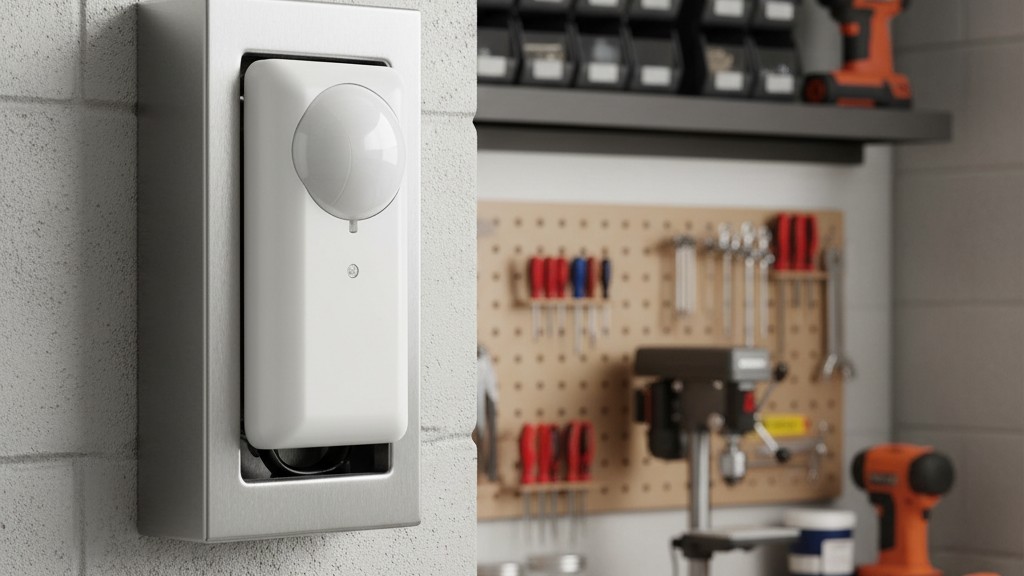
The gold standard—visible in any well-built industrial lab—is wiring a commercial-grade sensor switch into a metal electrical box mounted at chest height above the bench. This isn’t an NEC code tutorial; if you aren’t comfortable with 120V mains wiring, hire a sparky or use the plug-in method. But for those who know what they’re doing, a device like the Lutron Maestro (specifically the MS-OPS2 or similar 5-amp models) is ideal. You mount this in a deep 4-square metal box, wired to control a receptacle downstream.
The beauty of the hard-wired switch is the “click.” These units typically use a mechanical relay (or a robust triac with a distinct switching sound). When the timer expires, you hear it. It provides auditory feedback that your equipment has been de-energized. You can walk out of the garage, turn off the lights, and if you forgot the iron, you will hear the clack of the relay ten, twenty, or thirty minutes later. It is the sound of a system working as designed.
For those who cannot rewire their walls, or who want a portable solution, plug-in motion adapters exist. Brands like Westek or MLC offer units that look like a bulky wall wart with a sensor eye on top. You plug the adapter into the wall, and your power strip into the adapter. The logic is the same, though the components are often cheaper. If you go this route, verify the load rating. A soldering iron draws relatively little power (usually 50W to 100W), well within the limits of these adapters. Do not, however, plug a 1500W heat gun or a space heater into a cheap plastic motion adapter. That is trading one fire hazard for another.
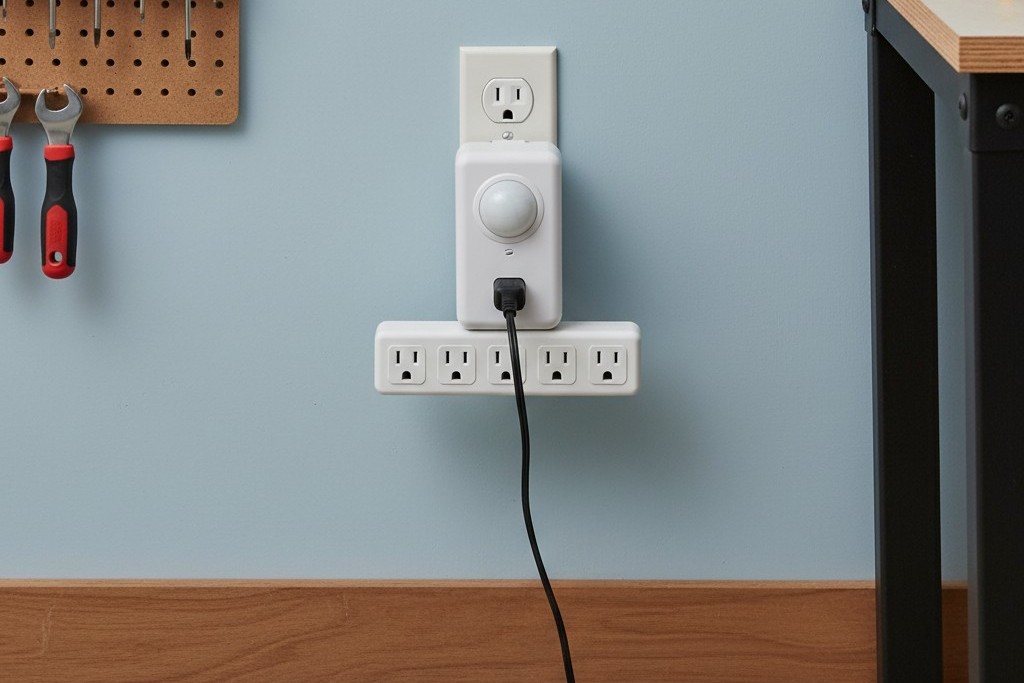
The critical step for either method is the timeout setting. You must take the faceplate off the switch or adjust the dials on the adapter to the maximum setting—usually 30 minutes. This is the “anti-frustration” buffer. If you sit still for 29 minutes, you are probably asleep or dead. If you are working, you will likely reach for solder, adjust your chair, or move your head enough to reset the timer within that window.
人感センサーを活用した省エネソリューションをお探しですか?
PIR人感センサー、人感センサー搭載省エネ製品、人感センサースイッチ、商業施設向けOccupancy/Vacancy(在室/不在)ソリューションについては、お気軽にお問い合わせください。
When to Bypass
There are edge cases where this “dead-man” logic fails, and recognizing them is critical before you ruin a project. The most common demand signal comes from the 3D printing crowd. People often ask if they can put their Ender 3 or Prusa on the same motion-controlled circuit.
The answer is a hard no.
A 3D printer needs to run for hours, often unsupervised, and more importantly, it needs a cool-down cycle. If a motion sensor cuts power to a printer while the hotend is at 200°C, the cooling fan stops immediately. Heat creeps up the filament path, melting the plastic in the heat break and causing a jam that requires a complete teardown to fix. Worse, it can damage the PTFE lining. Smart plugs (with the caveats mentioned earlier) are actually better for printers because they can be triggered by the print completion status. But for the soldering iron, the hot glue gun, and the branding iron? The motion sensor is king.
Ultimately, this is about acknowledging that you are the weak link. You will get tired. You will get distracted. You will eventually leave the shop with the iron on. When that happens, you don’t want to rely on your memory of a checklist. You want to rely on a passive infrared sensor that doesn’t know your name, doesn’t care about your project, and ruthlessly cuts the power when you aren’t there to tend the fire.







