
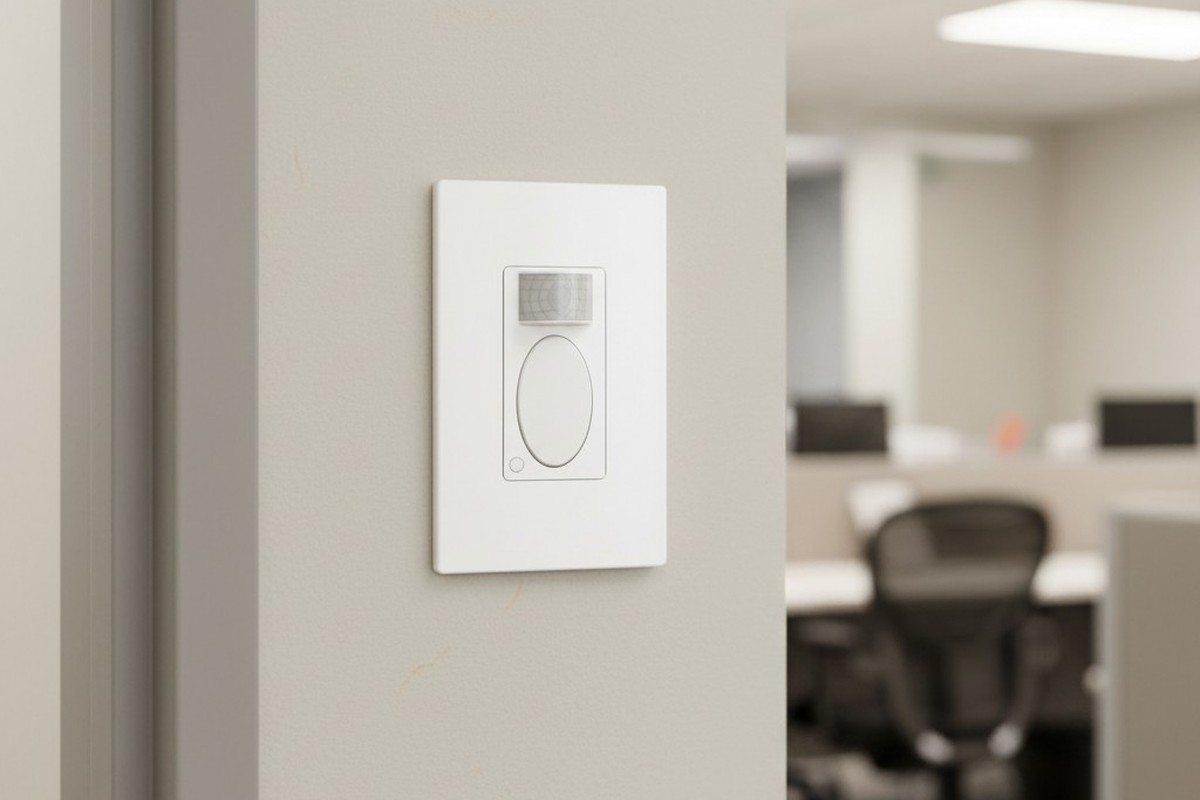
Walk past the copy alcove of any mid-sized office building around 2:00 PM, and you’ll likely witness a peculiar ritual. A staff member, standing perfectly still while the large Canon ImageRunner collates a hundred-page brief, is suddenly plunged into darkness. What follows is the “Waving Man” dance: a frantic flapping of arms above the head to convince the room that a human being is still present. It is a scene of low-stakes humiliation that plays out in law firms, medical billing centers, and university admin blocks every single day.
The frustration isn’t just the darkness; it’s that the machine fails to recognize the work being done. The staff member hasn’t left—they’ve simply stopped moving laterally. In facility management, this is a failure of configuration, not hardware. The sensor installed on the wall (likely a standard Rayzeek RZ021 or similar PIR unit) is doing exactly what the factory told it to do. The problem is that the factory assumes you are walking down a hallway, not reading a document while a machine hums beside you.
Why The Sensor Thinks You Are Gone
To fix the problem, you first have to understand what that little plastic lens is actually looking for. Passive Infrared sensors do not “see” people in the way a camera does. They detect rapid changes in heat signatures moving across invisible zones. The white plastic cover on the front of the switch is a Fresnel lens, which breaks the room’s view into fan-shaped segments. When a warm object (you) crosses the line between one segment and another, the sensor trips the relay and keeps the lights on.
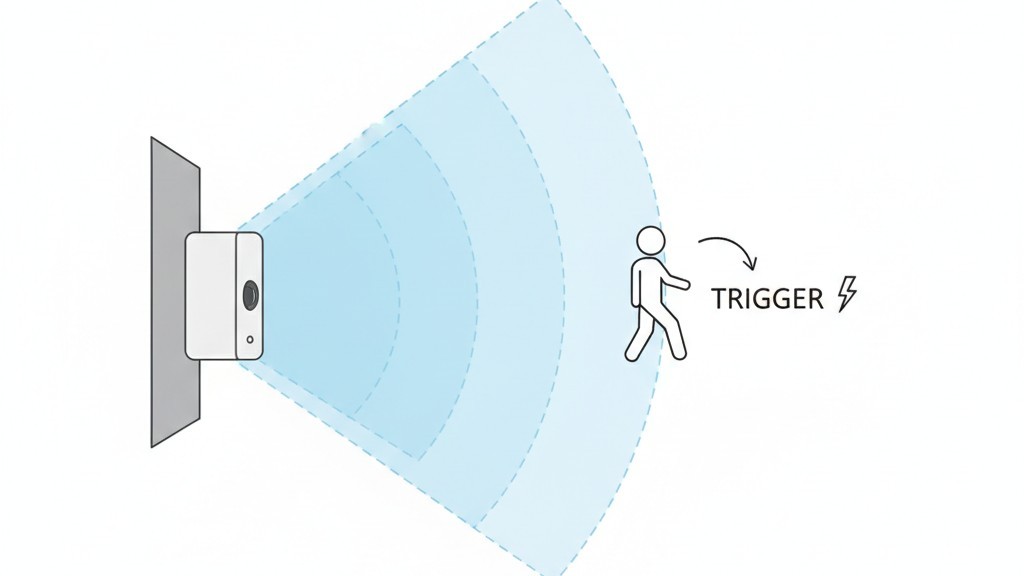
This physics creates a massive blindspot for stationary tasks. When someone stands at a copier, a shredder, or a coffee station, they usually move their hands within a very small radius. They aren’t walking across the room. To the sensor, which scans for gross motor movement across its lens segments, a person standing still to read a collated report is indistinguishable from an empty room.
This issue gets worse if the sensor is installed near an HVAC supply vent. If the heat kicks on and blows warm air across the sensor’s field of view, it can create false triggers—ghosts in the machine. This usually leads installers to dial down the sensitivity to compensate. That lowered sensitivity is exactly what leaves the admin assistant in the dark.
The Hardware Reality: It’s Not Broken, It’s Just Untuned
The default reaction from most office managers is to assume the switch is broken or “cheap.” They might even go online to look for a “better” brand, assuming a more expensive Lutron or Wattstopper unit will magically know they are reading a paper. But the Rayzeek RZ021 units commonly found in these retrofits are perfectly capable of handling a copy room if they are parented correctly. The issue is almost always that the device is still running on its factory default settings, which are optimized for a showroom demo, not real life.
Fixing this does not require an app, a hub, or a Wi-Fi connection. It requires a 2mm flathead screwdriver—often called a jeweler’s driver—and the willingness to pop a faceplate. Underneath the sleek exterior of the RZ021, hidden beneath the plastic toggle button, is a control panel of tiny trimpots (trimmer potentiometers). These are physical dials that change the resistance in the circuit. There is no software here to glitch out; there is only a mechanical setting that needs to be physically turned.
A note on the model variants: Before you start prying at the wall, ensure you aren’t fighting a “Vacancy” sensor. The industry distinguishes between Occupancy sensors (Auto-ON/Auto-OFF) and Vacancy sensors (Manual-ON/Auto-OFF). If you have to press the button to turn the lights on when you enter, but they turn off automatically, you have a Vacancy model (often denoted with a ‘VS’ in the model number). No amount of dial turning will make that switch turn on automatically when you walk in. That is a hardware choice.
קבלו השראה מפורטפוליו חיישני התנועה של Rayzeek.
לא מוצאים את מה שאתם מחפשים? אל דאגה. תמיד יש דרכים חלופיות לפתור את הבעיות שלכם. אולי אחד הפורטפוליוים שלנו יכול לעזור.
Configuration: The Mandatory “Max” Setting
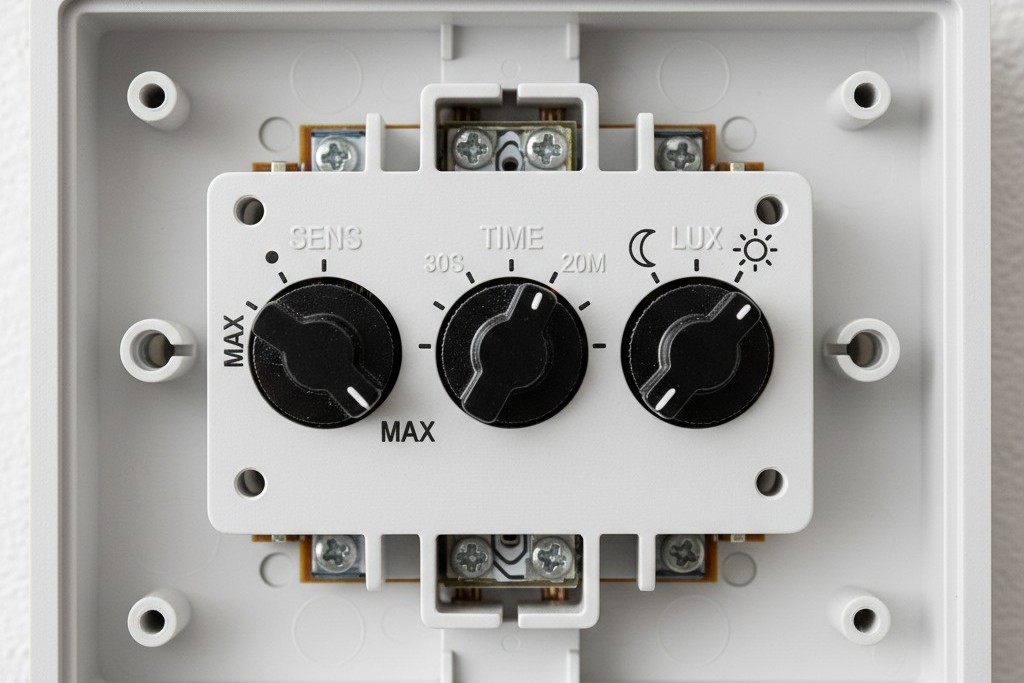
The actual fix is tactile. After removing the wall plate (carefully, as the plastic tabs on generic plates snap if you look at them wrong), you will see three small dials typically labeled Time, Light (or Lux), and Sens (Sensitivity). The factory usually ships these centered or set to “Test” mode. For a copy room, a break room, or any space where people linger, the “Sens” dial is the most critical.
You must turn the Sensitivity dial to its absolute maximum. On the Rayzeek units, this is usually fully clockwise. Do not worry about “false positives” from the hallway; in a small enclosed room, you need the sensor to detect the minor hand movements of someone stapling a document. If the dial is set to medium, it requires a full body walk to trigger. At maximum, it has a fighting chance of seeing a hand wave or a shift in weight.
The second adjustment is the Time Delay. The factory default is often 5 minutes, or sometimes even 15 seconds for test mode. This is the “Energy Star” setting, designed to look good on a spec sheet. In the real world, 5 minutes is aggressive to the point of hostility. A large print job on a Xerox AltaLink can take 12 minutes to spool and finish. If the user stands there reading their phone while it prints, the lights will die twice during the job. The dial is analog, so there is no digital readout, but you want to aim the arrow for the 20-minute mark (usually about 75% of the rotation). If the dial feels imprecise, err on the side of longer.
אולי יעניין אותך גם

- מתח: 2 סוללות AAA
- מצב יום/לילה
- השהיית זמן: 15 דקות, 30 דקות, שעה אחת (ברירת מחדל), שעתיים

- חיישן נוכחות PIR להתקנה על התקרה עם יציאת ממסר מגע יבש
- אספקת מתח נמוך 12/24VDC או 12/24VAC
- מגעי ממסר מבודדים COM, NO ו-NC עבור היזונים של EMS, HVAC ובקרת מבנים

- מתג חיישן תנועה מיקרוגל שקוע לתקרה במתח נמוך DC
- כניסת 12 VDC / 24 VDC עם טווח של 10-30 VDC
- זרם עבודה מרבי של 10A עם השהיית זמן, סף Lux ורגישות מתכווננים
- מתג חיישן תנועה מיקרוגל שקוע לתקרה לעומסים גבוהים יותר
- כניסת מתח רשת 100-265 VAC, דגם 10A
- חיישן מיקרוגל 5.8GHz עם השהיית זמן מתכווננת, סף Lux ורגישות
- מתג חיישן תנועה מיקרוגל שקוע להתקנה בתקרה
- כניסת מתח רשת 100-265VAC, דגם 5A
- חיישן מיקרוגל 5.8GHz עם השהיית זמן מתכווננת, סף Lux ורגישות
- עמעם חיישן נוכחות PIR להתקנה בתקרה RZ037 למתח של 220V
- זרם עבודה מרבי של 3A עם עומס נקוב של 660W
- לחצן LUX שולט על הפעלה/כיבוי של חיישן האור ועל בהירות העמעום שנקבעה על ידי המשתמש
- עמעם חיישן נוכחות PIR להתקנה בתקרה RZ037 למתח של 110V
- זרם עבודה מרבי של 3A עם עומס נקוב של 330W
- לחצן LUX שולט על הפעלה/כיבוי של חיישן האור ועל בהירות העמעום שנקבעה על ידי המשתמש

- מתג חיישן תנועה מיקרוגל להתקנה בתקרה במתח נמוך DC
- כניסת 12 VDC / 24 VDC עם טווח של 10-30 VDC
- זרם עבודה מרבי של 10A עם השהיית זמן, סף Lux ורגישות מתכווננים
- מתג חיישן תנועה מיקרוגל להתקנה בתקרה לעומס גבוה יותר
- כניסת מתח רשת 100-265 VAC, דגם 10A
- חיישן מיקרוגל 5.8GHz עם השהיית זמן מתכווננת, סף Lux ורגישות
- מתג חיישן תנועה מיקרוגל להתקנה בתקרה
- כניסת מתח רשת 100-265VAC, דגם 5A
- חיישן מיקרוגל 5.8GHz עם השהיית זמן מתכווננת, סף Lux ורגישות

- מתג חיישן תנועה PIR שקוע לתקרה במתח נמוך DC
- כניסת 12 VDC / 24 VDC עם טווח של 10-30 VDC
- זרם עבודה מרבי של 10A עם השהיית זמן מתכווננת, סף תאורה (Lux) ורגישות מתכווננים

- מתג חיישן תנועה PIR שקוע לתקרה לעומס גבוה יותר
- כניסת מתח רשת 100-265 VAC, דגם 10A
- גילוי ב-360 מעלות עם השהיית זמן מתכווננת, סף תאורה (Lux) ורגישות מתכווננים
- מתג חיישן תנועה PIR שקוע לתקרה
- כניסת מתח רשת 100-265VAC, דגם 5A
- גילוי ב-360 מעלות עם השהיית זמן מתכווננת, סף תאורה (Lux) ורגישות מתכווננים

- ערכת מתג ומקלט אלחוטיים לבקרת תאורה הפעלה/כיבוי (ON/OFF) למבנים סגורים
- מקלט 100-230VAC, 50/60Hz עם זרם נקוב של 5A
- מתג אלחוטי מוזן סוללת CR2032 עם תקשורת בתדר 2.4GHz
- זיהוי נוכחות (הפעלה אוטומטית/כיבוי אוטומטי)
- 12–24V DC (10–30VDC), עד 10A
- כיסוי של 360°, קוטר של 8–12 מטר
- השהיית זמן 15 שניות–30 דקות
- חיישן תאורה כבוי/15/25/35 Lux
- רגישות גבוהה/נמוכה
- מצב נוכחות עם הפעלה אוטומטית/כיבוי אוטומטי
- 100–265V AC, 10A (נדרש מוליך אפס)
- כיסוי של 360°; קוטר גילוי של 8–12 מטרים
- השהיית זמן של 15 שניות–30 דקות; Lux OFF/15/25/35; רגישות גבוהה/נמוכה
- מצב נוכחות עם הפעלה אוטומטית/כיבוי אוטומטי
- 100–265V AC, 5A (נדרש מוליך אפס)
- כיסוי של 360°; קוטר גילוי של 8–12 מטרים
- השהיית זמן של 15 שניות–30 דקות; Lux OFF/15/25/35; רגישות גבוהה/נמוכה
The False Economy of the 5-Minute Timer
Expect pushback on this. A facilities director or a sustainability-minded owner might argue that setting the timer to 20 minutes “wastes energy.” They envision the lights burning for 15 minutes after someone leaves, spinning the meter and costing a fortune. This is what we call “Phantom Savings.” It is a theoretical efficiency that ignores the operational reality of the building.
Let’s look at the math. A standard copy room might have two or three LED troffers. In the old days of 400-watt metal halide or T12 fluorescents, leaving them on was costly. Today, an LED fixture might pull 40 watts. Extending the timeout from 5 minutes to 20 minutes means the light stays on for an extra 15 minutes per cycle. At $0.12 per kWh, that extra quarter-hour of light costs fractions of a penny.
Compare that fraction of a penny to the cost of a Senior Partner or a specialized technician losing their train of thought because the room went black. The labor cost of the interruption exceeds the annual energy savings of the aggressive timeout in a single instance. We are not trying to heat a warehouse here; we are keeping a 10×10 room lit for a human being. Reliability is the ultimate efficiency. If the staff puts duct tape over the sensor because it annoys them—which happens more often than code inspectors admit—you have saved zero energy. Set the dial to 20 minutes, turn the sensitivity to high, and let the sensor do its job quietly.







