

It’s mid-February, ten degrees below zero, and the wind chill is doing its best to freeze the fluid in your eyeballs. You are standing at the threshold of your garage entry door. In your left hand, you have three reusable bags from Costco, heavy with frozen goods. In your right hand, a gallon of 2% milk and the handle of a terrifyingly heavy laundry detergent jug. You manage to kick the door open, stepping from the freezing garage into the pitch-black mudroom.

This is the critical moment. In a poorly designed home, this is where you perform the “Elbow Dance”—twisting your torso to mash a rocker switch with your tricep, hoping you don’t miss and drop the milk on the tile. Or worse, you stand there in the dark, panting, shouting at a voice assistant that can’t hear you over the hum of the furnace. If you have to speak, touch, or tap an app to turn on a light in a transit zone, the automation has failed.
The mudroom isn’t a place for “mood lighting” or complex scenes. It’s a decontamination chamber and a transit hub. It requires zero-friction illumination. You don’t need a smarter bulb or a cloud-connected hub. You need a dumb, ruthless, hardwired motion sensor switch. Specifically, reliable PIR (Passive Infrared) units like the Rayzeek RZ021 series that don’t care if your internet is down or if your hands are full.
The Latency of the Cloud vs. The Speed of the Relay
There is a pervasive myth in modern home improvement that “Smart Home” means “App Controlled.” You see it in the aisles of big-box stores: Wi-Fi switches, Bluetooth bulbs, and ecosystems that promise you can control your hallway light from a beach in Cabo. But ask yourself: why would you ever want to control your mudroom light from Cabo?
When you rely on a voice assistant—let’s say, shouting at an Echo Dot to “Turn on Mudroom”—you are sending a command from your mouth to a microphone. That audio is digitized, shot to your router, sent through your ISP to an AWS server farm in Virginia, processed for natural language, sent back to a hub in your house, and finally triggers the light. Best case scenario? That takes about 1.5 seconds. When you’re walking briskly with heavy bags, 1.5 seconds is the difference between a lit room and tripping over the runner rug in the dark.
Even worse is the “Breathless Failure.” If you’ve just hauled fifty pounds of groceries up the stairs, you’re breathing heavy. Voice assistants struggle to parse commands through panting. You end up shouting at a plastic puck in the dark, which is the opposite of a futuristic living experience.
A hardwired PIR sensor operates locally. It detects the heat signature of your body moving across its field of view and snaps a mechanical relay shut. The latency is roughly 200 milliseconds. It’s instant. It happens before your brain even registers that you need light. There is no app to load, no firmware to update, and no server to go down during a storm.
The Hardware: Why Rayzeek and Why FOV Matters
Not all motion sensors are built equal. If you walk into a hardware store and grab the cheapest generic sensor, you will likely encounter the “Tunnel Vision” problem. Many older or cheaper units have a narrow Field of View (FOV), sometimes as low as 120 degrees.
您可能也會感興趣

- 電壓:2 粒 AAA 電池
- 日/夜模式
- 延遲時間:15 分鐘、30 分鐘、1 小時(預設)、2 小時

- 吸頂式 PIR 人體感應器,配備乾觸點繼電器輸出
- 12/24VDC 或 12/24VAC 低電壓供電
- 用於 EMS、HVAC 和建築控制輸入的 COM、NO 和 NC 隔離繼電器觸點

- 低壓直流嵌入式天花安裝微波人體感應開關
- 12 VDC / 24 VDC 輸入,支援 10-30 VDC 範圍
- 最大工作電流 10A,配備可調節延時、光感閾值及靈敏度
- 高負載嵌入式天花安裝微波人體感應開關
- 100-265 VAC 市電輸入,10A 型號
- 5.8 GHz 微波感應,配備可調節延時、光感閾值及靈敏度
- 嵌入式天花安裝微波人體感應開關
- 100-265 VAC 市電輸入,5A 型號
- 5.8 GHz 微波感應,配備可調節延時、光感閾值及靈敏度
- 適用於 220V 電源的天花安裝 RZ037 PIR 被動式紅外線佔空感應調光開關
- 最大工作電流 3A,額定負載 660W
- LUX 按鈕控制光線感應器開關及用戶設定之調光亮度
- 適用於 110V 電源的天花安裝 RZ037 PIR 被動式紅外線佔空感應調光開關
- 最大工作電流 3A,額定負載 330W
- LUX 按鈕控制光線感應器開關及用戶設定之調光亮度

- 低壓直流天花安裝微波人體感應開關
- 12 VDC / 24 VDC 輸入,支援 10-30 VDC 範圍
- 最大工作電流 10A,配備可調節延時、光感閾值及靈敏度
- 高負載吸頂式微波動態感應器開關
- 100-265 VAC 市電輸入,10A 型號
- 5.8 GHz 微波感應,配備可調節延時、光感閾值及靈敏度
- 吸頂式微波動態感應器開關
- 100-265 VAC 市電輸入,5A 型號
- 5.8 GHz 微波感應,配備可調節延時、光感閾值及靈敏度

- 低壓直流嵌頂式 PIR 動態感應器開關
- 12 VDC / 24 VDC 輸入,支援 10-30 VDC 範圍
- 最大工作電流 10A,具備可調式時間延遲、光照度閾值及靈敏度

- 高負載嵌頂式 PIR 動態感應器開關
- 100-265 VAC 市電輸入,10A 型號
- 360度偵測,具備可調式時間延遲、光照度閾值及靈敏度
- 嵌頂式 PIR 動態感應器開關
- 100-265 VAC 市電輸入,5A 型號
- 360度偵測,具備可調式時間延遲、光照度閾值及靈敏度

- 用於室內開關照明控制的無線開關及接收器套裝
- 100-230VAC,50/60Hz 接收器,額定電流 5A
- CR2032 電池供電無線開關,採用 2.4GHz 通訊
- 佔用感應(自動開啟/自動關閉)
- 12–24V DC (10–30VDC),最高 10A
- 360° 覆蓋,直徑 8–12 米
- 延遲時間 15 秒至 30 分鐘
- 光感應器 關閉/15/25/35 Lux
- 高/低靈敏度
- 自動開啟/自動關閉佔用模式
- 100–265V AC,10A(需接零線)
- 360° 全方位覆蓋;8–12 米偵測直徑
- 延遲時間 15 秒至 30 分鐘;Lux 關閉/15/25/35;靈敏度 高/低
- 自動開啟/自動關閉佔用模式
- 100–265V AC,5A(需接零線)
- 360° 全方位覆蓋;8–12 米偵測直徑
- 延遲時間 15 秒至 30 分鐘;Lux 關閉/15/25/35;靈敏度 高/低
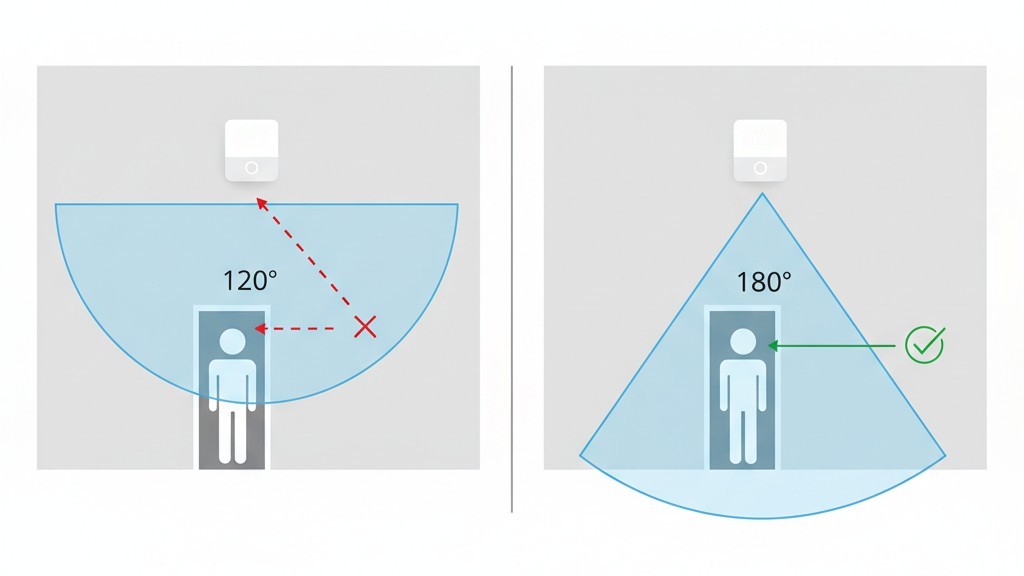
In a mudroom, the switch is often located right next to the door casing. If the sensor has a narrow cone of vision, it cannot “see” you until you are already two feet into the room. That defeats the purpose. You want the light on the millisecond the door cracks open.
This is where units like the Rayzeek RZ021 or similar high-spec occupancy sensors distinguish themselves. They utilize a Fresnel lens that offers a full 180-degree FOV. This means the sensor can detect motion virtually parallel to the wall it is mounted on. As soon as your shoulder breaks the plane of the door jamb, the lens catches the infrared shift, and the relay clicks.
A quick note on “Occupancy” vs. “Vacancy” modes, because this trips up almost everyone:
- Occupancy Mode (Auto-On / Auto-Off): This is what you want for mudrooms, pantries, and garages. You walk in, light turns on. You leave, light turns off.
- Vacancy Mode (Manual-On / Auto-Off): This is for bedrooms or media rooms. You press the button to turn it on, but if you forget, it turns off automatically.
Most Rayzeek units allow you to toggle between these, but for the grocery haul scenario, you must ensure you are in Occupancy mode. If you have to tap the switch, we are back to the Elbow Dance.
The Copper Reality: Wiring It Right
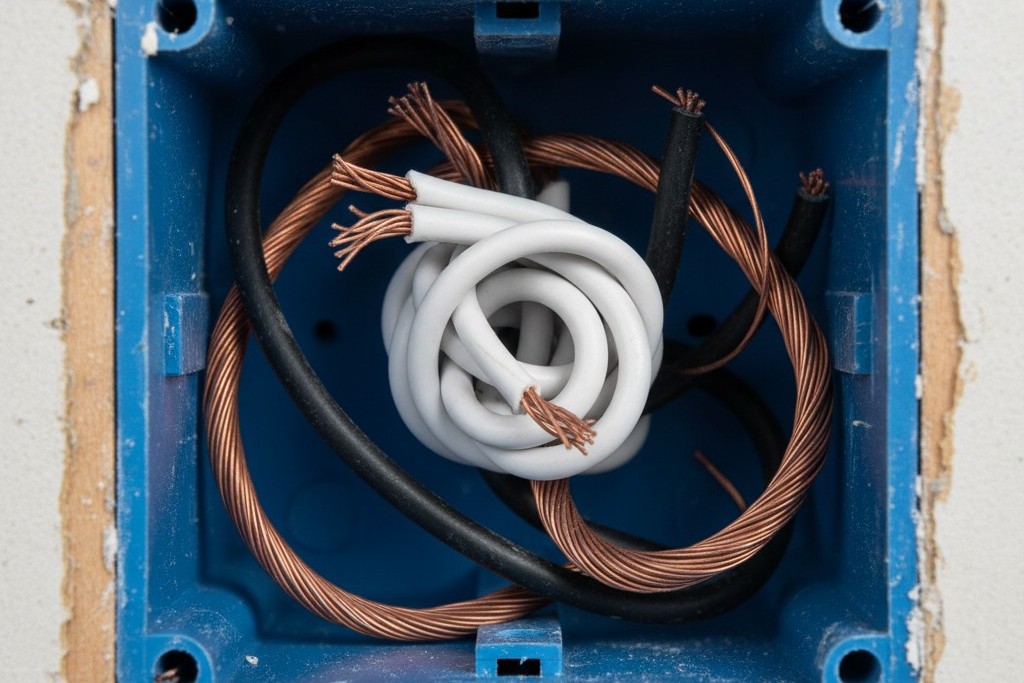
Before you rush to order a sensor, open your wall box and look at the copper. This is the part that separates a functional install from a flickering nightmare.
正在尋找動態感應節能解決方案?
歡迎聯絡我們以獲取完整的 PIR 動態感應器、動態感應節能產品、動態感應器開關以及人體感應/無人感應商業解決方案。
Reliable motion sensors generally require a Neutral Wire (usually a bundle of white wires tucked in the back of the box). The sensor itself is a computer; it needs power to run its “eyes” even when the light is off. In a standard setup, it sips power from the hot (black) and returns it via the neutral (white).
If you live in a home built before the mid-80s, you might open the switch box and see only black wires (and maybe a bare copper ground). This is a “Switch Loop.” If you buy a standard Rayzeek or Lutron sensor that demands a neutral, you will have nowhere to connect that white wire, and it won’t work.
There are “No-Neutral” sensors on the market. They are tempting. They work by trickling a tiny amount of electricity through the light bulb itself to stay alive. This was fine with incandescent bulbs. With modern LEDs, however, that trickle current is often enough to make the bulb glow faintly or flash like a strobe light when it’s supposed to be off. It’s called “ghosting,” and it will drive you insane. If you have the neutral wire, use it. The stability of a direct line-neutral connection is worth the extra two minutes of wire-nutting.
Also, be warned: Motion sensor switches are physically fat. They house a relay, a circuit board, and the lens assembly. If you are trying to jam this into a shallow metal gang box from 1960 that is already stuffed with stiff 12-gauge Romex, you are going to have a bad time. You need room.
Tuning the Ghost
Once the sensor is in the wall, your job isn’t done. A fresh install often leads to the “Ghost in the Hallway” phenomenon.
Picture this: It’s 3:00 AM. The house is silent. Suddenly, the mudroom lights blaze to life. You lie in bed, heart hammering, wondering if someone broke in. You grab a bat, creep downstairs, and find… nothing. The light turns off. Ten minutes later, it happens again.
This is almost always caused by the HVAC system. A nearby floor register kicks on, blowing a stream of warm air across the sensor’s lens. The PIR sensor detects that rapid temperature change as motion.
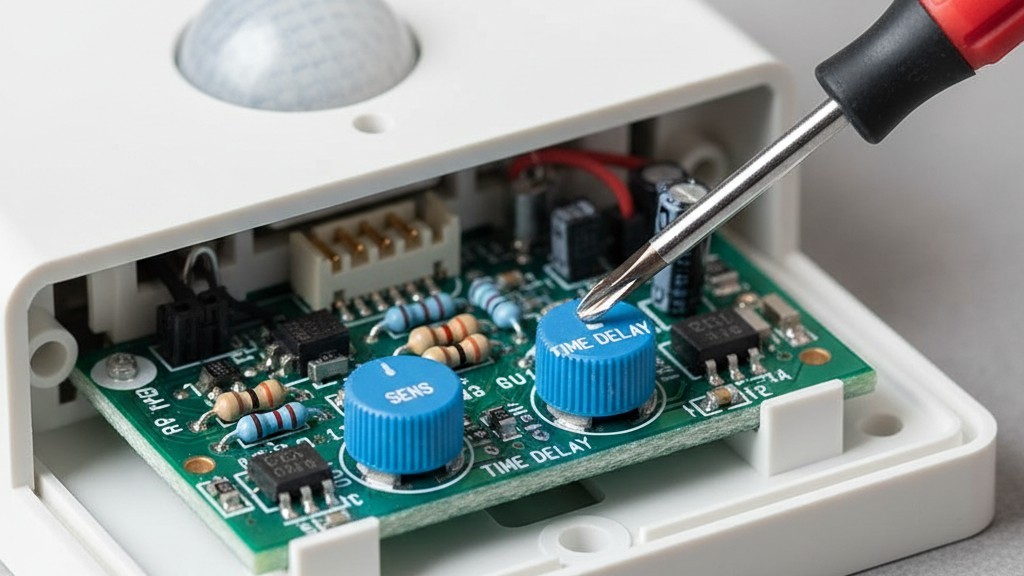
The Rayzeek units (and most pro-grade sensors) have small adjustment dials, usually hidden under the faceplate or accessible via button combos. You don’t need an app for this; you need a small flathead screwdriver.
- Sensitivity: Dial this down if you have phantom triggers. You want it just sensitive enough to catch a person, not a blast of air.
- 延時設定: For a mudroom, 1 to 5 minutes is the sweet spot. Anything longer is wasting energy; anything shorter (like the 15-second test mode) will leave you waving your arms in the dark while you’re trying to tie your shoes.
The Pet Factor: If you have a 70-pound Golden Retriever, he is going to trigger the lights. That’s just physics; he’s a large heat signature. However, if you have a cat, you can sometimes “mask” the sensor. Use a small strip of electrical tape on the bottom third of the Fresnel lens. This blinds the sensor to movement near the floor while keeping it active for human-height motion. It’s a crude hack, but it works better than any software algorithm I’ve seen.
The Ambient Light Check
Finally, there is one setting that separates the pros from the amateurs: the Ambient Light Sensor (ALS).
從 Rayzeek 動態感測器產品組合中獲得靈感。
找不到您想要的產品?別擔心。總有其他方法可以解決您的問題。也許我們的其中一個產品組合可以幫到您。
There is nothing more annoying than a light turning on when it’s high noon and the sun is streaming through the window. It’s wasteful. The RZ021 has an ALS feature that measures the natural light in the room. If there is enough daylight, the motion sensor stays dormant. You usually have to calibrate this—press and hold a button when the natural light is at the level where you would start wanting artificial light.
When you get this right, the switch disappears. You don’t touch it. You don’t talk to it. You don’t open an app for it. You kick the door open with your frozen hands full of groceries, and the room is simply waiting for you, bright and ready. That is what a smart home is actually supposed to be.







