
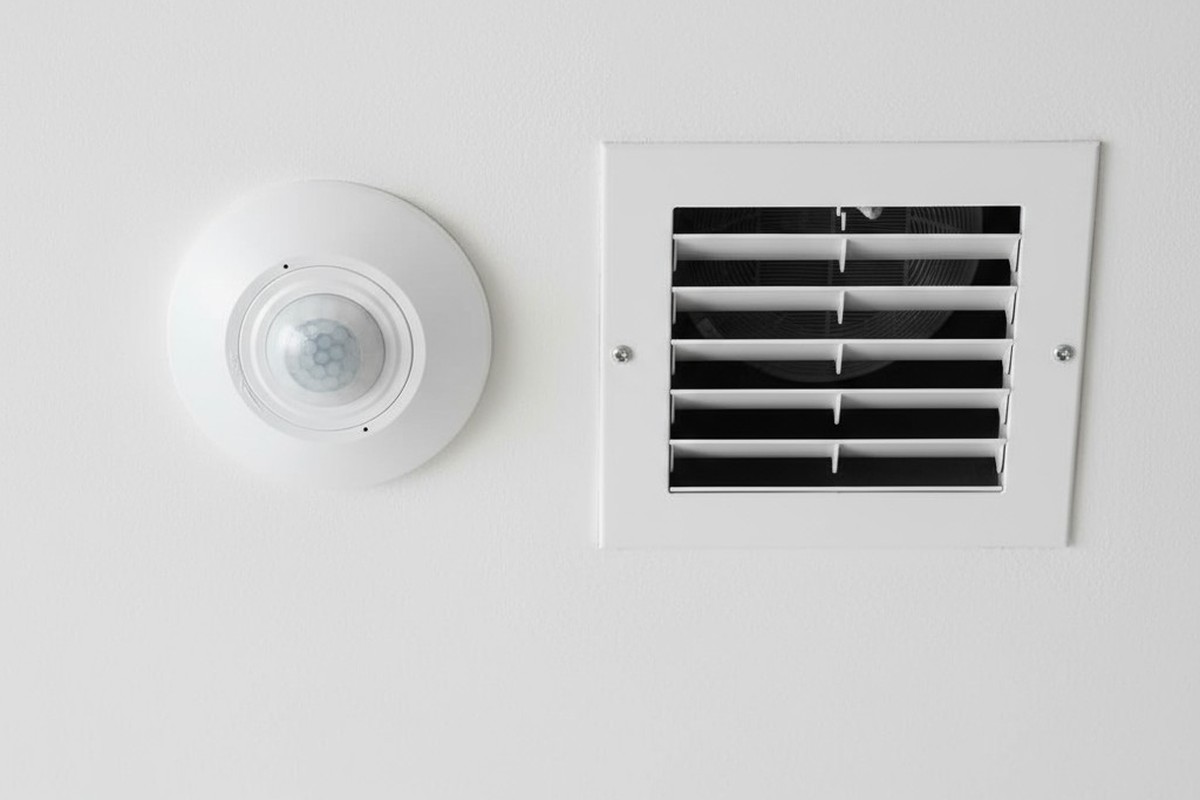
A light flickers on in an empty hallway. A security floodlight blasts an unoccupied yard. These are the small frustrations that undermine the promise of an automated space. When a motion sensor—a device built to respond to human presence—starts seeing ghosts, it morphs from a tool of convenience into a source of annoyance and wasted energy. The immediate reaction is to blame the device, to assume it’s faulty or just too sensitive.
But the truth is more subtle, rooted in the physics of the environment itself. The sensor isn’t broken; it’s being deceived. It is reacting perfectly to invisible events: currents of warm air, shifting patches of sunlight, and sudden drafts. This phenomenon, a form of thermal turbulence, creates phantom motion that can be understood and, more importantly, tamed through intelligent strategy, not just fiddling with a dial.
How a Sensor ‘Sees’ Heat: The Science of Passive Infrared
The most common type of motion sensor, Passive Infrared (PIR), doesn’t see motion like a camera. It sees heat. Specifically, it’s tuned to detect the wavelength of infrared radiation emitted by the human body. The term “passive” means the sensor emits no energy of its own; it simply watches for changes in the thermal landscape it monitors.
The Segmented Lens: A Grid of Detection Zones
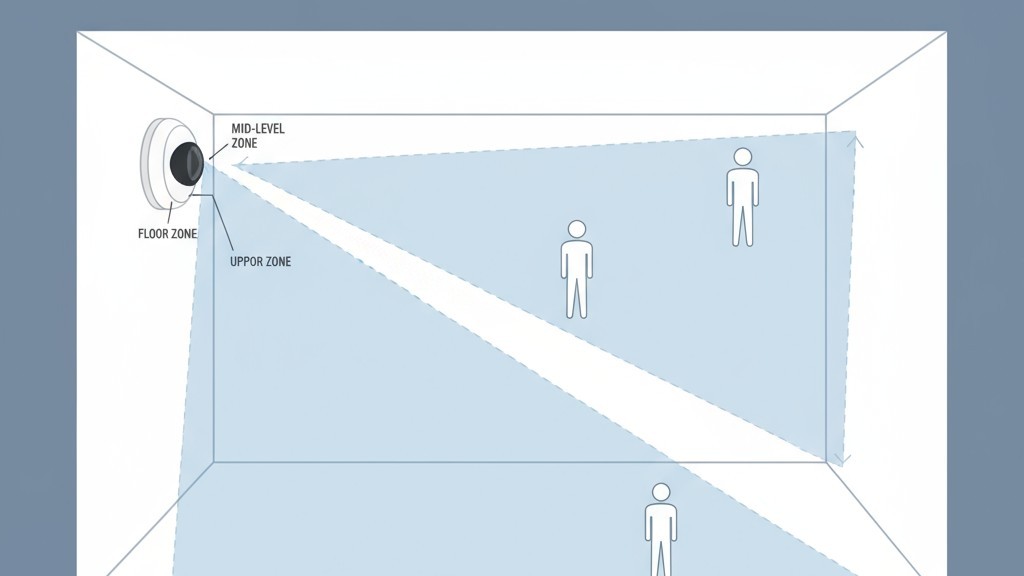
That domed, multifaceted plastic cover on a PIR sensor isn’t just for protection. It’s a critical component called a Fresnel lens. This lens takes a wide field of view and focuses it onto the tiny sensor element inside, but it does so in a fragmented way, effectively dividing the room into a grid of wedge-shaped detection zones. The sensor isn’t watching the room as a single picture, but as a series of distinct thermal segments.
From Stable to Spike: What Triggers a Sensor
In a still, thermally stable room, the sensor establishes a baseline reading for the infrared energy in each zone and is designed to ignore this static state. A trigger only occurs when an object with a different heat signature, such as a person, moves from one zone to another. This causes a rapid change—a sudden spike or dip in infrared energy detected first in one segment, then in an adjacent one. The sensor’s logic interprets this quick, sequential change across its zones as motion.
The Real Culprit: Thermal Ghosts in the Machine
The system works reliably until the environment introduces moving thermal events not attached to a person. These are the “thermal ghosts” that cause false triggers. A patch of sunlight on a cool floor, for instance, creates a pocket of warmth. As the sun moves, that warm patch creeps across the floor. If its path crosses from one of the sensor’s detection zones to another, the sensor sees a moving front of thermal energy and triggers an alert.
Air currents operate on the same principle. A gust of cold air from an open door, a draft from a leaky window, or a blast of hot air from an HVAC vent all represent a mass of air at a different temperature moving through the space. When this moving air crosses the sensor’s grid, it mimics the thermal signature of a person walking past, resulting in a false positive. The sensor is doing its job correctly; the environment is feeding it bad data.
Søger du bevægelsesaktiverede energibesparende løsninger?
Kontakt os for komplette PIR-bevægelsessensorer, bevægelsesaktiverede energibesparende produkter, bevægelsessensorafbrydere og kommercielle tilstedeværelses-/fraværsløsninger.
The ‘Maximum Sensitivity’ Fallacy
Faced with false triggers, many people reduce a sensor’s sensitivity. Conversely, if a sensor fails to detect motion, the instinct is to crank it to the maximum. But in the context of thermal turbulence, this is a flawed approach. Turning the sensitivity to its highest level doesn’t make the sensor smarter; it just lowers the threshold for what it considers a significant thermal event.
It amplifies the problem, not the solution.
A sensor on maximum sensitivity becomes exceptionally good at detecting the very things it should ignore: subtle air currents and minor temperature fluctuations. This often leads to more false triggers, deepening the user’s frustration and cementing the belief that the device is broken. True reliability comes not from a more reactive sensor, but from a cleaner environment and smarter logic.
The Placement Principle: Design for a Stable Environment
The most effective strategy for eliminating thermal false triggers is correct placement. Before you even touch a drill, the goal is to position the sensor where its view is as thermally stable as possible, aimed away from predictable sources of temperature change.
Map the Thermal Landscape
A brief observation of the space reveals its thermal patterns. Note where sunlight falls throughout the day, especially in the morning and evening. Identify the locations of HVAC vents, radiators, and large appliances. Consider how opening doors affects air circulation. This mental map is the key to finding the right mounting location.
Key Placement Rules
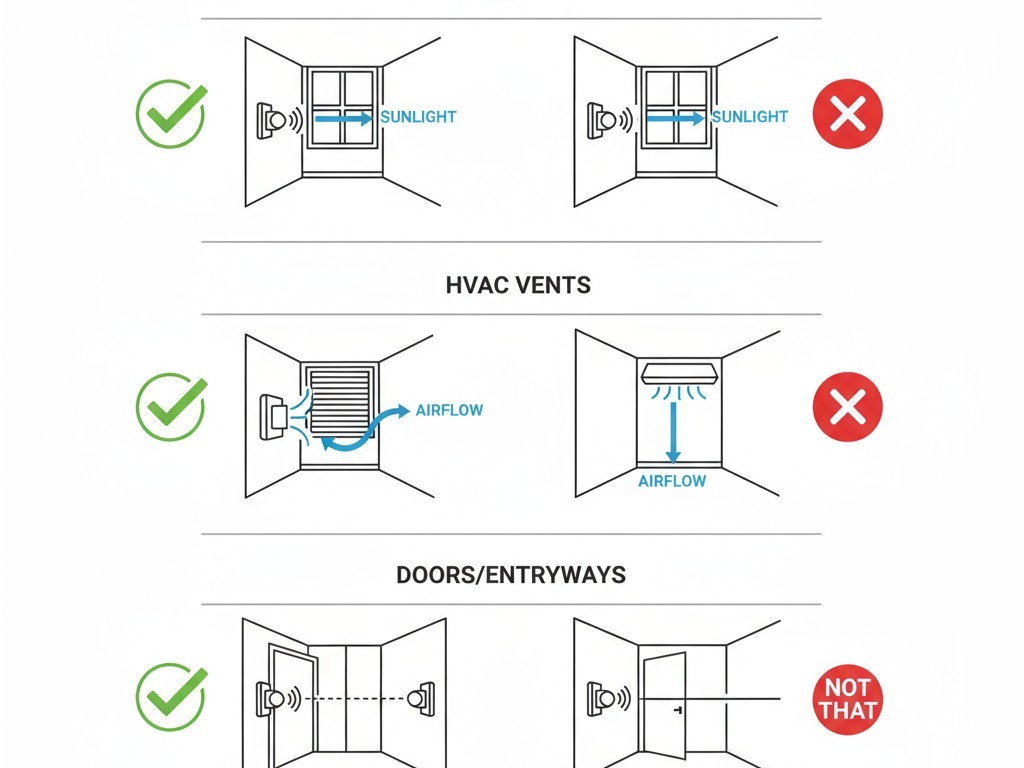
The primary rule is to aim the sensor’s field of view away from direct sunlight. If a sensor must be in a room with a large window, mounting it on the same wall as the window can be effective, as it won’t be looking directly at the thermal flux. Second, avoid aiming the sensor at or near an HVAC supply vent, a primary source of false triggers. Finally, in vestibules or entryways, position the sensor so its view is perpendicular to the door, not aimed at it. This prevents gusts of outside air from sweeping directly across its detection zones.
Måske er du også interesseret i

- Spænding: 2 AAA-batterier
- Dag/nat-tilstand
- Tidsforsinkelse: 15 min, 30 min, 1 t (standard), 2 t

- Loftmonteret PIR-tilstedeværelsessensor med tørkontaktrelæudgang
- 12/24VDC eller 12/24VAC lavspændingsforsyning
- Isolerede relækontakter (COM, NO og NC) til EMS-, HVAC- og bygningsstyringsindgange

- Lavspændings DC indbygget loftmonteret mikrobølge-bevægelsessensor-afbryder
- 12 VDC / 24 VDC-indgang med 10-30 VDC-område
- Maks. 10A arbejdsstrøm med justerbar tidsforsinkelse, Lux-tærskel og følsomhed
- Indbygget loftmonteret mikrobølge-bevægelsessensor-afbryder til højere belastning
- 100-265 VAC netspændingsindgang, 10A-model
- 5,8 GHz mikrobølgeregistrering med justerbar tidsforsinkelse, Lux-tærskel og følsomhed
- Indbygget loftmonteret mikrobølge-bevægelsessensorkontakt
- 100-265 VAC netspændingsindgang, 5A-model
- 5,8 GHz mikrobølgeregistrering med justerbar tidsforsinkelse, Lux-tærskel og følsomhed
- Loftmonteret RZ037 PIR-tilstedeværelsessensor-dæmper til 220V-strømforsyning
- Maksimal arbejdsstrøm på 3A med 660W nominel belastning
- LUX-knap styrer lyssensor TIL/FRA samt brugerdefineret lysdæmpning
- Loftmonteret RZ037 PIR-tilstedeværelsessensor-dæmper til 110V-strømforsyning
- Maksimal arbejdsstrøm på 3A med 330W nominel belastning
- LUX-knap styrer lyssensor TIL/FRA samt brugerdefineret lysdæmpning

- Lavspændings DC loftmonteret mikrobølge-bevægelsessensorkontakt
- 12 VDC / 24 VDC-indgang med 10-30 VDC-område
- Maks. 10A arbejdsstrøm med justerbar tidsforsinkelse, Lux-tærskel og følsomhed
- Loftmonteret mikrobølge-bevægelsessensorkontakt til højere belastning
- 100-265 VAC netspændingsindgang, 10A-model
- 5,8 GHz mikrobølgeregistrering med justerbar tidsforsinkelse, Lux-tærskel og følsomhed
- Loftmonteret mikrobølge-bevægelsessensorkontakt
- 100-265 VAC netspændingsindgang, 5A-model
- 5,8 GHz mikrobølgeregistrering med justerbar tidsforsinkelse, Lux-tærskel og følsomhed

- Lavspændings DC PIR-bevægelsessensorkontakt til indbygning i loft
- 12 VDC / 24 VDC-indgang med 10-30 VDC-område
- Maks. arbejdsstrøm 10A med justerbar tidsforsinkelse, Lux-tærskel og følsomhed

- PIR-bevægelsessensorkontakt til indbygning i loft til højere belastning
- 100-265 VAC netspændingsindgang, 10A-model
- 360-graders registrering med justerbar tidsforsinkelse, Lux-tærskel og følsomhed
- PIR-bevægelsessensorkontakt til indbygning i loft
- 100-265 VAC netspændingsindgang, 5A-model
- 360-graders registrering med justerbar tidsforsinkelse, Lux-tærskel og følsomhed

- Trådløst kontakt- og modtagersæt til indendørs TÆND/SLUK-belysningsstyring
- 100-230VAC, 50/60Hz modtager med 5A mærkestrøm
- CR2032-drevet trådløs kontakt med 2,4GHz-kommunikation
- Tilstedeværelse (Auto-TÆND/Auto-SLUK)
- 12–24V DC (10–30VDC), op til 10A
- 360° dækning, 8–12 m diameter
- Tidsforsinkelse 15 s–30 min
- Lyssensor Fra/15/25/35 Lux
- Høj/Lav følsomhed
- Auto-ON/Auto-OFF tilstedeværelsestilstand
- 100–265V AC, 10A (nulleder påkrævet)
- 360° dækning; 8–12 m detekteringsdiameter
- Tidsforsinkelse 15 s–30 min; Lux OFF/15/25/35; Følsomhed Høj/Lav
- Auto-ON/Auto-OFF tilstedeværelsestilstand
- 100–265V AC, 5A (nulleder påkrævet)
- 360° dækning; 8–12 m detekteringsdiameter
- Tidsforsinkelse 15 s–30 min; Lux OFF/15/25/35; Følsomhed Høj/Lav
Shielding the Sensor: Physical Fixes for Problem Spots
Sometimes, ideal placement isn’t an option. A room’s layout or wiring constraints might force a sensor into a location exposed to thermal interference. In these cases, physical modifications can shield the sensor from the source of the problem.
Bliv inspireret af Rayzeek bevægelsessensor-porteføljer.
Finder du ikke det, du søger? Fortvivl ikke. Der er altid alternative måder at løse dine problemer på. Måske kan en af vores porteføljer hjælpe.
The Power of Shade
A simple but effective solution is to create a “visor” or “hood” for the sensor. This small shield, mounted just above the lens, can block high-angle sunlight from creating moving hot spots in the sensor’s view. Similarly, recessing the sensor slightly into a ceiling or wall uses the surrounding structure as a natural shield.
Strategic Masking
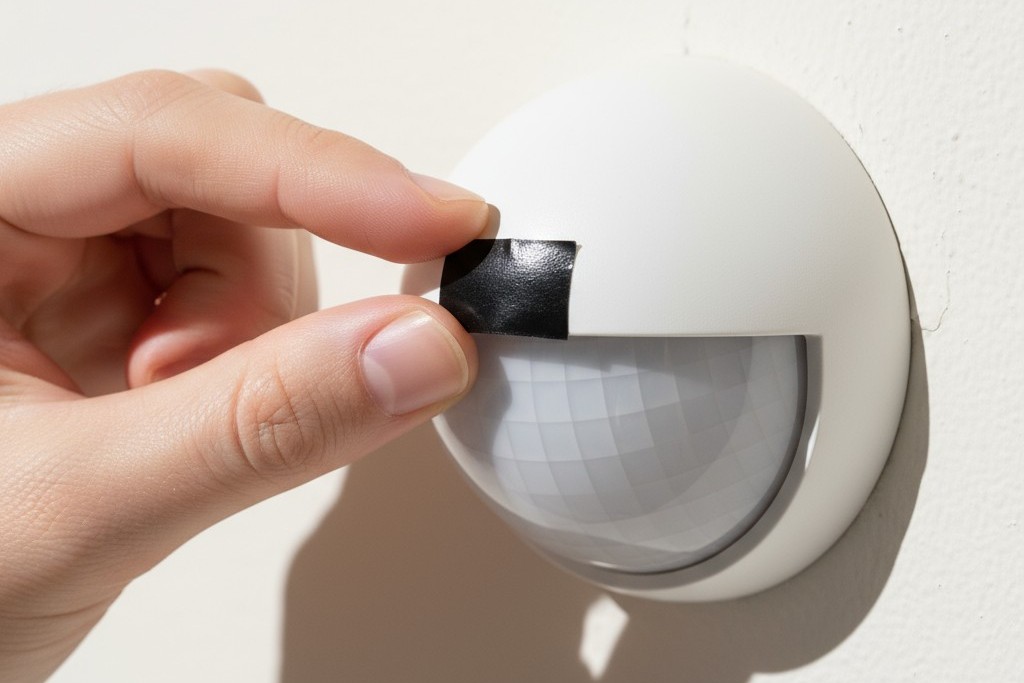
For a more targeted approach, you can “blind” the sensor to a specific problem area. By placing a small piece of opaque electrical tape over a specific facet of the Fresnel lens, you block its ability to see the corresponding zone. If a single HVAC vent is causing all the trouble, identifying and masking the part of the lens that covers it can be a surgical fix that leaves the rest of the detection area fully active.
Intelligent Mitigation: Outsmarting the Environment with Logic
The most advanced solutions move beyond physical placement and into the realm of software. Modern systems can use additional inputs to make smarter decisions about whether a thermal event is worth acting on.
Lux Gating: Tying Motion to Ambient Light
Lux gating is a powerful feature that uses a sensor’s built-in light meter (photocell) to prevent false triggers from sunlight. The logic is simple: if the sensor’s main job is to control lights, there’s no need to turn them on when the sun is already flooding the room. The system can be configured with a “lux gating” threshold. When the ambient light level is above this point, motion sensing is disabled. This elegantly solves the moving sunbeam problem by telling the sensor to ignore motion during the brightest parts of the day.
While thermal turbulence is a primary cause of false triggers, other factors like small pets, insects on the lens, or electrical interference can also be culprits. But understanding and mitigating these invisible currents of heat and air is the most critical step toward creating a motion sensing system that is not just automated, but truly intelligent.







