

You know the scene. You’re in a high-stakes meeting in a “fishbowl”—one of those modern, floor-to-ceiling glass conference rooms architects love and engineers tolerate. The discussion heats up. Then, the lights die. Someone has to wave their arms like a drowning sailor to bring them back.
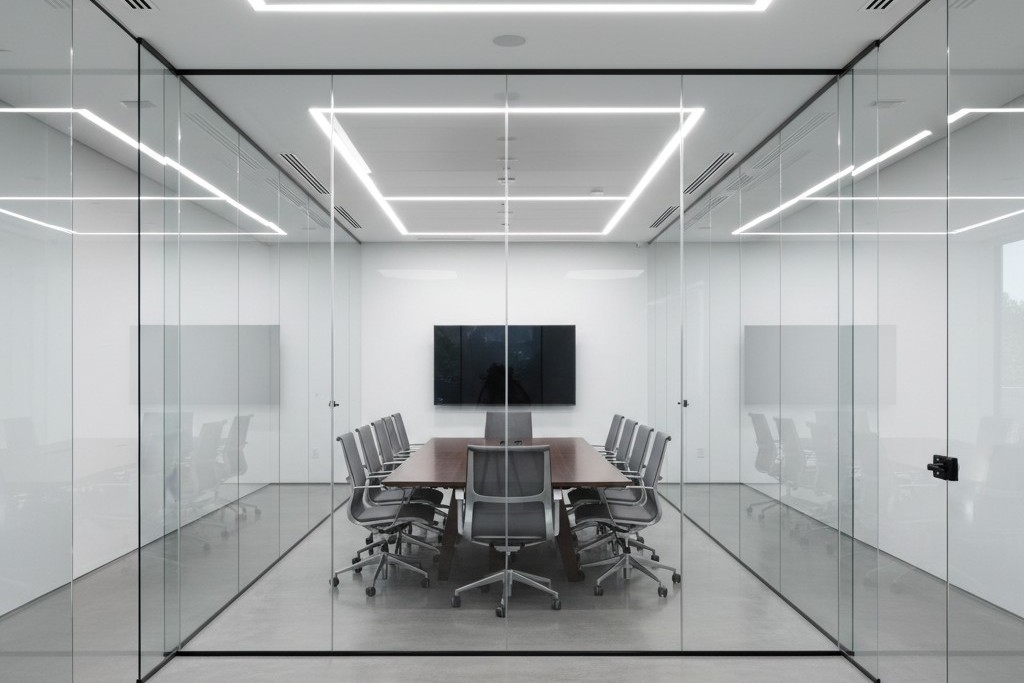
Worse, the room sits empty. Yet every time someone walks down the hallway to get a coffee, the lights inside the glass box blaze to life. The sensor detects a passerby and decides, incorrectly, that the party is in the conference room. This is “ghost switching,” and in the era of open-plan glass offices, it’s an epidemic.
The facility manager usually blames the sensor brand. The client blames the electrician. But it’s rarely broken hardware. The problem is that standard motion detection physics breaks down when you surround a room with invisible walls. You cannot simply install a sensor in a glass box the same way you install one in a drywall closet and expect it to behave.
The Physics of Invisibility
To fix this, you have to understand what the sensor is actually seeing. Most commercial sensors use one of two technologies, or a combination of both (Dual-Technology). Neither of them understands glass.
被動式紅外線(PIR) is the bedrock of motion sensing. It looks for heat differentials moving across a segmented field of view—specifically, the infrared energy of a human body moving against background walls. Glass is interesting because, to IR, it is opaque. Generally, a PIR sensor cannot “see” heat through glass. If you stand outside a window and wave at a PIR sensor, it shouldn’t trigger. Modern office glass comes in many grades, though. Thin, single-pane architectural glass can heat up when a warm body passes close to it, or allow just enough IR leakage through gaps in the doorframe to trigger a sensitive unit.
Ultrasonic technology is usually the villain here. This is the “Dual” in Dual-Tech sensors (like the Wattstopper DT series or similar units from Leviton). These sensors emit a high-frequency sound wave (often around 32kHz or 40kHz) and listen for the Doppler shift caused by movement.
Ultrasonic waves don’t respect glass the way IR does. They treat the room like a pressurized volume of air. If the glass wall vibrates because a heavy cart rolls down the hallway, the sensor hears it. If there is a one-inch air gap under the glass door, the ultrasonic waves pour out into the hallway like water. When someone walks by, they disturb that wave pattern. The sensor, sitting faithfully in the ceiling, detects a frequency shift and fires the relay. It thinks the movement is inside the room because the “room” effectively leaked into the corridor.
Don’t be tempted to solve this with app-based consumer smart bulbs, by the way. Mesh networks aren’t designed for the heavy interference of a commercial ceiling, and putting a battery-powered toy in a maintenance-heavy environment is a recipe for failure. Stick to hard-wired controls.
Geometry: The Rookie Mistake
The second point of failure is geometric. In a standard drywall room, installers are trained to put the sensor in the corner or near the door, looking into the room. This ensures that as soon as you walk in, you cross the beam.
In a glass room, this is fatal. If you place a wall-switch sensor (like a Lutron Maestro or Leviton OSSMT) next to the glass door, it is almost certainly facing the glass wall opposite it—or worse, looking diagonally out through the clear glass front of the room. Even if the glass blocks IR, the sensor’s peripheral vision is wide (often 180 degrees). It catches the heat signature of people walking past the door gap.
The fix requires moving the device, which might mean opening the wall—an annoyance that pays for itself in reduced complaints. Mount the sensor on the header wall (the same wall the door is on), facing inward toward the back of the room. By positioning the sensor so its “back” is to the hallway, you physically prevent it from seeing the traffic outside. It can only see the people actually at the conference table.
正在尋找動態感應節能解決方案?
歡迎聯絡我們以獲取完整的 PIR 動態感應器、動態感應節能產品、動態感應器開關以及人體感應/無人感應商業解決方案。
If your lighting controls are integrated with the HVAC system—meaning the lights tell the VAV box to increase airflow—this placement is critical. A sensor that triggers on hallway traffic will ramp up the AC in an empty room, wasting energy. Just ensure the new position doesn’t block the sensor’s view of the thermostat, or you’ll trade lighting complaints for temperature complaints.
The Tape Trick and Sensitivity
Sometimes you can’t move the box. The conduit is set, the drywall is painted, and the client is screaming. This is where you need to stop acting like a programmer and start acting like a mechanic.
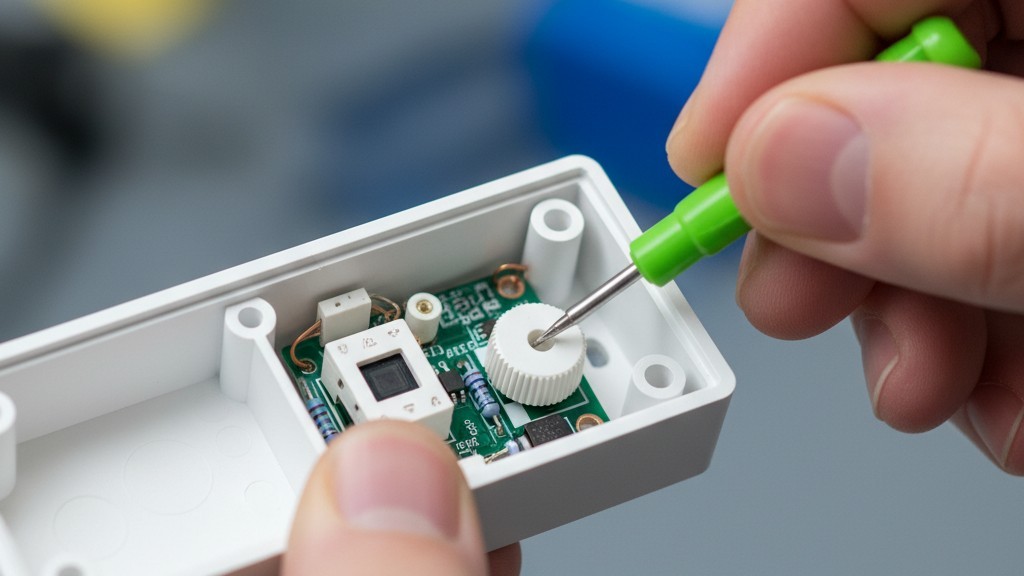
Open the sensor box. Don’t throw away the little plastic bag of accessories. Inside, you will often find small, opaque stickers or plastic inserts. These are masking labels, the most effective, under-utilized tool in the lighting industry.
從 Rayzeek 動態感測器產品組合中獲得靈感。
找不到您想要的產品?別擔心。總有其他方法可以解決您的問題。也許我們的其中一個產品組合可以幫到您。
If your sensor is picking up hallway traffic on the left side, apply the masking tape over the left segments of the Fresnel lens. You are physically blinding the sensor to that specific angle. It’s crude, it looks low-tech, and it works perfectly. A piece of foil tape costs nothing but solves problems that hours of sensitivity tuning cannot.
Speaking of tuning: check the trimpots (the small dials) under the faceplate. You will likely need a small green screwdriver. Factory defaults often have both PIR and Ultrasonic sensitivity set to roughly 75–100%. In a glass room, you must turn the Ultrasonic sensitivity down. Way down. Drop it to 20% or 30%. You want it sensitive enough to pick up someone typing at the table, but deaf to the vibration of the glass wall. If the sensor has a “Microphonics” setting (common in Acuity brands), turn that off entirely. It listens for noise, and glass rooms are acoustically reflective echo chambers.
The Logic Fix: Manual On
If you change only one setting, make it this: Change the operating mode from “Occupancy” to “Vacancy.”
“Occupancy Mode” is Auto-On / Auto-Off. You walk in, lights turn on. You leave, lights turn off. This is the default for most installs, and it is the source of the “ghost switching” madness. Every false trigger turns the lights on.
“Vacancy Mode” is Manual-On / Auto-Off. You walk into the room and you 不可 press the button to turn the lights on. When you leave, the sensor watches for emptiness and turns them off automatically.
This simple logic change eliminates 100% of false-on triggers. If a ghost walks by the hallway, the sensor might “see” it, but since the logic requires a physical button press to start the cycle, the lights stay dark. The room remains dignified and empty.
There is a moral argument here, too. In a glass-walled room, “Auto-On” is a nuisance. It assumes intent where there is none. Manual-On forces intent. It complies with strict energy codes like California’s Title 24, and it stops the building from looking like a disco at night.
(You might worry people will complain about having to touch a switch. In practice, the complaint volume for “I had to push a button” is near zero compared to “The lights keep turning on and scaring me.”)
The Timeout Economy
Finally, address the “waving arms” problem. This usually happens because the “Timeout” setting—the delay before lights cut out—is set aggressively low.
您可能也會感興趣

- 電壓:2 粒 AAA 電池
- 日/夜模式
- 延遲時間:15 分鐘、30 分鐘、1 小時(預設)、2 小時

- 吸頂式 PIR 人體感應器,配備乾觸點繼電器輸出
- 12/24VDC 或 12/24VAC 低電壓供電
- 用於 EMS、HVAC 和建築控制輸入的 COM、NO 和 NC 隔離繼電器觸點

- 低壓直流嵌入式天花安裝微波人體感應開關
- 12 VDC / 24 VDC 輸入,支援 10-30 VDC 範圍
- 最大工作電流 10A,配備可調節延時、光感閾值及靈敏度
- 高負載嵌入式天花安裝微波人體感應開關
- 100-265 VAC 市電輸入,10A 型號
- 5.8 GHz 微波感應,配備可調節延時、光感閾值及靈敏度
- 嵌入式天花安裝微波人體感應開關
- 100-265 VAC 市電輸入,5A 型號
- 5.8 GHz 微波感應,配備可調節延時、光感閾值及靈敏度
- 適用於 220V 電源的天花安裝 RZ037 PIR 被動式紅外線佔空感應調光開關
- 最大工作電流 3A,額定負載 660W
- LUX 按鈕控制光線感應器開關及用戶設定之調光亮度
- 適用於 110V 電源的天花安裝 RZ037 PIR 被動式紅外線佔空感應調光開關
- 最大工作電流 3A,額定負載 330W
- LUX 按鈕控制光線感應器開關及用戶設定之調光亮度

- 低壓直流天花安裝微波人體感應開關
- 12 VDC / 24 VDC 輸入,支援 10-30 VDC 範圍
- 最大工作電流 10A,配備可調節延時、光感閾值及靈敏度
- 高負載吸頂式微波動態感應器開關
- 100-265 VAC 市電輸入,10A 型號
- 5.8 GHz 微波感應,配備可調節延時、光感閾值及靈敏度
- 吸頂式微波動態感應器開關
- 100-265 VAC 市電輸入,5A 型號
- 5.8 GHz 微波感應,配備可調節延時、光感閾值及靈敏度

- 低壓直流嵌頂式 PIR 動態感應器開關
- 12 VDC / 24 VDC 輸入,支援 10-30 VDC 範圍
- 最大工作電流 10A,具備可調式時間延遲、光照度閾值及靈敏度

- 高負載嵌頂式 PIR 動態感應器開關
- 100-265 VAC 市電輸入,10A 型號
- 360度偵測,具備可調式時間延遲、光照度閾值及靈敏度
- 嵌頂式 PIR 動態感應器開關
- 100-265 VAC 市電輸入,5A 型號
- 360度偵測,具備可調式時間延遲、光照度閾值及靈敏度

- 用於室內開關照明控制的無線開關及接收器套裝
- 100-230VAC,50/60Hz 接收器,額定電流 5A
- CR2032 電池供電無線開關,採用 2.4GHz 通訊
- 佔用感應(自動開啟/自動關閉)
- 12–24V DC (10–30VDC),最高 10A
- 360° 覆蓋,直徑 8–12 米
- 延遲時間 15 秒至 30 分鐘
- 光感應器 關閉/15/25/35 Lux
- 高/低靈敏度
- 自動開啟/自動關閉佔用模式
- 100–265V AC,10A(需接零線)
- 360° 全方位覆蓋;8–12 米偵測直徑
- 延遲時間 15 秒至 30 分鐘;Lux 關閉/15/25/35;靈敏度 高/低
- 自動開啟/自動關閉佔用模式
- 100–265V AC,5A(需接零線)
- 360° 全方位覆蓋;8–12 米偵測直徑
- 延遲時間 15 秒至 30 分鐘;Lux 關閉/15/25/35;靈敏度 高/低
Green building initiatives often push for 5-minute timeouts. In a conference room, this is aggressive stupidity. People sit still in meetings. They read slides. They listen to a speaker. If the sensor is set to 5 minutes, the lights will cut out during every thoughtful pause.
Set the timeout to a minimum of 15 minutes. 20 is better.
The math supports this. Consider a room with 40W of LED lighting. The cost to run those lights for an extra 10 minutes is a fraction of a penny. Now calculate the cost of interrupting a meeting with six executives who bill at $200 an hour. The distraction cost of the “waving arms dance” vastly outweighs the energy savings of a short timeout.
Checklist: The Glass Room Protocol
When the client calls about the haunted conference room, don’t just swap the sensor. Follow this order of operations:
- Check the Mode: Switch to Vacancy (Manual-On / Auto-Off). This fixes 90% of hallway triggers instantly.
- Mask the Lens: Use foil tape or blinders to block the view of the door and glass.
- Dial Down Ultrasonic: Reduce sensitivity to <30% to stop it from hearing the glass vibrate.
- Extend Timeout: Set to 15 minutes minimum to prevent false-offs during meetings.
- Relocate (Last Resort): If all else fails, move the sensor to the header wall facing inward.
The glass office is here to stay. Your sensors need to adapt to it, not the other way around.







