

You know the smell of a cooked server room. It’s not just the ozone tang of frying electronics. It’s that specific, cloying scent of plastic housing baking at 105°F for forty-eight hours.
This usually hits you on a Monday morning. The silence is your first warning. The portable AC unit in the corner isn’t humming, the rack fans are screaming at max RPM, and the exhaust air feels thick enough to chew.
The culprit usually isn’t a catastrophic hardware failure of the servers themselves. It’s the support gear—cheap, consumer-grade cooling shoved into a converted broom closet to keep enterprise hardware alive on a shoestring budget. When you retrofit a residential-grade controller like the Rayzeek RZ series into a mission-critical environment, you bridge two worlds that hate each other: the aesthetic world of home automation and the unforgiving thermodynamics of 24/7 heat rejection.
It can be done, and it can save a small business thousands in cooling costs. But only if you ignore the marketing on the box and respect the physics of the switch.
The Hardware Lie: The Auto-Restart Problem
Before you touch the wiring, you need to run a hardware check that invalidates half the portable AC units on the market. In a residential setting, “smart” AC means soft-touch digital buttons and a remote. In a server closet, those digital controls are a liability.
Here’s the failure mode. Power flickers at 2:00 AM during a storm. The UPS keeps the servers up, but wall power drops for ten seconds. When power returns, a standard “dumb” mechanical AC unit—the kind with physical knobs—simply resumes cooling because the circuit is physically closed. A modern digital unit defaults to “Standby.” The Rayzeek switch might do its job perfectly, restoring power to the outlet, but the AC unit sits there, energized but off, waiting for a human finger to press a button that isn’t there.
This makes the “Plug Pull Test” non-negotiable. With the AC unit running full blast, yank the power cord from the wall. Wait thirty seconds. Plug it back in. If the compressor doesn’t kick back on automatically without you touching the control panel, that unit cannot be used for primary or backup server cooling. No amount of smart switching can fix a device that requires a physical finger press to start.
Don’t confuse this with smart plugs—those cheap WiFi dongles you stick between the wall and the cord. Many accidental IT admins assume they can use an Alexa-compatible plug to toggle the AC remotely. That might work for a desk lamp, but adding another layer of cheap silicon between the wall and a high-amperage compressor is asking for a meltdown. If the AC unit lacks auto-restart memory, a smart plug is just a remote kill switch, not a recovery tool.
Physics of the Switch: Resistive vs. Inductive Loads
With the cooling hardware verified, look at the controller. The spec sheet for a Rayzeek sensor or switch might boast a “15 Amp” rating. That number is dangerous if you don’t understand what kind of amps they mean.
Most consumer electronics ratings rely on Resistive Load. This covers things like incandescent light bulbs or simple space heaters—devices where current draw is steady and predictable. An air conditioner is an Inductive Load. When a compressor motor kicks on, it doesn’t draw a steady 10 Amps; it pulls a massive spike of inrush current—often termed Locked Rotor Amps (LRA)—that can momentarily triple the running amperage.
This spike lasts milliseconds, but it generates an arc across the relay contacts inside the switch. Over time—or sometimes immediately—this arc pits the metal contacts. Eventually, they weld shut. A welded relay means the cooling never turns off (which is fine) or never turns on (which is catastrophic).
Quizás le interese

- Tensión: 2 pilas AAA
- Modo Día/Noche
- Temporización: 15 min, 30 min, 1 h (por defecto), 2 h

- Sensor de presencia PIR para montaje en techo con salida de relé de contacto seco
- Alimentación de baja tensión de 12/24VDC o 12/24VAC
- Contactos de relé aislados COM, NO y NC para entradas de EMS, HVAC y control de edificios

- Interruptor con sensor de movimiento por microondas empotrable en techo de baja tensión DC
- Entrada de 12 VDC / 24 VDC con rango de 10-30 VDC
- Corriente de funcionamiento máxima de 10A con retardo de tiempo, umbral de Lux y sensibilidad ajustables
- Interruptor con sensor de movimiento por microondas empotrable en techo para cargas más elevadas
- Entrada de tensión de red de 100-265 VAC, modelo de 10A
- Detección por microondas de 5,8 GHz con temporizador, umbral Lux y sensibilidad ajustables
- Interruptor con sensor de movimiento por microondas empotrable para techo
- Entrada de tensión de red de 100-265 VAC, modelo de 5A
- Detección por microondas de 5,8 GHz con temporizador, umbral Lux y sensibilidad ajustables
- Regulador con sensor de presencia PIR RZ037 de techo para alimentación de 220V
- Corriente de funcionamiento máxima de 3A con carga nominal de 660W
- El botón LUX controla el encendido/apagado del sensor de luz y la regulación de brillo ajustada por el usuario
- Regulador con sensor de presencia PIR RZ037 de techo para alimentación de 110V
- Corriente de funcionamiento máxima de 3A con carga nominal de 330W
- El botón LUX controla el encendido/apagado del sensor de luz y la regulación de brillo ajustada por el usuario

- Interruptor con sensor de movimiento por microondas de techo para CC de bajo voltaje
- Entrada de 12 VDC / 24 VDC con rango de 10-30 VDC
- Corriente de funcionamiento máxima de 10A con retardo de tiempo, umbral de Lux y sensibilidad ajustables
- Interruptor con sensor de movimiento por microondas de techo para mayor carga
- Entrada de tensión de red de 100-265 VAC, modelo de 10A
- Detección por microondas de 5,8 GHz con temporizador, umbral Lux y sensibilidad ajustables
- Interruptor con sensor de movimiento por microondas de techo
- Entrada de tensión de red de 100-265 VAC, modelo de 5A
- Detección por microondas de 5,8 GHz con temporizador, umbral Lux y sensibilidad ajustables

- Interruptor con sensor de movimiento PIR para montaje empotrable en techo de CC de bajo voltaje
- Entrada de 12 VDC / 24 VDC con rango de 10-30 VDC
- Corriente máxima de trabajo de 10 A con tiempo de retardo, umbral de luxes y sensibilidad ajustables

- Interruptor con sensor de movimiento PIR empotrable en techo para mayor carga
- Entrada de tensión de red de 100-265 VAC, modelo de 10A
- Detección de 360 grados con tiempo de retardo, umbral de luxes y sensibilidad ajustables
- Interruptor con sensor de movimiento PIR empotrable en techo
- Entrada de tensión de red de 100-265 VAC, modelo de 5A
- Detección de 360 grados con tiempo de retardo, umbral de luxes y sensibilidad ajustables

- Kit de emisor inalámbrico y receptor para el control de iluminación de encendido/apagado en interiores
- Receptor de 100-230 V CA, 50/60 Hz con corriente nominal de 5 A
- Interruptor inalámbrico alimentado por CR2032 con comunicación de 2,4 GHz
- Presencia (encendido automático/apagado automático)
- 12–24 V CC (10–30 V CC), hasta 10 A
- Cobertura de 360°, 8–12 m de diámetro
- Tiempo de retardo de 15 s a 30 min
- Sensor de luz Desactivado/15/25/35 Lux
- Sensibilidad alta/baja
- Modo de presencia con encendido/apagado automático
- 100–265V CA, 10A (requiere neutro)
- Cobertura de 360°; diámetro de detección de 8–12 m
- Temporización: 15 s–30 min; Lux OFF/15/25/35; Sensibilidad Alta/Baja
- Modo de presencia con encendido/apagado automático
- 100–265V CA, 5A (requiere neutro)
- Cobertura de 360°; diámetro de detección de 8–12 m
- Temporización: 15 s–30 min; Lux OFF/15/25/35; Sensibilidad Alta/Baja
When selecting a controller for a server closet, look past the bold “15A” on the front of the box. Dig into the datasheet for the Motor Load or Inductive rating. Often, a switch rated for 15A resistive is only rated for 1/2 HP or roughly 5-8 Amps of motor load. If your portable AC draws 12 Amps while running, it likely pulls 30+ Amps on startup, far exceeding the safety margins of standard lighting controls.
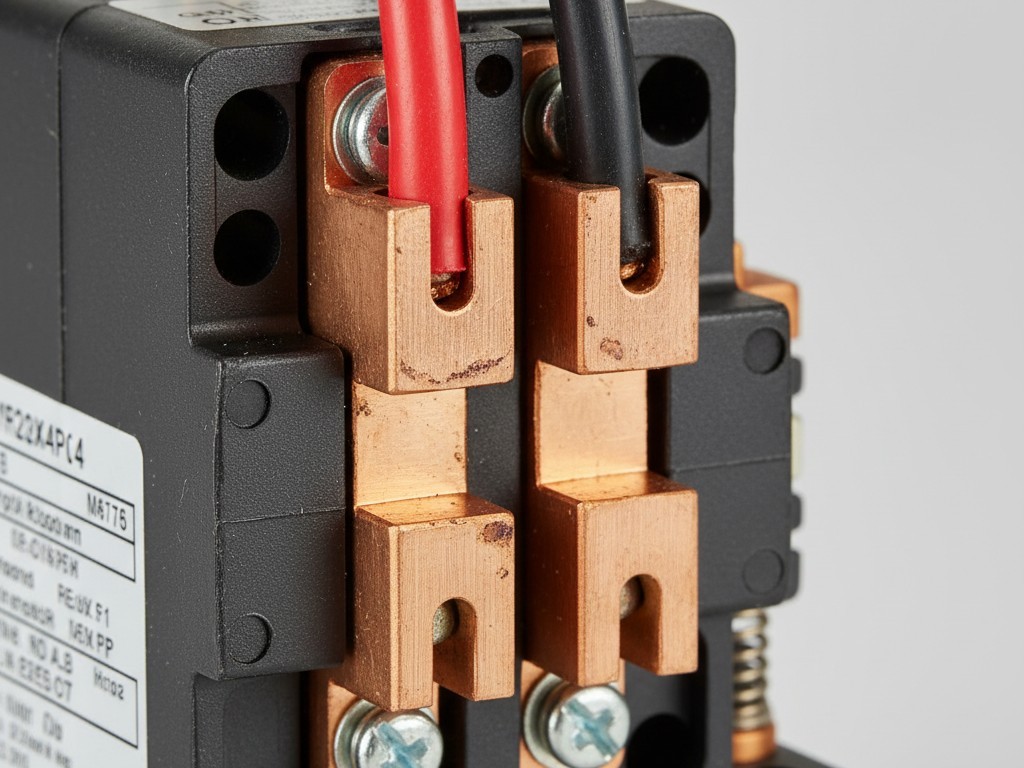
Don’t trust the switch to carry a borderline load directly. Use it to trigger a heavy-duty contactor—a relay actually built to take the punishment of a compressor start.
Configuration for Critical Cooling
Assuming the load math works out (or you’ve isolated the load with a contactor), the next failure point is logic configuration. Rayzeek units, particularly motion sensor variants like the RZ021, are designed for human comfort, not machine survival.
Occupancy sensors default to: Motion Detected -> Turn On. No Motion -> Wait 5 Minutes -> Turn Off.
This is perfect for a bathroom fan. It is useless for a server room. Servers don’t move. If you wire a cooling unit to a standard occupancy sensor, the AC runs while you are in the room working, then shuts off ten minutes after you leave, beginning the slow cook of your hard drives.
Facility managers often try to use these sensors to control lights and cooling simultaneously. This creates a “Comfort vs. Critical” conflict. You want the lights off when you leave; you want the cooling on. You cannot bind these two variables to the same logic gate without a compromise that endangers the hardware.
For a server closet, you have to invert the logic or bypass it entirely. If you use a Rayzeek sensor for cooling control, set it to Temperature Trigger mode if available, or wire it in parallel with a thermostat. A more robust “MacGyver” approach for backup cooling involves hardwiring the cooling circuit to be “Always On” unless a specific high-temp threshold is met. This uses the smart switch only as a high-limit cutoff or a remote reboot tool, rather than a daily cycle controller.
Inspírese con los portafolios de sensores de movimiento Rayzeek.
¿No encuentra lo que busca? No se preocupe. Siempre existen formas alternativas de resolver sus problemas. Quizá alguno de nuestros portafolios pueda ayudarle.
If you must use the motion sensor, relegate it to controlling exhaust fan boost or overhead lights—never primary cooling. If you have no choice but to use a sensor-based trigger for an exhaust fan, set the timeout to the maximum available setting. Even then, it’s a gamble compared to a simple thermal switch.
¿Busca soluciones de ahorro de energía activadas por movimiento?
Póngase en contacto con nosotros para obtener sensores de movimiento PIR completos, productos de ahorro de energía activados por movimiento, interruptores con sensor de movimiento y soluciones comerciales de presencia/vacancia.
The Fail-Safe Verification
You aren’t done until you’ve simulated the disaster. A spec sheet promise isn’t a receipt of function. You need a “Failure Mode Trace”—a sequence of physical abuses to ensure the system fails into a safe state.
First, kill the WiFi. Unplug the router. Does the cooling controller maintain its last state, or does it default to “Off”? If the Rayzeek unit relies on a cloud connection to Tuya or Smart Life servers to execute logic, it is not a fail-safe device. It needs local memory.
Second, kill the breaker. Flip the power off, wait five minutes for capacitors to drain, and flip it back on. Watch the AC unit. Does it restart? Does the switch restore power immediately, or is there a delay?
Finally, check the heat. Use a heat gun or a hair dryer to artificially spike the temperature near the sensor. Verify that backup cooling kicks in at the designated threshold. We aren’t looking for precision here—we aren’t calibrating a laboratory instrument. We are verifying that when the primary HVAC dies on a Saturday night, this $40 piece of plastic and copper will actually close the circuit and save the $40,000 stack of metal sitting in the rack.
If it passes these tests, it stays. If it fails even one, rip it out and go back to the drawing board.







