

Physics does not care about your mesh network. You can install the most expensive Wi-Fi 6 access points money can buy, but the moment you roll a steel tool chest in front of a receiver in a pole barn, that signal dies. Workshops are not living rooms. They are hostile environments filled with electromagnetic interference, physical obstructions, and users wearing thick nitrile gloves.
We see the same mistake repeated in shop fit-outs every season. A woodworker or mechanic wants automatic lighting, so they buy the same “Smart Life” app-driven switch they use in their kitchen. Then the complaints start. The lights won’t pair. They drop offline when the welder starts up. Or worst of all, they demand a firmware update when you just want to turn the lights on to find a wrench.
In a workshop, reliability is defined by Mean Time Between Interaction. If you have to touch the switch to reboot it, re-pair it, or fuss with an app, the device has failed. You don’t need better software to fix this. You need better hardware. Specifically, you want sensors that rely on physical trim pots—literal screws you turn with a driver—rather than code relying on a cloud server in a different time zone.
The Case for the “Grease Test”

Consider the ergonomics of the average shop day. Your hands are covered in grease, sawdust, or resin. You are wearing mechanics gloves. You need to adjust the timeout on your lights because they keep turning off while you’re under a chassis.
If you installed a smart switch, you now have to strip off your gloves, find your phone, hope it unlocks with a dirty thumbprint, open an app, wait for it to connect to a cloud server, and slide a virtual toggle. If you installed a high-end Lutron Maestro, you are standing there holding a plastic button for 15 seconds, counting LED flashes like you’re trying to defuse a bomb, hoping you didn’t just reset the unit to factory defaults.
This is where the Rayzeek RZ021 and similar “dumb” sensors win. They pass the Dirty Hands Test. Pop the faceplate off, and you are looking at three physical dials (trim pots): Time, Lux (light sensitivity), and Sensitivity (range). You take a generic flathead screwdriver—the one you use for prying paint cans—and turn the dial. Clockwise for more, counter-clockwise for less. That’s it. No pairing mode, no 2.4GHz signal requirement, no account creation.
Some will argue that you lose the granularity of an app. They’ll say, “But I can’t set it to exactly 13 minutes.” It doesn’t matter. In the field, you don’t need 13 minutes. You need “Short,” “Medium,” or “Long.” A physical potentiometer gives you infinite resolution between its stops without requiring a single packet of data to traverse a network that is likely being scrambled by the aluminum siding of your garage anyway.
Vacancy Mode: A Safety Critical Requirement
There is a dangerous misconception that “Motion Sensor” equals “Auto-On.” In a workshop, “Auto-On” (Occupancy Mode) can be a liability. In some zones, it is a severe safety hazard.
Quizás le interese

- Tensión: 2 pilas AAA
- Modo Día/Noche
- Temporización: 15 min, 30 min, 1 h (por defecto), 2 h

- Sensor de presencia PIR para montaje en techo con salida de relé de contacto seco
- Alimentación de baja tensión de 12/24VDC o 12/24VAC
- Contactos de relé aislados COM, NO y NC para entradas de EMS, HVAC y control de edificios

- Interruptor con sensor de movimiento por microondas empotrable en techo de baja tensión DC
- Entrada de 12 VDC / 24 VDC con rango de 10-30 VDC
- Corriente de funcionamiento máxima de 10A con retardo de tiempo, umbral de Lux y sensibilidad ajustables
- Interruptor con sensor de movimiento por microondas empotrable en techo para cargas más elevadas
- Entrada de tensión de red de 100-265 VAC, modelo de 10A
- Detección por microondas de 5,8 GHz con temporizador, umbral Lux y sensibilidad ajustables
- Interruptor con sensor de movimiento por microondas empotrable para techo
- Entrada de tensión de red de 100-265 VAC, modelo de 5A
- Detección por microondas de 5,8 GHz con temporizador, umbral Lux y sensibilidad ajustables
- Regulador con sensor de presencia PIR RZ037 de techo para alimentación de 220V
- Corriente de funcionamiento máxima de 3A con carga nominal de 660W
- El botón LUX controla el encendido/apagado del sensor de luz y la regulación de brillo ajustada por el usuario
- Regulador con sensor de presencia PIR RZ037 de techo para alimentación de 110V
- Corriente de funcionamiento máxima de 3A con carga nominal de 330W
- El botón LUX controla el encendido/apagado del sensor de luz y la regulación de brillo ajustada por el usuario

- Interruptor con sensor de movimiento por microondas de techo para CC de bajo voltaje
- Entrada de 12 VDC / 24 VDC con rango de 10-30 VDC
- Corriente de funcionamiento máxima de 10A con retardo de tiempo, umbral de Lux y sensibilidad ajustables
- Interruptor con sensor de movimiento por microondas de techo para mayor carga
- Entrada de tensión de red de 100-265 VAC, modelo de 10A
- Detección por microondas de 5,8 GHz con temporizador, umbral Lux y sensibilidad ajustables
- Interruptor con sensor de movimiento por microondas de techo
- Entrada de tensión de red de 100-265 VAC, modelo de 5A
- Detección por microondas de 5,8 GHz con temporizador, umbral Lux y sensibilidad ajustables

- Interruptor con sensor de movimiento PIR para montaje empotrable en techo de CC de bajo voltaje
- Entrada de 12 VDC / 24 VDC con rango de 10-30 VDC
- Corriente máxima de trabajo de 10 A con tiempo de retardo, umbral de luxes y sensibilidad ajustables

- Interruptor con sensor de movimiento PIR empotrable en techo para mayor carga
- Entrada de tensión de red de 100-265 VAC, modelo de 10A
- Detección de 360 grados con tiempo de retardo, umbral de luxes y sensibilidad ajustables
- Interruptor con sensor de movimiento PIR empotrable en techo
- Entrada de tensión de red de 100-265 VAC, modelo de 5A
- Detección de 360 grados con tiempo de retardo, umbral de luxes y sensibilidad ajustables

- Kit de emisor inalámbrico y receptor para el control de iluminación de encendido/apagado en interiores
- Receptor de 100-230 V CA, 50/60 Hz con corriente nominal de 5 A
- Interruptor inalámbrico alimentado por CR2032 con comunicación de 2,4 GHz
- Presencia (encendido automático/apagado automático)
- 12–24 V CC (10–30 V CC), hasta 10 A
- Cobertura de 360°, 8–12 m de diámetro
- Tiempo de retardo de 15 s a 30 min
- Sensor de luz Desactivado/15/25/35 Lux
- Sensibilidad alta/baja
- Modo de presencia con encendido/apagado automático
- 100–265V CA, 10A (requiere neutro)
- Cobertura de 360°; diámetro de detección de 8–12 m
- Temporización: 15 s–30 min; Lux OFF/15/25/35; Sensibilidad Alta/Baja
- Modo de presencia con encendido/apagado automático
- 100–265V CA, 5A (requiere neutro)
- Cobertura de 360°; diámetro de detección de 8–12 m
- Temporización: 15 s–30 min; Lux OFF/15/25/35; Sensibilidad Alta/Baja
Imagine a woodworker setting up a complex cut on a table saw. The power flickers during a storm—common in rural shops—or the sensor resets. If the lights default to “On,” or the sensor triggers because you walked past the door, you might be startled. But the real danger is the inverse: “Auto-Off” when you are in a dangerous position.
More critical is the “Vacancy Mode” setting. This forces the user to manually toggle the switch to turn the lights ON, but the sensor will automatically turn them OFF after you leave. For zones with power tools like band saws or drill presses, this is the only acceptable configuration. You do not want lights popping on unexpectedly because a stray cat ran through the shop, potentially startling an operator or masking the indicator lights of a machine left running.
The Rayzeek units handle this with a physical dip switch or a specific wiring configuration, not a software toggle that can reset after a power outage. You set the hardware state, and it stays there until you physically change it again. This persistence is vital. We have seen “smart” switches default to “On” after a power loss, flooding a shop with light and heat when the owner is on vacation. A physical toggle never “forgets” its position.
Wiring Reality: Neutrals and Loads
Before ordering a box of sensors, look inside your wall. Most reliable sensors, including the RZ021, utilize a relay that requires a Neutral wire (usually White in US residential wiring).
Many older barns and detached garages use “switch loops,” where you have a Line and a Load (Black and maybe Red or taped White), but no true Neutral bundle in the box. If you don’t have that bundle of white wires capped off in the back, a standard relay sensor will not work. You will either need to pull new wire (a massive headache) or find a “No Neutral” sensor, which often relies on leaking a small amount of current through the bulb to stay powered.
¿Busca soluciones de ahorro de energía activadas por movimiento?
Póngase en contacto con nosotros para obtener sensores de movimiento PIR completos, productos de ahorro de energía activados por movimiento, interruptores con sensor de movimiento y soluciones comerciales de presencia/vacancia.
This current leakage brings us to the “LED flicker” problem. In a shop, you are likely running high-efficiency LED tubes or retrofit fixtures. Cheap LED drivers are notoriously sensitive. If you use a sensor that leaks current to power itself, your shop lights may never turn fully off, glowing faintly or strobing like a disco in the dark. The RZ021 avoids this by using the Neutral wire to power its internal electronics separately from the load. It’s a clean break.
Check the load rating, too. A 15-amp relay is standard, but if you are daisy-chaining twelve 4-foot fluorescent fixtures that haven’t been converted to LED yet, the in-rush current can weld the contacts of a cheap relay shut. The sensor clicks, but the lights never turn off. If you’re running old T12 ballasts, do the math on your amperage before installing the switch.
False Triggers: The Heat Problem
Workshops are often heated by forced-air units like the Modine Hot Dawg or similar ceiling-mounted heaters. This creates a specific problem for Passive Infrared (PIR) sensors. PIR sensors detect changes in heat signatures. When a 40,000 BTU heater kicks on and blasts a wave of hot air across the room, a sensitive PIR sensor can interpret that moving heat cloud as a person.
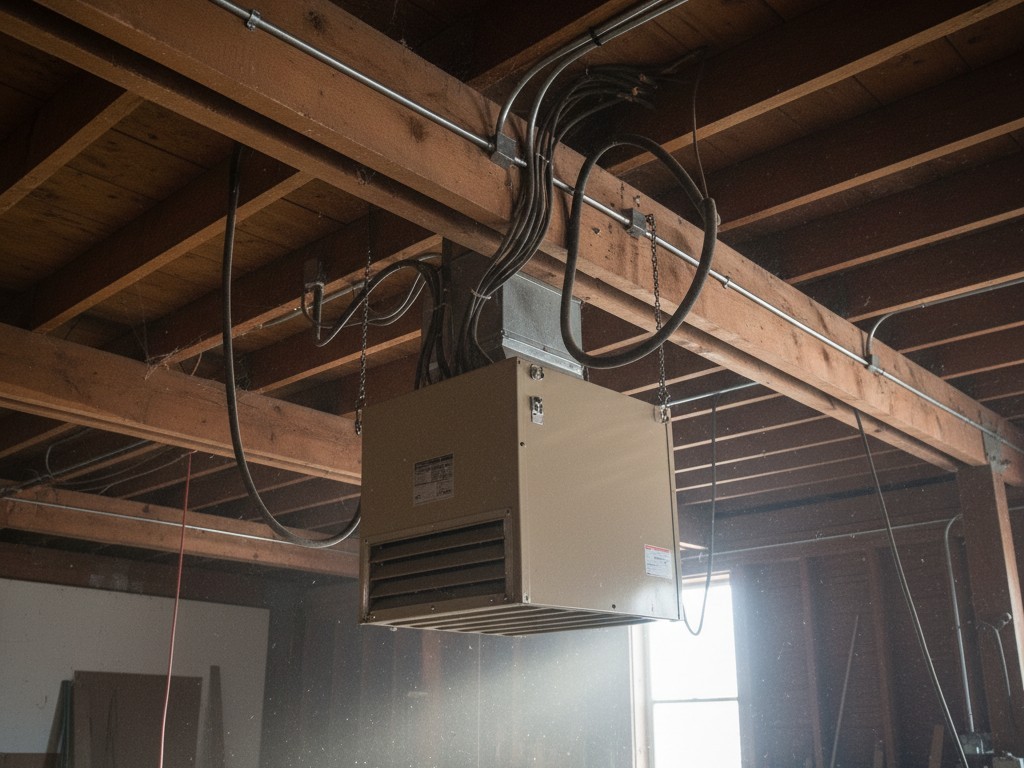
We’ve seen shops where the lights cycle on and off all night in winter, driving up the electric bill, solely because the sensor was mounted too close to a vent.
Inspírese con los portafolios de sensores de movimiento Rayzeek.
¿No encuentra lo que busca? No se preocupe. Siempre existen formas alternativas de resolver sus problemas. Quizá alguno de nuestros portafolios pueda ayudarle.
This is where that “Sensitivity” trim pot earns its keep. On a digital switch, you might have “High/Medium/Low” settings. Often, “Low” is still too sensitive for a drafty garage, and “Off” defeats the purpose. With a physical trim pot, you can dial the sensitivity down to the exact threshold where it ignores the heater blast but still picks up a person walking in. You tune it to the room, ignoring the factory preset.
The same applies to vibration. If your switch box is mounted on the same wall as your garage door track, the vibration of the door opening can trigger the sensor. A physical dial allows you to dampen that sensitivity until the phantom triggers stop.
The Verdict
There is a place for smart home technology. It belongs in the climate-controlled, wood-framed, Wi-Fi-saturated environment of a living room. It does not belong in a shop.
When you are standing on a ladder, trying to wire a sensor 12 feet in the air, or trying to adjust a timer with hands covered in sawdust, you do not want to be debugging a network connection. You want a device that respects the laws of physics and the reality of manual labor.
The Rayzeek RZ021 and its kin—the dumb, dial-driven, relay-based sensors—are built for this reality. They are not exciting. They do not talk to Alexa. They do not have an app. And that is exactly why they will still be working five years from now, long after the “Smart Life” server has changed its API and bricked the competition.







