
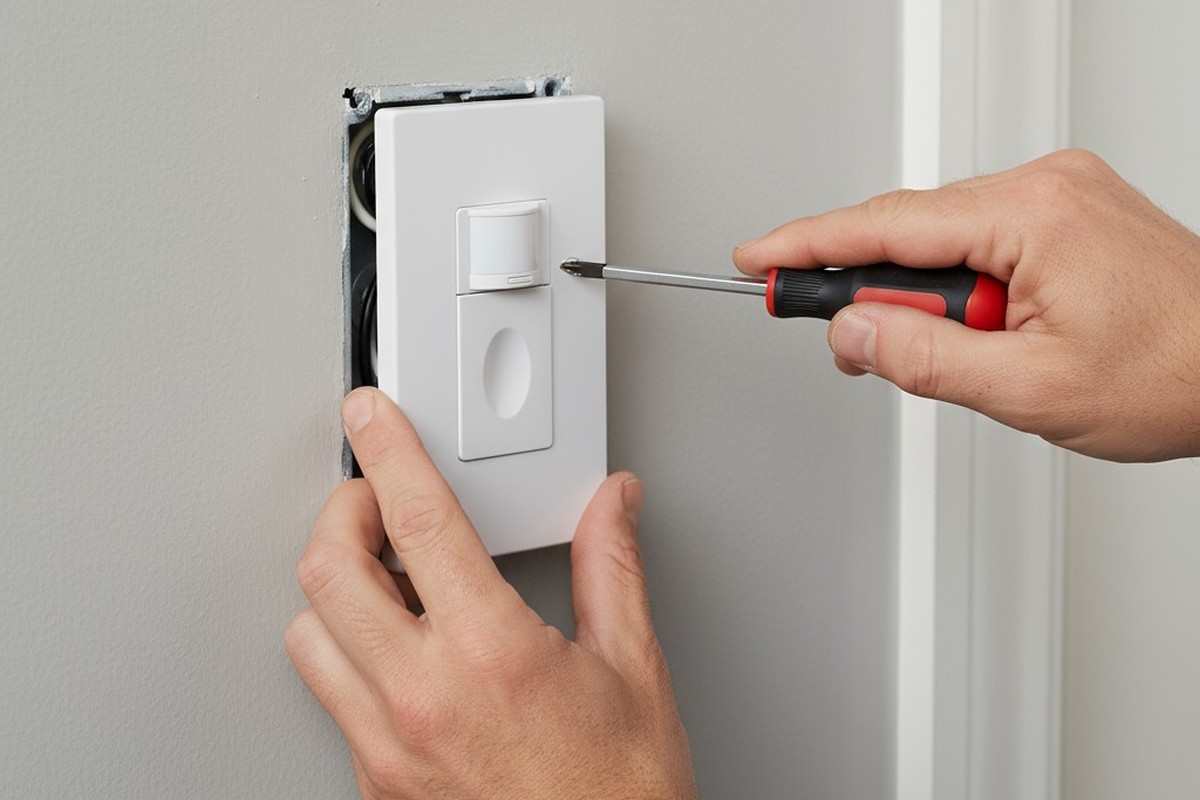
Small offices develop a rhythm of waste that becomes invisible through familiarity. The bathroom exhaust fan, for instance, often runs for hours after the last employee leaves. It hums through the night, pulling conditioned air out of the building in service of a room no one occupies. The switch near the door, meant to offer control, becomes a liability. Someone forgets to turn it off, or no one feels responsible for the shared space, and the fan becomes a constant, inefficient, and unnecessary presence.
The costs are real. A typical bathroom exhaust fan draws 30 to 60 watts. Left running 24/7 in a space used only intermittently, it consumes 26 to 52 kilowatt-hours per month—energy that accomplishes nothing. The noise compounds the problem. Even a quiet fan generates a low-frequency hum that permeates adjacent spaces, creating an ambient distraction that employees learn to tune out but never truly escape. The root of this waste is not the fan, but its control mechanism. Manual switches rely on consistent human behavior, assuming both a memory to turn things off and a sense of ownership in a shared space. In practice, both assumptions fail.
Occupancy sensing eliminates this dependency on human action. A sensor detects presence, activates the fan, and keeps it running for a defined period after the room is empty. This post-occupancy purge allows the fan to complete its ventilation task without running indefinitely. The system requires no reminders, no habits, and no shared responsibility. It responds to actual use and stops when its work is done. The question isn’t whether to automate, but how to configure the system—and which popular technologies to avoid.
The Cost of a Fan That Never Stops
Walk into a small office bathroom at 9 PM and you’ll likely hear it: the fan is still running. The switch remains in the ‘on’ state because someone flipped it that afternoon and no one thought to flip it back. In some offices, the fan has no switch at all, wired to run continuously under the flawed assumption that constant ventilation is a form of air quality insurance. Both scenarios lead to the same wasteful outcome.
The energy cost isn’t catastrophic, but it is relentless. A 50-watt fan running 24 hours a day consumes roughly 36 kilowatt-hours per month. At an average commercial electricity rate of 11 cents per kilowatt-hour, that single fan costs about four dollars a month, or $48 a year. For an office with three bathrooms, the annual waste climbs over $100. This figure only reflects the electricity, not the additional load on HVAC systems forced to replace the conditioned air being pumped outside.
The noise is harder to quantify but no less real. Even a fan rated at a quiet 0.5 sones produces a low, continuous hum that seeps into hallways and adjacent offices. Employees stop noticing it consciously, but the brain continues to process the sound, adding a subtle but persistent cognitive load. The manual switch isn’t a control mechanism; it’s a point of failure disguised as simplicity. It assumes the person who activates the fan will also deactivate it, but in an office, the incentive structure collapses. The person who turns it on may not be the last user of the day, and the employee who notices it running at 6 PM may assume someone else still needs it. This diffusion of responsibility guarantees the fan will run far longer than necessary.
Надихайтеся портфоліо датчиків руху Rayzeek.
Не знайшли те, що шукаєте? Не хвилюйтеся. Завжди є альтернативні способи розв'язання ваших завдань. Можливо, одне з наших портфоліо стане вам у пригоді.
How Occupancy Sensing Works
An occupancy sensor uses motion or heat to detect a human presence and control the fan. When someone enters, the sensor closes a relay to power the fan on. The fan runs as long as the room is occupied and continues for a preset period after the person leaves. This continuation, the post-occupancy purge, is a deliberate and essential feature.
A bathroom fan’s purpose isn’t just to run during occupancy, but to remove odors and moisture afterward. Air exchange takes time. A small bathroom might contain 100 cubic feet of air, and a fan rated at 50 cubic feet per minute (CFM) theoretically exchanges that volume in two minutes. Practical ventilation, however, requires multiple air changes to be effective. The post-occupancy purge provides this time. After the occupant leaves, the sensor starts a timer and the fan continues to run—for 15 or 20 minutes—until the space is properly ventilated. Then, it shuts off. It doesn’t run overnight. It stops because it was programmed to complete a specific, time-bound task.
This is the difference between deliberate action and passive waste. A continuously running fan operates without reference to need, ventilating an empty bathroom at 3 AM as aggressively as an occupied one at 3 PM. An occupancy-controlled fan runs only when triggered by actual use. If a bathroom is used five times during a workday, and each use triggers a 20-minute purge, the fan runs for about 100 minutes. The rest of the day, it is silent. This can reduce runtime by 70 to 80 percent compared to continuous operation, and by nearly 95 percent compared to a fan left on overnight. The system makes a simple binary determination—occupied or vacant—and executes a fixed program. The user’s only interaction is walking into the room.
Setting a Timeout That Works
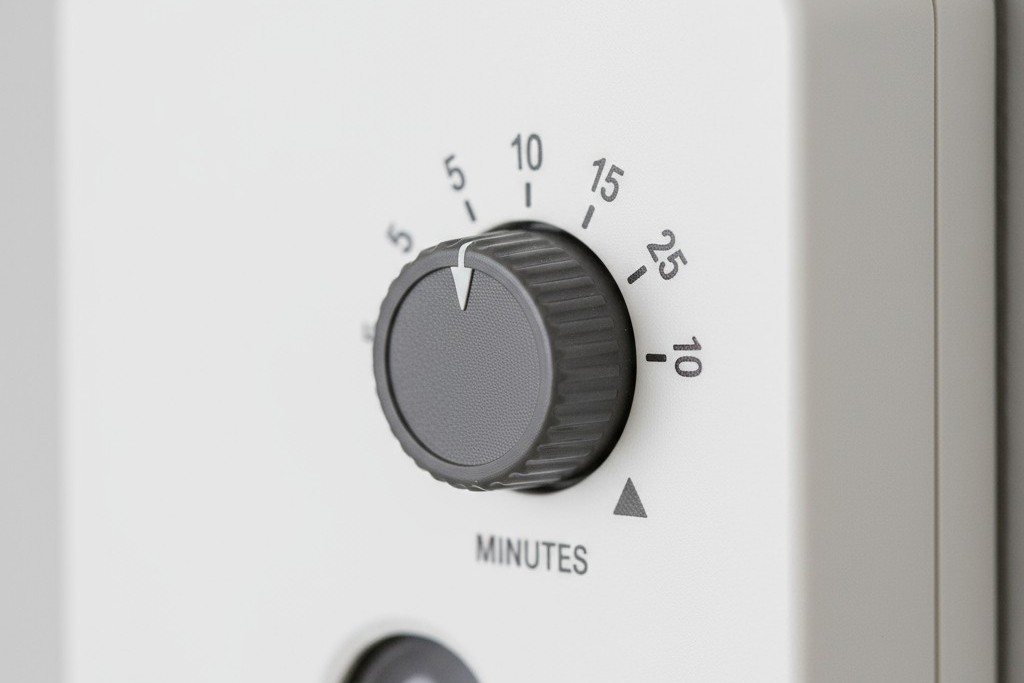
The timeout setting on an occupancy sensor defines how long the fan runs after the room is vacated. This single parameter determines whether the system ventilates effectively or just wastes energy in a new way. Set it too short, and odors linger. Set it too long, and the fan runs well past the point of useful air exchange.
A five-minute timeout is too short for most offices. While a 50-CFM fan can cycle the air volume once or twice in that time, odor elimination requires more than simple displacement. Air doesn’t move in a perfect, uniform flow; pockets of still air linger in corners and behind partitions. Three to five air changes are needed to reduce odor concentration to imperceptible levels. Five minutes provides a minimal purge that may leave the next user with an unpleasant experience.
Conversely, a sixty-minute timeout is wasteful by design. After 20 to 30 minutes, a fan has exchanged the air volume multiple times, and the marginal benefit of continued operation plummets. Running the fan for another 30 minutes doesn’t improve air quality in proportion to the energy consumed. It’s ghost-running under a different name, caused by excessive caution instead of human forgetfulness.
The practical range for most office bathrooms is 15 to 20 minutes. This allows a standard exhaust fan to complete three to four full air changes in a typical space, thoroughly eliminating odors before entering the zone of diminishing returns. For a bathroom used five times per day, a 20-minute timeout results in 100 minutes of total runtime—a perfect balance of thoroughness and efficiency. In high-traffic restrooms, the sensor simply resets the timer with each new occupant. The fan continues to run in response to continuous use, not wastefully. The timeout is a floor, not a ceiling.
Шукаєте енергозбережні рішення з датчиками руху?
Зв'яжіться з нами, щоб отримати повний асортимент інфрачервоних (PIR) датчиків руху, енергозбережних продуктів, що активуються рухом, вимикачів із датчиками руху, а також комерційних рішень для контролю присутності та відсутності (Occupancy/Vacancy).
Why Humidity Sensors Chase the Wrong Signal
Humidity-based fan controls operate on a simple principle: they activate when moisture levels rise above a set threshold, as they do during a shower. The fan runs until the humidity drops back to baseline. This works well in homes, where showers are the primary source of moisture and odors. It fails in office bathrooms.
The reason is that most small office bathrooms don’t produce meaningful humidity spikes. Employees use the toilet and wash their hands with water that isn’t hot enough to generate significant steam. The humidity change from a 30-second hand wash is negligible, well below the trigger threshold for a sensor designed to detect a shower. The sensor waits for a signal that never arrives, while odors from normal use accumulate unaddressed.
The failure mode can also operate in reverse. If an employee uses very hot water, the sensor might trigger the fan for an event that requires minimal ventilation. The fan runs in response to moisture that would dissipate naturally in minutes, wasting energy on a non-existent problem. The system is measuring the wrong variable. It reacts to a byproduct, moisture, rather than the root cause: human presence. Furthermore, a humidity sensor won’t stop a manually activated fan from running all night. It solves a problem—moisture from bathing—that doesn’t exist in most offices, making it the wrong tool for the job.
Choosing the Right Sensor for the Space
The two primary technologies for bathroom occupancy sensors are passive infrared (PIR) and ultrasonic. The choice isn’t about quality, but about matching the detection method to the restroom’s physical layout. Dual-technology sensors that combine both exist, but are often overkill for a single bathroom.
And don’t worry about light. A common misconception is that sensors require ambient light to function. Modern sensors use infrared or sound waves, neither of which depends on visible light. A windowless bathroom poses no challenge; in fact, it simplifies the installation by eliminating any need to account for daylight.
Passive Infrared (PIR) for Open Layouts
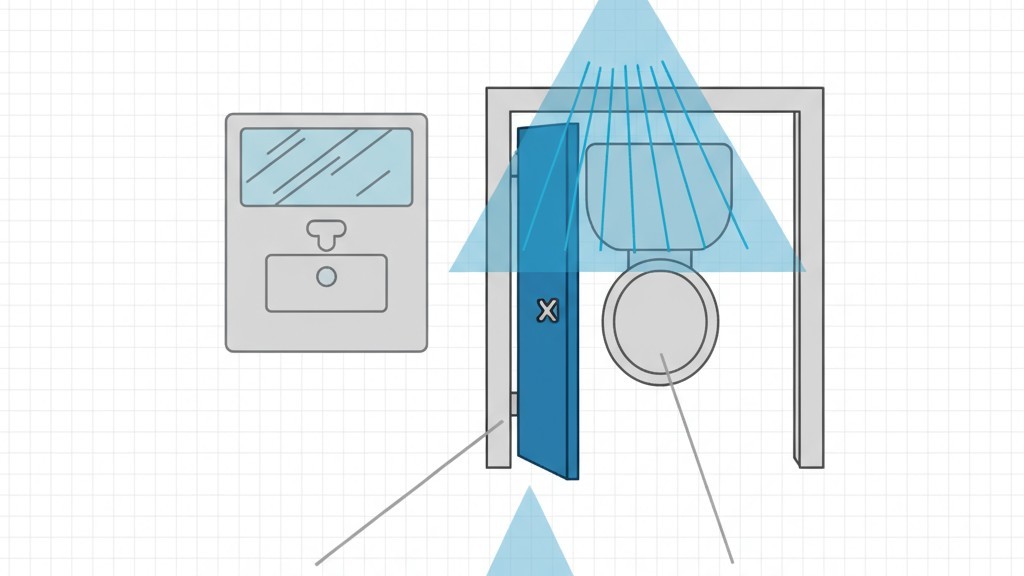
Passive infrared sensors detect the heat emitted by the human body. A PIR sensor doesn’t emit energy; it observes changes in the infrared radiation within its field of view. When a person moves, their heat signature disrupts the static background, and the sensor triggers.
PIR sensors excel in open, single-user restrooms where the sensor has an unobstructed line of sight. Mounted on the ceiling or high on a wall, it can see the entire room. The primary limitation is that infrared radiation does not penetrate solid objects. If a user enters a stall with a floor-to-ceiling door, a PIR sensor mounted outside cannot see them and will time out, mistakenly declaring the room vacant. For this reason, PIR alone is insufficient for fully enclosed stalls.
Ultrasonic Sensors for Enclosed Stalls
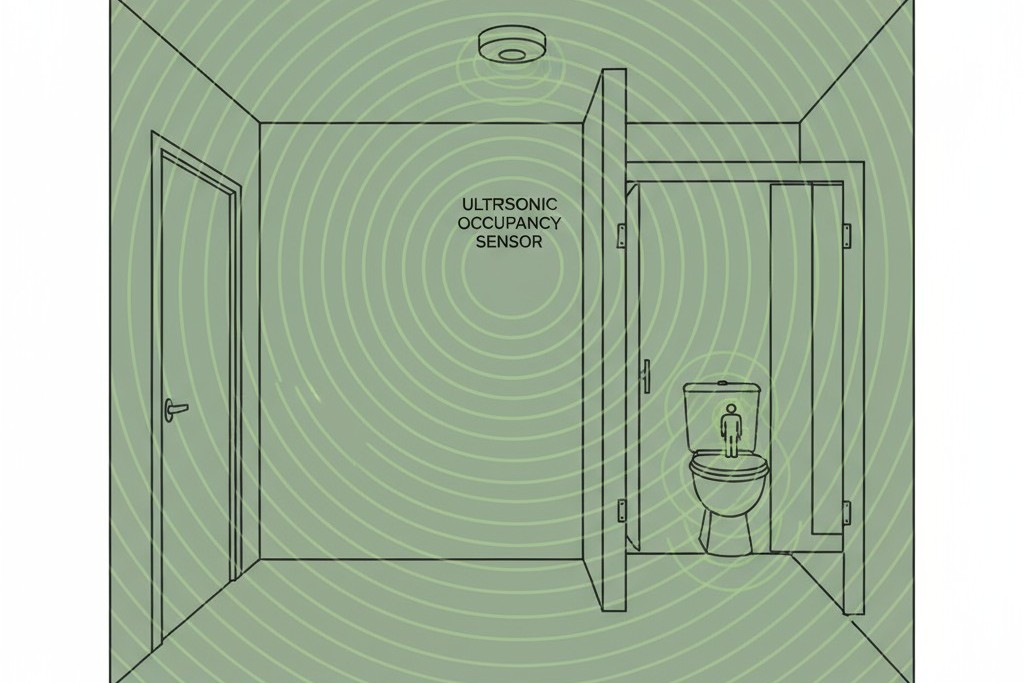
Ultrasonic sensors emit high-frequency sound waves, well above the range of human hearing, and listen for their reflection. When a person moves, the reflected waves shift in frequency due to the Doppler effect. The sensor detects this shift as motion.
Because sound waves reflect off surfaces, ultrasonic sensors do not require a direct line of sight. They can fill a space with complex geometry, detecting motion even behind partitions and inside closed stalls. This makes them the necessary choice for multi-stall restrooms with floor-to-ceiling dividers. The trade-off is a slight sensitivity to air movement from HVAC vents, but in a controlled bathroom environment, this is rarely a practical problem. The decision is architectural: match the sensor’s method to the physical barriers in the space.
Putting It All Together
The most effective way to implement occupancy control is with a standalone sensor dedicated solely to the fan circuit. Tying the fan and the lights to a single sensor is a common mistake. A light can turn off after a minute of vacancy, but the fan needs to run for 15-20 minutes to complete its purge cycle. A single sensor forces a compromise: either the light wastes energy, or the fan fails to ventilate properly.
Можливо, вас зацікавить

- Напруга: 2 батарейки AAA
- Режим День/Ніч
- Затримка часу: 15 хв, 30 хв, 1 год (за замовчуванням), 2 год

- Стелярний PIR-датчик присутності з виходом реле типу «сухий контакт»
- Низьковольтне живлення 12/24 В постійного струму або 12/24 В змінного струму
- Ізольовані контакти реле COM, NO та NC для систем управління будівлями (EMS), опалення, вентиляції та кондиціонування (HVAC)

- Низьковольтний врізний стельовий мікрохвильовий вимикач із датчиком руху постійного струму
- Вхід 12 В / 24 В постійного струму з діапазоном 10–30 В постійного струму
- Максимальний робочий струм 10A з регульованою затримкою часу, порогом Lux і чутливістю
- Врізний стельовий мікрохвильовий вимикач із датчиком руху для підвищеного навантаження
- Вхідна мережева напруга 100-265 VAC, модель 10A
- Мікрохвильове виявлення 5.8 GHz з регульованою затримкою часу, порогом Lux і чутливістю
- Врізний стельовий мікрохвильовий вимикач із датчиком руху
- Вхідна мережева напруга 100-265 VAC, модель 5A
- Мікрохвильове виявлення 5.8 GHz з регульованою затримкою часу, порогом Lux і чутливістю
- Стельовий димер із PIR-датчиком присутності RZ037 для живлення 220V
- Максимальний робочий струм 3A із номінальним навантаженням 660W
- Кнопка LUX керує увімкненням/вимкненням датчика освітленості та налаштованою користувачем яскравістю димування
- Стельовий PIR-датчик присутній з димером RZ037 для живлення 110V
- Максимальний робочий струм 3A із номінальним навантаженням 330W
- Кнопка LUX керує увімкненням/вимкненням датчика освітленості та налаштованою користувачем яскравістю димування

- Низьковольтний стельовий мікрохвильовий датчик руху постійного струму
- Вхід 12 В / 24 В постійного струму з діапазоном 10–30 В постійного струму
- Максимальний робочий струм 10A з регульованою затримкою часу, порогом Lux і чутливістю
- Стельовий мікрохвильовий датчик руху для підвищеного навантаження
- Вхідна мережева напруга 100-265 VAC, модель 10A
- Мікрохвильове виявлення 5.8 GHz з регульованою затримкою часу, порогом Lux і чутливістю
- Стельовий мікрохвильовий датчик руху
- Вхідна мережева напруга 100-265 VAC, модель 5A
- Мікрохвильове виявлення 5.8 GHz з регульованою затримкою часу, порогом Lux і чутливістю

- Низьковольтний врізний стельовий PIR-датчик руху постійного струму
- Вхід 12 В / 24 В постійного струму з діапазоном 10–30 В постійного струму
- Максимальний робочий струм 10A з регульованою затримкою часу, порогом Lux та чутливістю

- Врізний стельовий PIR-датчик руху для підвищеного навантаження
- Вхідна мережева напруга 100-265 VAC, модель 10A
- Детекція на 360 градусів з регульованою затримкою часу, порогом Lux та чутливістю
- Врізний стельовий вимикач із PIR-датчиком руху
- Вхідна мережева напруга 100-265 VAC, модель 5A
- Детекція на 360 градусів з регульованою затримкою часу, порогом Lux та чутливістю

- Комплект бездротового вимикача та приймача для внутрішнього керування освітленням (УВІМК/ВИМК)
- Приймач 100-230VAC, 50/60Hz із номінальним струмом 5A
- Бездротовий вимикач із живленням від CR2032 та зв'язком 2.4GHz
- Режим присутності (Auto-ON/Auto-OFF)
- 12–24V DC (10–30VDC), до 10A
- Зона охоплення 360°, діаметр 8–12 m
- Затримка часу 15 s–30 min
- Датчик освітленості Off/15/25/35 Lux
- Висока/низька чутливість
- Режим присутності Auto-ON/Auto-OFF (автоматичне увімкнення/вимкнення)
- 100–265V AC, 10A (необхідна нейтраль)
- Зона охоплення 360°; діаметр виявлення 8–12 м
- Затримка часу 15 s–30 min; Lux OFF/15/25/35; чутливість High/Low
- Режим присутності Auto-ON/Auto-OFF (автоматичне увімкнення/вимкнення)
- 100–265V AC, 5A (необхідна нейтраль)
- Зона охоплення 360°; діаметр виявлення 8–12 м
- Затримка часу 15 s–30 min; Lux OFF/15/25/35; чутливість High/Low
A standalone fan sensor can replace an existing wall switch or be mounted on the ceiling, with its timeout configured specifically for ventilation. The installation involves line-voltage electrical wiring and should be performed by a licensed electrician, especially in a commercial building. The result is a reliable, maintenance-free system that operates for years. Some models include a manual override button for edge cases, like when a maintenance worker needs to disable the fan, but the sensor will handle over 95% of operations automatically.
Before proceeding, always verify that local building codes permit intermittent ventilation. Some jurisdictions require continuous minimum ventilation, though an occupancy-controlled fan often satisfies the requirement for air changes over time. If continuous operation is mandated, a sensor can still be used to control a booster fan that activates during occupancy, eliminating the worst of the waste. The principle remains the same: automation, when applied correctly, stops the ghost in the machine.







